Version history
Prompts are code, and code needs history. Saving an agent, skill, workflow, dashboard, widget, or atlas
definition records a version under <latchHome>/history/<kind>/<name>/, so “it worked yesterday” is a
question with an answer.
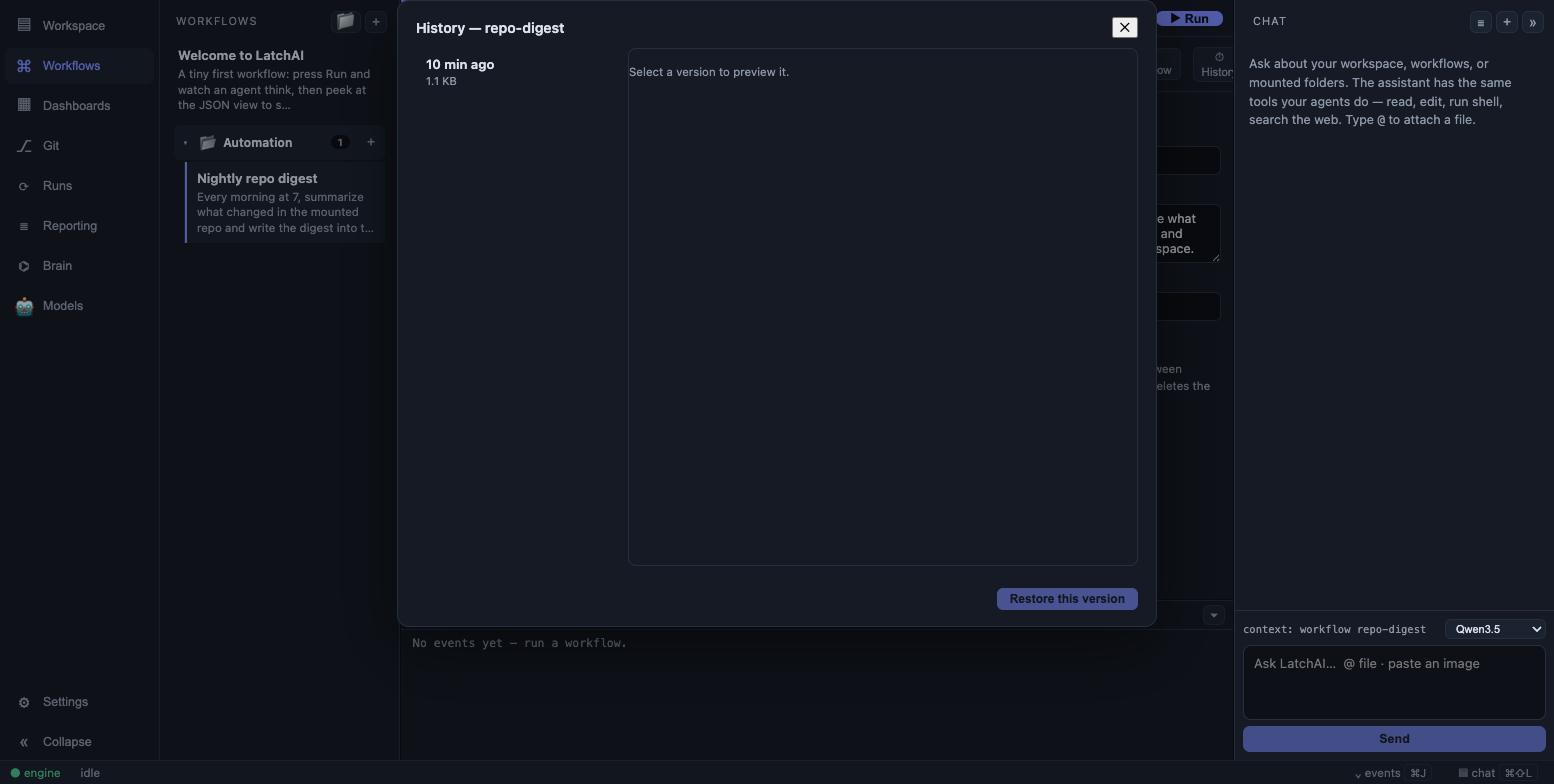
Versions for one document, newest first, with the selected one previewed in full.
Three things are worth knowing before you go looking for a version. Only the live file is ever read — prompts and the executor never see the history directory. A burst of saves is one version, so an editing session collapses to “the state before the burst” rather than one copy per save. And history survives deletion, which is what makes restore-after-delete possible.
The rules, exactly
Section titled “The rules, exactly”| Kinds | agent, skill, workflow, dashboard, widget, atlas |
| Path | <latchHome>/history/<kind>/<name>/<epoch-ms>.<ext> — .md for everything but workflows, which are .json |
| What is recorded | The outgoing content: the live file as it was before the save that triggered it |
| Coalescing window | 5 minutes — a save whose newest version is younger than that records nothing |
| Retention | 50 versions per document; the oldest are pruned on write |
| Skipped when | The content is byte-identical to the newest version |
| Recorded on | Every write, including re-filing a workflow into a sidebar folder. Never on delete — a delete simply leaves the history behind. |
Because versions are named by millisecond timestamp, the directory sorts chronologically and ls is a
perfectly good history browser:
ls ~/LatchAI/history/agent/code-reviewer/# 1753380114882.md 1753466520431.md 1753552903117.mdThey are ordinary files. Diff two of them with diff, or diff one against the live document, and
nothing in LatchAI minds:
diff ~/LatchAI/history/agent/code-reviewer/1753466520431.md ~/LatchAI/agents/code-reviewer.mdThat last command is also how you get a diff at all: the in-app browser previews a version, it does not compare two.
Where the live document is
Section titled “Where the live document is”Restore writes the old content back to the live file, so it helps to know where that is — and one of them is not where you’d guess:
| Kind | Live file |
|---|---|
agent |
<latchHome>/agents/<name>.md |
workflow |
<latchHome>/workflows/<id>.json |
dashboard |
<latchHome>/dashboards/<id>.md |
widget |
<latchHome>/widgets/<name>.md |
atlas |
<latchHome>/atlas/<id>.md |
skill |
<latchHome>/workspace/.claude/skills/<name>/SKILL.md |
Skills live in the workspace, not beside the other definitions, because that is where an agent’s skills are discovered from.
Where to find it in the workbench
Section titled “Where to find it in the workbench”- Workflows — the
⏱ Historybutton in the workflow toolbar. - Dashboards — the
⏱ Historybutton in the dashboard editor’s toolbar. - Agents, skills, and widget types — the history button in their Settings editors.
Atlas definitions are recorded on every save too, but have no browser — their versions are on disk under
history/atlas/ and are restorable through the API below.
Three different undo layers
Section titled “Three different undo layers”LatchAI has three histories and they do not overlap. It’s worth knowing which one you want:
| Layer | Covers | Where |
|---|---|---|
| Version history | Documents you author — agents, skills, workflows, dashboards, widgets, atlases | <latchHome>/history/ |
| Checkpoints | Workspace files changed by a run or a chat turn | <latchHome>/runs/checkpoints.git |
| Your own git | The repositories you mounted | Your repos |
A bad prompt edit is version history. A run that wrote the wrong file is a checkpoint. A commit you regret is git.
Vault notes are a fourth thing and deliberately not here: a vault is its own
git repository, and the daemon commits it when you accept, reject or refile a note. Its history is git log, not history/.
Restoring
Section titled “Restoring”The history browser lists versions newest first with their size and age, previews the one you select, and restores it. Restoring writes the old content back to the live file — which, being a save, records a version of its own.
That last part is the point: restore is itself undoable. The snapshot taken on restore ignores the coalescing window, precisely so a restore can never be the save that got collapsed away. A workflow is validated against the schema before its live file is touched, so restoring a version that predates a schema change fails cleanly instead of writing a file the executor can’t load.
The whole flow is also an API, which is what a “roll every agent back to Tuesday” script would use — and it is the only way to restore a document you have already deleted, since a deleted document has no editor to open the browser from:
curl -s localhost:7777/api/history/agent/code-reviewer# {"versions":[{"id":"1753552903117","ts":1753552903117,"bytes":4210}, …]}
curl -s localhost:7777/api/history/agent/code-reviewer/1753552903117   # {"content":"---\nname: …"}curl -XPOST localhost:7777/api/history/agent/code-reviewer/1753552903117/restore
Versions are always newest-first, ids are always millisecond timestamps, and an unrecognised kind is an error rather than an empty list.
Troubleshooting
Section titled “Troubleshooting”A brand-new document shows “No versions yet.” That is correct, not a bug. A version is the state a save replaced, so creating a document records nothing — there was no previous live file. The first version appears on your second save. The same logic explains a suspiciously thin history after a fast editing session: only the first save in a burst records anything — the state before the burst — and everything within five minutes of it is deliberately collapsed away.
A version you expected is missing. Two rules drop one silently, both on purpose: a save whose content is byte-identical to the newest version records nothing, and the 51st version prunes the oldest. A document you have been editing for months holds its last 50 states, not all of them.
History under a name you don’t recognise. History is keyed by <kind>/<name>, and the name is the
filename. Saving a document under a different name starts a fresh timeline and leaves the old one intact
under the old name — nothing is lost, but it is somewhere else.