Agent memory
An agent with memory: true in its frontmatter remembers.
What it remembers is markdown files in the workspace — its own, plus a shared folder
every memory-enabled agent can read and write — reached through a single memory tool,
listed in its prompt at the start of every turn, and reviewable by you in
Settings ▸ Memory.
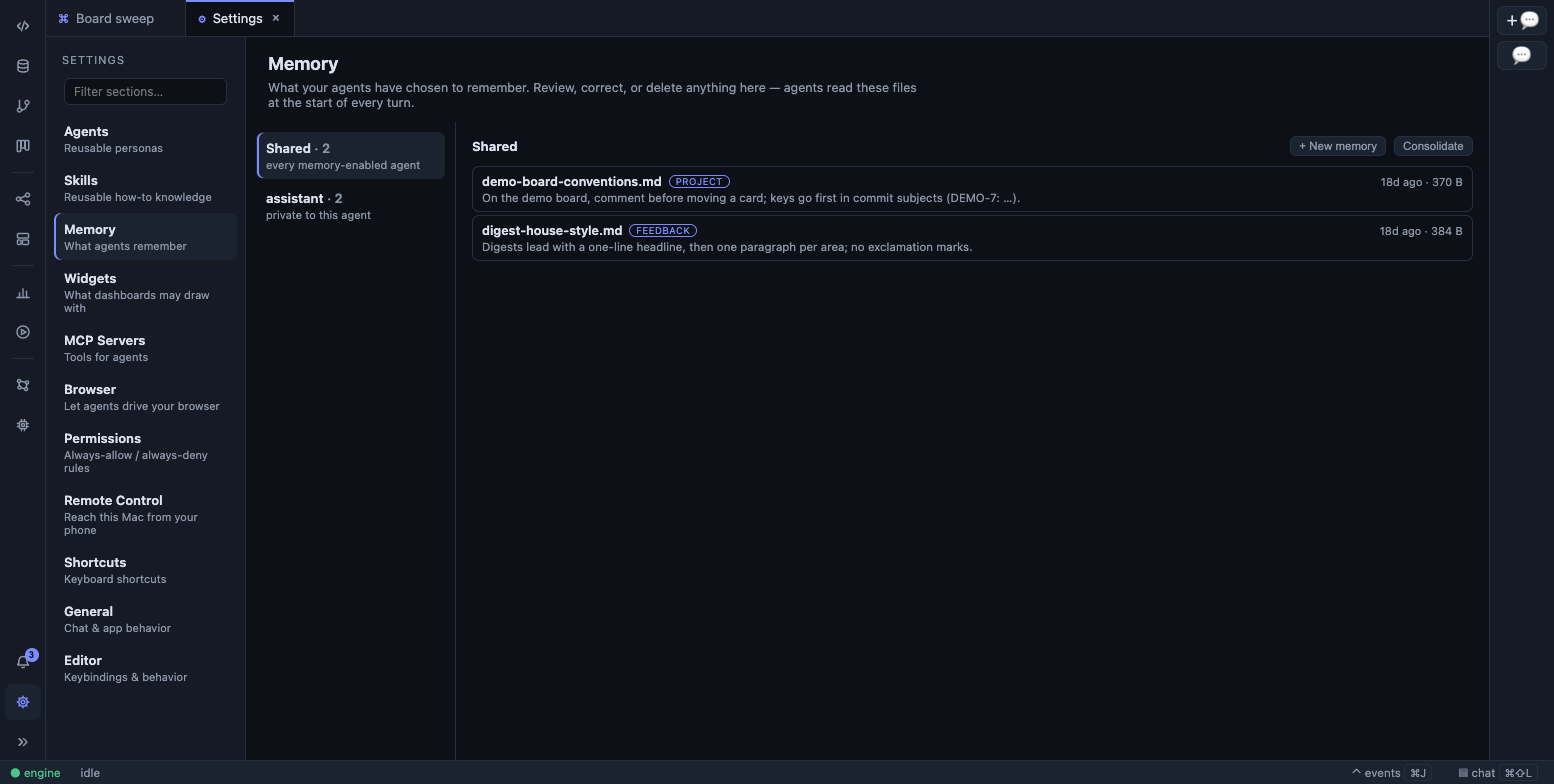
Everything an agent remembers is a file you can read, edit, or delete.
Where it lives
Section titled “Where it lives”~/LatchAI/workspace/memory/ shared/ user-level facts every agent shares prefers-short-answers.md release-writer/ one folder per agent, named after the definition house-style.mdAgents see these through a virtual path: /memories/<file>.md is their own folder,
/memories/shared/<file>.md is the shared one. Only .md files, and no other
directories — the tool refuses anything else, and every refusal names the call that would
have worked, so the model’s next attempt can land.
A memory file is markdown with a small frontmatter:
---description: House style for release notes — headline first, no exclamation marks.type: feedback---
Asked for a headline on every release note and no exclamation marks …
description is the one line every index shows (clipped at 120 characters); type is one
of user, feedback, project, or reference. A file without frontmatter uses its first
non-empty line as the description, so notes written before frontmatter existed still index
correctly. Age comes from the file’s modification time.
Because memory lives inside workspace/, every write flows through
checkpoints and the review gate like any other file
change — an agent quietly rewriting its own beliefs shows up in a diff. A rename is
recorded the same way, so a moved note is visible too.
The memory tool
Section titled “The memory tool”One tool, six commands, modelled on a file editor:
| Command | What it does |
|---|---|
view |
A directory listing (the index, with ages) or one file with numbered lines; view_range: [start, end] reads a slice, -1 as the end reads to the bottom |
create |
Write or overwrite a whole file |
str_replace |
Edit in place — old_str must match exactly once, and the splice is literal, so a remembered $$ or $1 survives |
insert |
Add lines after insert_line (0 = top) |
delete |
Remove a file |
rename |
Move a file |
Viewing /memories shows the agent’s own notes and the shared folder, so it never has
to guess that a second scope exists.
The tool only works for a named agent — a chat with a bare model has no memory to speak of — and it needs no permission prompt, because the worst it can do is edit a markdown file the checkpoint already covers.
What reaches the prompt
Section titled “What reaches the prompt”Only the index, never the bodies. A memory-enabled agent’s system prompt carries a
## Your memory section listing every own and shared file as path — description (age),
followed by the house rules: view relevant memories before working, treat them as
point-in-time, update with str_replace rather than duplicating, delete what proves wrong,
one topic per file, kebab-case names, start each file with the description/type
frontmatter, link related notes with [[wikilinks]], put user-level facts in
/memories/shared/, and never store secrets. The agent reads a file when it decides it
needs to, so a large memory costs almost no context until it is used.
The same block is assembled for chat (rebuilt every turn), for workflow agent nodes, and for delegated subagents.
Reviewing it
Section titled “Reviewing it”Settings ▸ Memory lists the scopes — Shared first, then each agent — and the files
in each with their type, age, size, and description. Open one in the markdown editor, edit
it, save; + New memory creates a file seeded with the frontmatter skeleton
(description: / type:); Delete asks first and names the path. Edits you make here
are ordinary file writes and don’t appear in any run’s diff.
A scope you didn’t expect can appear: a folder outlives the agent that made it. An agent
whose definition no longer sets memory: true — or that has been deleted outright — keeps
its notes on disk and is listed with a memory off tag, so you can read or clear them
rather than losing track of them.
An agent’s own Persistent memory checkbox lives in its editor under Settings ▸ Agents;
it is the same as writing memory: true in the file.
Consolidation
Section titled “Consolidation”Memory accumulates. Consolidate, on any scope in Settings ▸ Memory, asks a model to
tidy it: merge duplicates, rewrite weak descriptions and add missing types, fix broken
[[wikilinks]], delete notes that are obsolete or contradict each other, keep — and say
so — when unsure, and never invent a fact. It runs the ordinary tool loop with exactly one
tool, memory, in a fresh registry that cannot read files, run shell, or reach the
network, on your default model, and finishes with a short report of what it changed and
what a human should look at. Consolidating an agent’s private scope leaves
/memories/shared/ alone.
It is manual, capped at 30 turns, and it can take a minute or more. Its tool calls and
token usage stream like any other run, and its spend is booked in
Usage under aux:memory.
Reaching it from outside the UI
Section titled “Reaching it from outside the UI”The same tree is an API: GET /api/memory returns every scope and its files,
GET/PUT/DELETE /api/memory/<scope>/<file> reads, writes and removes one note, and
POST /api/memory/consolidate with {"scope": "shared"} runs the pass and answers with
its report and the paths it touched. See the HTTP API.
The brain sees it
Section titled “The brain sees it”Memory files are nodes in the brain, linked to the agent that
owns them by remembers edges, and a [[wikilink]] in a memory resolves to whatever it
names — a workflow, a chat, a work item.