Models
Everything model lives in one place: the Models page. Open it from the Models
entry in the activity bar (the Intelligence group, below Brain), or — in the desktop app —
from View › Models in the menu bar (⌘⇧M). It is a full-page tab — the sidebar steps
aside while you’re in it — with three sections: Library, Find models, and API.
LatchAI thinks with two kinds of models, and the Library treats them as one list:
- On this Mac — models you download from the in-app catalog. They run entirely on your machine: nothing you say leaves the computer, there is nothing to sign up for, and they keep working offline.
- Connected — models behind an API: OpenAI-compatible endpoints (Ollama, LM Studio, a local vLLM server, or OpenAI itself) and Anthropic via the official SDK.
With neither configured, LatchAI falls back to an offline demo model so everything stays clickable — and says so whenever that model is the one answering.
If you took the Run on this Mac path in onboarding, one model is already downloading and already pinned as your default — the status bar carries its progress and the Library is where you watch it land.
The Library
Section titled “The Library”The Library is where you pick the default model — one radio button that spans both kinds of row. The default powers chat and agent nodes unless a conversation, node, or agent definition picks another; a model running on this Mac is as valid a default as a hosted one.
On this Mac
Section titled “On this Mac”Each downloaded model is a row with Load / Unload, a delete button, and — while loaded — live stats: how much memory it is holding and, when it is generating, its current tokens per second. One model is loaded at a time (loading one unloads the previous one), and you rarely need to press Load at all: the first chat turn or workflow run that names a local model loads it automatically.
In-flight downloads appear in the same list with a progress bar, transfer speed, an ETA, and a pause button. Pausing keeps the partial files; a paused or interrupted download offers Resume — even across an engine restart — or 🗑 to discard what’s on disk. Three downloads stream at once; the rest queue.
Local models show up in every model picker as local:<name> — for example
local:Qwen3-4B-GGUF — with no configuration: downloading a model is what registers it.
Connected
Section titled “Connected”External models are rows in the same Library: a name, a type, a base URL where the type
needs one, a model name, and an optional API key. OpenAI-compatible rows also take two
optional fields — Extra body (JSON merged into every request to that server) and
Context window (the token count that sizes compaction).
Each row has Test connection, which sends one real, tiny completion and reports
either ✓ Connected — <model> replied in <n>ms or a specific failure (see
Troubleshooting).
API keys you enter here are stored in the macOS Keychain via the secret store — never in a config file. Saving hot-swaps the providers in the running engine; no restart.
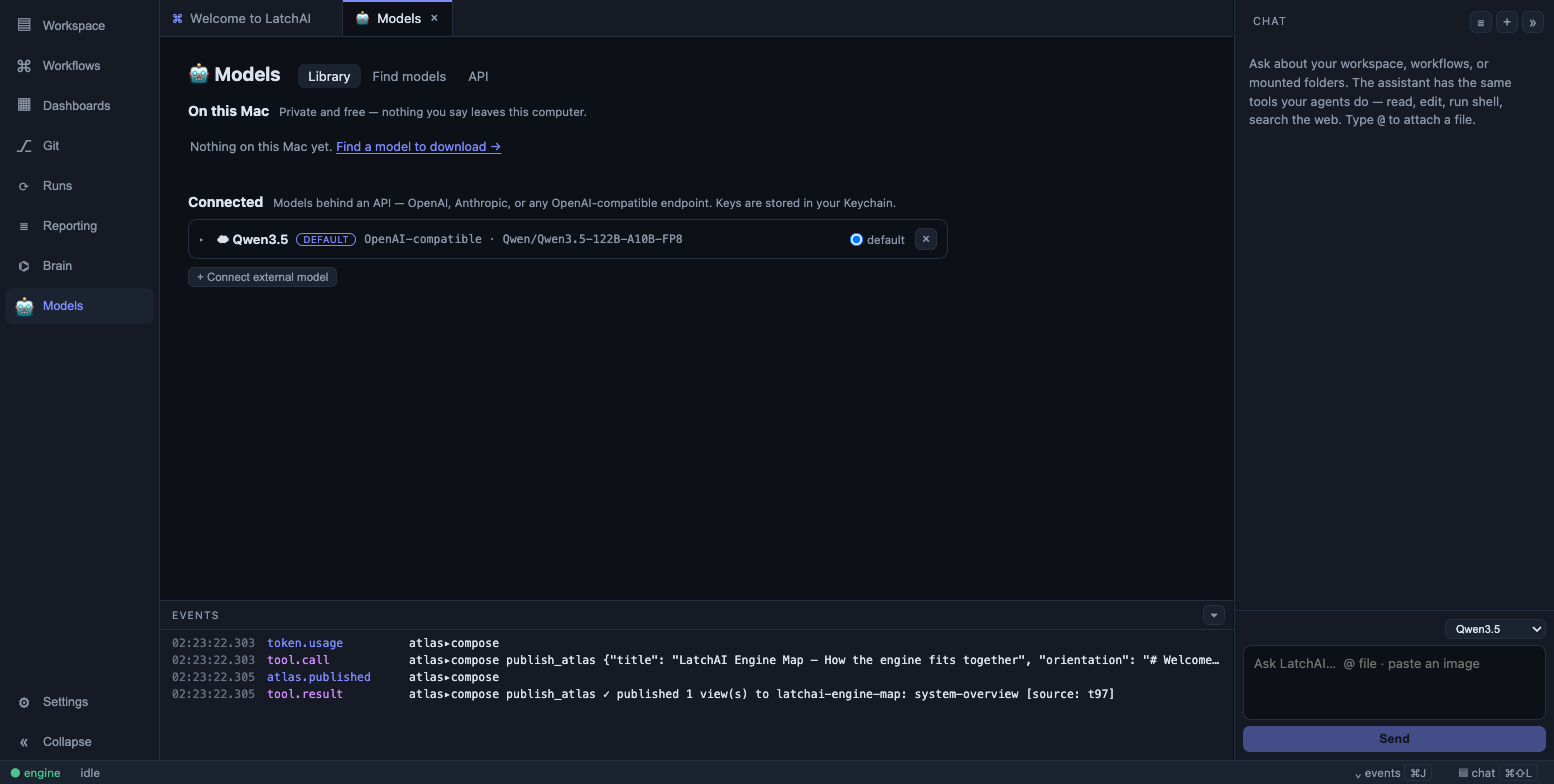
The Library: models on this Mac and connected models in one list, one default radio across both. Keys go to the Keychain and are never echoed back.
OpenAI-compatible endpoints
Section titled “OpenAI-compatible endpoints”Anything that speaks the OpenAI chat-completions dialect — Ollama, LM Studio, a local
vLLM server, or OpenAI itself — connects with a base URL, a model name, and (optionally)
a key. For Ollama that looks like base URL http://localhost:11434/v1, model qwen3:8b.
The base URL is the prefix LatchAI appends /chat/completions to, so it includes the /v1.
Leave the key blank for a server that doesn’t want one — nothing is sent when it’s empty.
Anthropic
Section titled “Anthropic”Anthropic is a first-class type with no base URL. Credentials resolve the way they do
for any Anthropic SDK application: an explicit API key first, then
ANTHROPIC_API_KEY / ANTHROPIC_AUTH_TOKEN, then an ant auth login OAuth profile
(browser sign-in, no static key on disk). A row with no model name defaults to
claude-opus-4-8, and the window is assumed to be 200k tokens unless you say otherwise.
Adaptive thinking is enabled on plain turns. Tool turns run without it — echoing thinking blocks back through LatchAI’s provider-neutral history isn’t wired yet, and Claude requires them unchanged inside a tool loop. Setting an explicit temperature or top_p also turns thinking off for that call: the Messages API rejects the combination.
Find models
Section titled “Find models”Find models searches a public catalog of open models (the Hugging Face Hub) and only
shows what this app can actually run — GGUF text-generation repos. A hand-picked ★
featured shelf opens the page, followed by the highest-rated compatible models.
Search by a model’s plain name (qwen, llama, gpt-oss), type Publisher/ to browse
one publisher or Publisher/term to search inside one, and use the ↗ on any row to read
about the model on Hugging Face.
Opening a result lists its available download sizes (quants): smaller ones use less
memory and disk at a small cost in quality. Each size carries a fit badge — ✓ fits,
⚠ tight, or ✗ won't fit — checked against this machine’s memory:
estimated = weights × 1.15 + 3 GB      (mmapped weights + KV cache + workspace)budget    = total memory − 8 GB        (OS and apps reserve)
✓ fits         estimated < 60% of budget⚠ tight        60–90%✗ won't fit    > 90%
The badges are explicitly estimates — the UI says so — and a “won’t fit” download warns rather than forbids.
Downloads are resumable via HTTP Range, size-checked on completion (a stream that starts from scratch is also sha256-checked against the Hub’s checksum), and visible from anywhere in the app via a status bar chip. Models are never bundled with LatchAI — each one is fetched from Hugging Face at your request and carries its own license, surfaced on its Hugging Face page.
Hub access is anonymous by default. Store a Hugging Face token as the secret HF_TOKEN
in the secret store to raise rate limits and reach gated repos;
the engine sends it server-side, so it never reaches the browser.
Under the hood
Section titled “Under the hood”The local runtime is llama.cpp’s
llama-server (MIT-licensed; attribution ships in the repo’s
THIRD-PARTY-LICENSES.md), running GGUF-format models. The loaded model runs as a
separate, supervised process on 127.0.0.1:7791, guarded by an API key minted fresh for
that spawn — so nothing else on the machine (or a website in your browser) can talk to
it. It is started with --jinja (per-family tool-call parsing) and --metrics (the live
tokens-per-second read-out).
Context size is fitted to the machine automatically: --fit on starts from the model’s
training context and shrinks it until model plus KV cache fit memory, so the same model
lands anywhere from 32k to 250k+ tokens depending on the Mac. LatchAI reads the window the
server actually opened and remembers it, so compaction is sized correctly from the first
turn. Set models.contextTokens in latchai.config.json to pin an explicit size
instead, or models.llamaPort to move the port.
If the process dies, only it dies: the engine reports the crash in the Models page and in the run, and the daemon (and any overnight pipeline) keeps going. Unload kills the process, which is the one way to be sure the memory came back.
Tool schemas are reduced to the subset llama.cpp’s schema→grammar converter handles reliably before they are sent; if a grammar is still rejected, LatchAI retries the call with unconstrained arguments rather than failing the turn.
Getting the llama-server binary
Section titled “Getting the llama-server binary”Local hosting needs the llama-server binary. The engine looks for it in this order:
- The
LATCHAI_LLAMA_SERVERenvironment variable — an absolute path to anyllama-serverbinary, e.g. the one frombrew install llama.cpp. vendor/llama-cpp/*/llama-serverunder the repo root.vendor/is gitignored: download a macOS arm64 release archive from the llama.cpp releases page and unpack it there.- A
llama-serverbeside the packaged desktop app’s other resources.
The repository does not ship the binary, and the packaged desktop build does not bundle one either — the third lookup is a hook, not a guarantee. Either way you supply it once and the Models page works from then on.
Without the binary, loading a local model fails with a message naming the options — everything else keeps working, and connected models don’t need it at all.
Choosing a model per chat, node, or agent
Section titled “Choosing a model per chat, node, or agent”The Library’s default is just that — a default. The chat composer and the workflow
Inspector share one picker that answers “who runs this?”: every model in the Library
first (local rows marked ● loaded or ○), then your agents
grouped by folder. Picking an agent wins over a model, because that is how the engine
resolves it too.
The first entry is Default · <model>, naming whatever is currently pinned (just
Default when nothing is). Selecting it stores the literal name default, so the engine
re-resolves your pinned default on every turn — re-pin a different model in the Library
and the next message follows it, with nothing to change in the conversation. A name that no
longer exists shows as missing: … rather than being silently swapped for whatever is
listed first.
Three places override the default:
- Per chat — the model dropdown in the chat panel; the choice is remembered with the session and applies to the next turn.
- Per node — an agent node’s
config.providertakes a model name. An unknown name silently falls back to the default rather than failing the run, so check your spelling if a node seems to ignore it. - Per agent — an agent definition’s
model:frontmatter names one too, and it outranks both of the above. The seeded assistant ships withmodel: default.
Generation settings per agent
Section titled “Generation settings per agent”An agent definition also carries optional decoding hints, editable in the agent editor’s Generation row and written to frontmatter:
---name: reviewermodel: defaulttemperature: 0.2topP: 0.9maxTokens: 4000seed: 7effort: highextraBody: {"top_k": 20, "repetition_penalty": 1.05}---Every one is optional and blank means unset — a cleared temperature is not 0. They
are hints: each provider maps what its backend supports and ignores the rest. effort is
low, medium, high or xhigh, and travels as reasoning_effort on the OpenAI
dialect and output_config.effort on Anthropic — sent only when you set it, because
plenty of OpenAI-compatible servers reject an unknown field. seed is honoured by
servers that implement it (vLLM, OpenAI) and dropped elsewhere. extraBody merges over
the provider entry’s own extraBody and under everything the request computes, so it can
add fields LatchAI doesn’t model but can’t break the protocol.
Knob dropping is model-aware: Claude 4.7-and-newer models reject temperature and
top_p outright, so LatchAI drops them (with one console warning per provider) instead of
400-ing every call. An agent node’s config can override any of these per node.
The editor’s model
Section titled “The editor’s model”Settings ▸ Editor has its own model slot. It feeds two things: the editor’s
tab autocomplete (ghost text at the cursor, Monaco only) and
the second tier of apply-from-chat, which asks a model to integrate a snippet when the
free exact splice declines. The picker lists every configured provider, and default
follows your pinned default. Autocomplete is on by default and calls that model on every
typing pause — the toggle beside it is the opt-out. A small, fast model suits this better
than the one you chat with.
The API
Section titled “The API”The API section runs an OpenAI-compatible gateway: one endpoint — default
127.0.0.1:7778/v1 — serving /v1/models and /v1/chat/completions (with streaming)
over every model in your Library. Requests route by model name: a local:<name>
model is loaded on demand, a connected provider is proxied through, default follows
your pin, and a downloaded model’s full Hugging Face repo id works too. Point any
OpenAI-compatible app at it instead of configuring each one separately:
curl -s 127.0.0.1:7778/v1/modelscurl -s 127.0.0.1:7778/v1/chat/completions \ -H 'content-type: application/json' \ -d '{"model": "local:Qwen3-4B-GGUF", "messages": [{"role": "user", "content": "hi"}]}'It maps the request fields you would expect — stream, max_tokens /
max_completion_tokens, temperature, top_p, stop, presence_penalty,
frequency_penalty, seed, tools, and multimodal image_url content parts — and each
provider applies what its backend supports. Responses carry real usage numbers, and
every gateway call is recorded in Usage under gateway, so
tokens an external editor spends through LatchAI still show up in your spend report.
On this machine, no key is needed. An Expose to network toggle widens the listener to your LAN — and generates a bearer key that is required for every non-localhost request; the network listener never starts without one, and a request without it gets a 401. Before enabling it, the UI spells out what exposure means: requests routed to paid providers spend on your keys, local-model requests occupy your machine’s memory and GPU, and prompts transit the LAN as plaintext HTTP.
The gateway serves completions and nothing else. Tool definitions pass through to the model, but tool execution stays with the caller — LatchAI’s workflows, files, and shell are not reachable through it, and LatchAI’s own app API stays localhost-only either way.
Context windows and compaction
Section titled “Context windows and compaction”A chat compacts when it approaches the model’s real context window, not a fixed guess.
The window comes from the provider: a local model reports what llama-server actually
opened, an OpenAI-compatible row can declare one in its Context window field,
Anthropic assumes 200k, and anything undeclared falls back to a conservative 128k.
Compaction fires at compactFraction of that window — 0.8 by default, adjustable in
Settings ▸ General.
The chat toolbar carries a small fill ring showing how close this session is to that
point; hovering it reads <used> / <window> tokens — compacts at ~<n>. It fills toward
the compaction threshold rather than the raw window, because that is the event worth
seeing coming. A dimmed ring means the model reported no usage numbers and the level is
an estimate.
Token accounting distinguishes cached prompt tokens from fresh ones where the provider
reports them — cached_tokens on the OpenAI dialect, cache reads and writes on
Anthropic — and Usage prices them accordingly.
When a model call fails
Section titled “When a model call fails”A transient failure — 429, a 5xx, a dropped socket — is retried: three attempts total,
a fixed ~5s pause between them (an honoured Retry-After wins, capped at 60s), and each
retry appears in the transcript as a model.retry event so you can see a rate limit
being ridden out. Stopping the run fails fast instead of soldiering through the
remaining attempts, and a retried call is never billed twice.
Demo mode
Section titled “Demo mode”With no model configured — or a local default still downloading — chat runs against an offline mock model, and says so: a banner above the composer marks replies as canned examples, not a real AI, with a link to the Models page (and, while a download is in flight, its live progress). The demo model exists so the app is explorable with zero setup; the banner exists so it can never masquerade as a real one.
The status bar
Section titled “The status bar”Two chips in the status bar keep models visible from every surface, and both click through to the Models page:
- 🤖 the loaded model — with live tokens per second while it is generating.
- ↓ an active download — with its percentage.
Under the hood: latchai.config.json
Section titled “Under the hood: latchai.config.json”The Models page writes latchai.config.json in your
LatchAI home — connected models live under
providers, keyed by display name, with a defaultProvider:
{ "providers": { "ollama": { "type": "openai", "baseUrl": "http://localhost:11434/v1", "model": "qwen3:8b", "contextTokens": 262144 }, "claude": { "type": "anthropic", "model": "claude-opus-4-8", "apiKey": "{{secret:provider.claude.apiKey}}" } }, "defaultProvider": "ollama"}A provider entry’s type is one of:
type |
What it is | Fields it reads |
|---|---|---|
openai |
Any OpenAI chat-completions endpoint | baseUrl, model, apiKey, extraBody, contextTokens, streamTools |
anthropic |
Claude over the official SDK | model, apiKey, extraBody, contextTokens |
local |
A downloaded model, served by llama-server |
model (its Hugging Face repo id) |
mock |
The offline demo model | — |
type may be omitted: an entry with a baseUrl and a model is treated as openai,
and anything else degrades to mock.
Downloaded local models never need an entry — they register themselves, and local:<name>
is a valid defaultProvider. (The local type exists so you can give one a second name
of your own.) Keys are {{secret:…}} references into the
secret store, named for the row (provider.<name>.apiKey);
keys you don’t touch on a later save carry over, so the UI never has to display a key
back to you. A legacy single provider block is normalized into providers.default the
first time the config is saved from the UI.
Streaming is used for plain and tool turns alike. A server that mangles streamed
tool-call fragments (the least interoperable corner of the OpenAI dialect) can set
streamTools: false on its provider entry to fall back to a single non-streaming
request for tool turns. Hand-added keys like that survive saves from the Models page.
The same file holds the rest of the model settings, each written by its own screen:
{ "api": { "bind": "local", "port": 7778 }, "models": { "contextTokens": 65536, "llamaPort": 7791 }, "completions": { "enabled": true, "provider": "local:Qwen3-4B-GGUF" }, "compactFraction": 0.8, "chatMaxTurns": 80}api is the gateway’s bind (the Expose-to-network toggle also stores its generated
apiKey here). models tunes the local runtime. completions is the editor’s
autocomplete switch and model slot. compactFraction and chatMaxTurns come from
Settings ▸ General.
The engine watches this file: a save from the Models page, or by hand, reloads the providers within a moment, with no restart.
Embeddings
Section titled “Embeddings”Semantic code search (search_code) needs an embeddings endpoint, configured separately
in the same file. It is any OpenAI-compatible /v1/embeddings service — LatchAI is developed
against a local embedding server running gte-base-en-v1.5 at 768 dimensions.
{ "embeddings": { "baseUrl": "http://localhost:8000/v1", "model": "gte-base-en-v1.5", "apiKey": "" }}The index persists to runs/semantic-index.json keyed by file mtime, so re-indexing is
incremental. POST /api/reindex rebuilds it across the workspace and every mount. With no
embeddings configured, search_code returns a clear “not configured” message instead of
failing the run.
Checking what’s live
Section titled “Checking what’s live”/api/status reports the active model along with the registered tools and MCP server
health:
curl -s localhost:7777/api/status{ "provider": "http://localhost:11434/v1 (qwen3:8b)", "providers": ["default", "ollama", "claude", "local:Qwen3-4B-GGUF"], "tools": ["read_file", "write_file", "edit_file", "list_dir", "run_shell", "…"], "mcp": {}, "embeddings": true, "running": [], "dashboardsRunning": []}provider is the resolved default’s display name — the base URL and model for an
OpenAI-compatible provider, anthropic (<model>) for Claude, local (<repo>) for a
model on this Mac, and a bare mock when nothing is configured. default is the alias
every picker sends; it always appears in the list. From the terminal,
npx tsx packages/engine/src/cli.ts tools lists the whole registry, built-ins and MCP
tools together.
Troubleshooting
Section titled “Troubleshooting”Everything “works” but the answers are canned. A provider spec missing baseUrl or
model does not fail — it falls back to the mock provider, loudly on the console:
[latchai] provider spec is missing baseUrl/model — falling back to MOCK; completions will be canned until latchai.config.json is fixedThat is deliberate (an unattended pipeline must not die at 3am over a typo), but it means
/api/status reporting "provider": "mock" when you configured a real one is the symptom
to look for. In chat, the same situation shows the demo banner.
Test connection tells you which of the three things is wrong. It sends one real completion and translates the failure: could not reach … (base URL, or the server is down), authentication failed — check the API key, endpoint reached, but model “x” was not found (the model isn’t pulled or the name is wrong), or no response within 15s.
A local model won’t load. Three usual causes, each with its own message: no
llama-server binary (see above); something else
already listening on port 7791, which the engine refuses to kill unless it answers like a
llama-server — set models.llamaPort to move; or the model never became healthy within
120 seconds, which on a first load usually means it is far too large for the machine.
Reasoning effort 400s the request. reasoning_effort is only sent when an agent asks
for one, and not every OpenAI-compatible server accepts it. Clear the agent’s Effort
field and the field stops going on the wire.