Triggers
Triggers are what turn LatchAI from a tool you drive into a tool that runs. Three trigger node types are armed by a trigger service inside the daemon; a workflow with one of them runs on its own as long as the engine is up. A workflow may have several — a cron beside a webhook beside a button — and each is armed on its own.
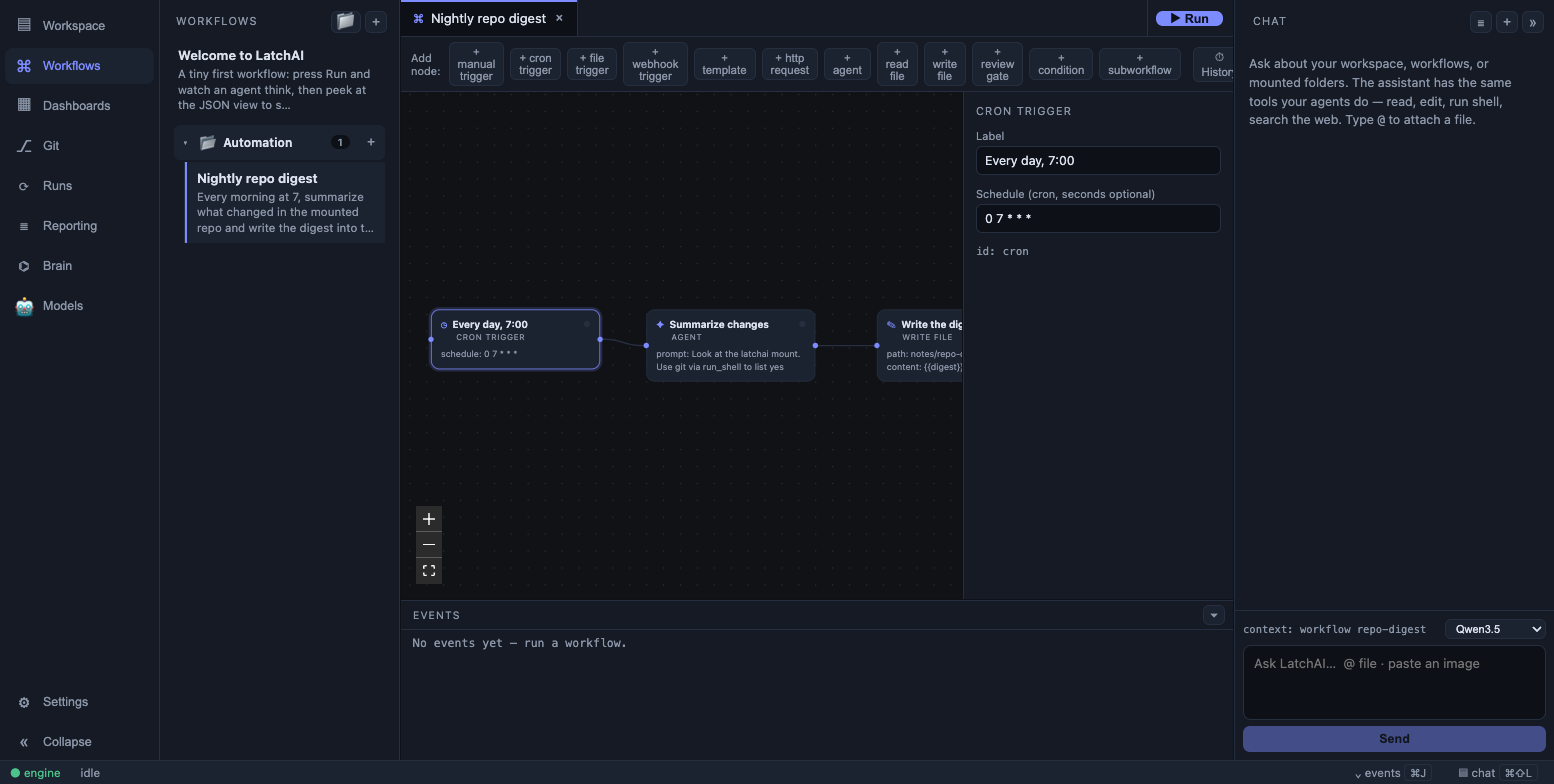
A trigger node’s schedule lives in the workflow document like any other config.
Adding one is the same motion as any other node: drop it on the canvas from the node
palette, fill in its config in the inspector, ⌘S. The save rewrites
<latchHome>/workflows/<id>.json, the trigger service notices the file changed, and the
schedule is live — no restart, no separate scheduler config.
cron_trigger
Section titled “cron_trigger”config.schedule is a cron expression, evaluated by croner.
Five fields are the familiar minute hour day month weekday; a sixth leading field means
seconds. You rarely type one: the inspector’s schedule builder offers presets — every
N minutes, hourly at a minute, daily at a time, weekly on chosen days, monthly on a day —
and a Custom cron mode for anything else. Whatever you pick, the document stores a
plain cron string, and an expression the presets can’t express (a six-field one, a range, a
month restriction) opens in Custom mode and is handed back byte for byte.
{ "id": "nightly", "type": "cron_trigger", "position": { "x": 60, "y": 160 }, "config": { "schedule": "0 2 * * *" }}| Expression | Fires |
|---|---|
0 2 * * * |
02:00 every day |
*/10 * * * * |
every ten minutes |
0 */5 * * * * |
every five minutes, on the zero second |
0 9 * * 1-5 |
09:00 on weekdays |
Under the builder is a preview, and it is the engine’s own answer rather than the browser’s guess: the UI posts the expression to the daemon, which parses it with the same croner the trigger service arms with and returns the next three fire times (plus a short English gloss for the shapes people hand-type). An expression croner rejects comes back with croner’s own message, so a schedule can’t be saved in a shape the trigger service will refuse.
The node’s output is the run payload when there is one, otherwise the literal string
cron: <schedule> — so a downstream template can say which schedule woke it.
{{state.trigger}} carries the same thing whichever trigger fired.
Schedules run in the machine’s local time: the daemon constructs each job without a timezone option, so a laptop that moves timezones moves its 2am job with it. A schedule croner can’t parse at arm time is reported on the daemon’s console and that one trigger is skipped; the rest of the workflow’s triggers still arm.
file_trigger
Section titled “file_trigger”config.path is a workspace-relative directory, watched recursively. The changed
file’s path — the watched directory plus the filename, as a relative path — becomes the
node’s output, so downstream nodes know what fired them.
{ "id": "inbox", "type": "file_trigger", "position": { "x": 60, "y": 160 }, "config": { "path": "input/inbox" }}The specifics matter here more than usual:
- The directory is created if it doesn’t exist, so arming a watch on a fresh path is not an error.
- A path that escapes the workspace is refused and logged. Mounted folders are not watchable this way — the watch root is the workspace, deliberately.
- Dotfiles are ignored, and only real files fire the trigger. Directory events don’t, which is what stops macOS FSEvents replaying the watched directory’s own creation at arm time as a phantom run.
- Events are debounced 400ms per trigger node, so one editor save that writes a temp
file and renames it produces one run rather than three — and two
file_triggers watching two folders never swallow each other’s fires.
webhook_trigger
Section titled “webhook_trigger”The daemon exposes POST /hooks/<workflow-id>; the request body becomes the node’s
output, capped at 8000 characters — parsed when the request’s content type says JSON,
so {{hook.story}} reads a field straight out of it, and kept as raw text otherwise. A
caller that claims JSON and sends something else gets the raw string rather than a failed
run: the node’s job is to hand the body on, not to police the sender.
POST /hooks/<workflow-id> fires the first webhook_trigger in document order — the
back-compatible URL, and the only one a single-webhook graph needs. A graph with more than
one also gets POST /hooks/<workflow-id>/<node-id> per node, each checked against its own
config.secret. An address naming a node that is not a webhook trigger of that workflow is
a 404, never a quiet fall-through to the first.
A webhook node may set config.secret, which callers present via the x-latchai-secret
header or a ?secret= query parameter. The comparison is constant-time over SHA-256 hashes
of both values, so neither the secret nor its length leaks through timing.
{ "id": "hook", "type": "webhook_trigger", "position": { "x": 60, "y": 160 }, "config": { "secret": "s3cr3t" }}curl -X POST http://127.0.0.1:7777/hooks/hook-echo \ -H 'x-latchai-secret: s3cr3t' \ -H 'content-type: application/json' \ -d '{"story":"AP-512","state":"merged"}'What a caller gets back says which of five things happened, so a delivery log is diagnosable without opening LatchAI:
| Status | Meaning |
|---|---|
| 202 | Accepted — a run was dispatched |
| 400 | The workflow file exists but the engine refuses it (a removed-format document), with the reason in the body |
| 403 | Bad or missing secret |
| 404 | No such workflow, no webhook trigger on it, no such node — or a path deeper than /hooks/<id>/<node> |
| 409 | The workflow is disabled, or that one trigger is paused |
Because the engine binds loopback and rejects non-local Host/Origin headers by
default, webhooks are local-only until you deliberately change the bind address
(LATCHAI_BIND). If you do expose it, set config.secret first: the hook has no other
authentication.
Several triggers, one run
Section titled “Several triggers, one run”A graph may declare as many trigger nodes as it likes, each a root (an edge into a
trigger is a validation error). One fire starts one run: the trigger that fired outputs
the payload, and every other trigger node is marked skipped before anything is dispatched
— so a node downstream of several of them sees the skipped edges resolve and runs on the
branch that did arrive, and {{other-trigger}} resolves to "". That is why
{{state.trigger}} is the reference to use below more than one trigger: it is the
fired trigger’s payload, in that trigger’s own shape, whichever one fired.
validate_workflow warns when a graph with several triggers references one of them by id.
{ "formatVersion": 2, "id": "sweep", "name": "Sweep (nightly or on demand)", "nodes": [ { "id": "nightly", "type": "cron_trigger", "position": { "x": 60, "y": 80 }, "config": { "schedule": "0 3 * * *" } }, { "id": "hook", "type": "webhook_trigger", "position": { "x": 60, "y": 200 }, "config": { "secret": "s3cr3t" } }, { "id": "press", "type": "manual_trigger", "position": { "x": 60, "y": 320 }, "config": {} }, { "id": "work", "type": "agent", "position": { "x": 340, "y": 200 }, "config": { "prompt": "Sweep the queue. Started with: {{state.trigger}}" } } ], "edges": [ { "from": "nightly", "to": "work" }, { "from": "hook", "to": "work" }, { "from": "press", "to": "work" } ]}▶ Run, POST /api/runs/<id>, and the CLI fire the manual_trigger if there is one —
that is the node run parameters live on — otherwise the first trigger in document order.
When the graph gave that pick a real choice (several triggers and no manual_trigger) the
run’s source names the node it landed on, as manual: <nodeId>.
Two places where “the first in document order” is a rule worth knowing rather than
discovering, so validation warns about both: a second webhook_trigger is reachable only at
its own /hooks/<id>/<node> URL, and a second manual_trigger can only ever be skipped.
A run started by a graph with more than one trigger records which node fired on its
run.started event, which is what lets a resume skip exactly the same trigger nodes the
original run did.
Arming and re-arming
Section titled “Arming and re-arming”The trigger service watches the workflows/ directory and hot re-arms on any change —
whether that change came from a save in the UI, a CLI write, or a git checkout — after a
500ms settle. You do not restart anything to change a schedule.
Re-arming rebuilds every cron job and file watcher from the files on disk, so a schedule you deleted stops firing, and one you renamed doesn’t double up. A file the engine cannot parse arms nothing and says so on the console on every re-arm — a cron that stopped firing overnight has to be diagnosable from the log alone.
The fire path re-reads the file too, rather than trusting the closure that was armed: a tick landing inside the re-arm window on a trigger you just paused is skipped rather than run.
One run at a time
Section titled “One run at a time”Only one run per workflow is in flight at a time. A trigger that fires while its workflow
is still running is skipped and logged — the guard that keeps a slow ten-minute job from
stacking on itself. The drop is visible, not silent: it emits a trigger.skipped event
carrying the workflow id and the source that fired, and a reason when the fire failed for
a second kind of reason (the file has since been rejected, or the document is one the
executor refuses to start — a cycle with no maxSteps).
That event has no run id, which means it reaches the live stream and the events panel but never lands in any run’s log — it is operational chatter about a run that didn’t happen, not run history.
Runs that do start carry their source on the run.started event (cron 0 2 * * *,
file input/inbox, webhook, manual, manual: <nodeId>, subworkflow:<nodeId>,
map:<nodeId>, resume), so the run log and the
Run Monitor distinguish a cron fire from a manual click.
The guard is per workflow, not per trigger: a second door firing while the first door’s
run is still going is dropped exactly as a second cron tick would be. Manual runs go
through it as well — POST /api/runs/<id> answers 409 rather than starting a second run —
and so does a workflow’s errorWorkflow,
which is dispatched through this same service.
Dashboards have their own schedule
Section titled “Dashboards have their own schedule”A dashboard definition’s refresh: cron is armed by the same
service, from the dashboards/ directory, and re-armed the same way when that directory
changes. It shares the discipline but not the queue: a refresh that comes due while the
previous build is still running is skipped, and the guard belongs to the dashboard service
rather than the workflow one. A dashboard with paused: true in its frontmatter is not
armed at all, while its ↻ button still builds on demand.
Turning triggers off
Section titled “Turning triggers off”Two switches, at two scopes:
disabled: trueon the workflow leaves every trigger unarmed while manual runs keep working — the safe way to park an automation without deleting it. The sidebar has a per-workflow toggle for it, and a disabled row wears an off badge. A workflow an agent authors with triggers is saved disabled until a person enables it."paused": truein one trigger’sconfigholds that one door and leaves the others open. A paused cron or file trigger is not armed (the daemon logs it on every re-arm); a paused webhook keeps its URL and answers 409 — distinct from a bad secret’s 403 and an unknown hook’s 404 — so a caller learns the door is held rather than gone. ▶ Run is never held by a pause, andpausedon amanual_triggeris ignored (nothing is armed for a button). The inspector shows the checkbox at the bottom of any pausable trigger, and the node card wears a ⏸ badge.
disabled outranks a pause: un-pausing one trigger inside a disabled workflow arms nothing.
Un-pausing needs no call of its own — dropping the key is a file change, and the watcher
re-arms.
Keeping the daemon alive
Section titled “Keeping the daemon alive”Triggers only fire while the engine is running. To survive logout and reboot, install it as a launchd service: see Run LatchAI as a service.