Agents
An agent is a file: <latchHome>/agents/<name>.md, frontmatter plus a system prompt body. That
makes “the release-notes writer” a thing you reference from a workflow node or the chat
panel instead of re-specifying a prompt every time it’s needed — and a thing you can
diff, review, and version like any other document.
---name: release-writerdescription: Writes release notes in the house style.model: default # a model name from the Models pagetools: [read_file, write_file, edit_file] # allowlist; omit for all toolsmaxTurns: 8memory: true # persistent notesvault: vault # a mounted knowledge vault it may readgroup: Docs # optional folder in the UIskills: [changelog-style] # pinned into every prompttemperature: 0.2 # generation hint---You write release notes for…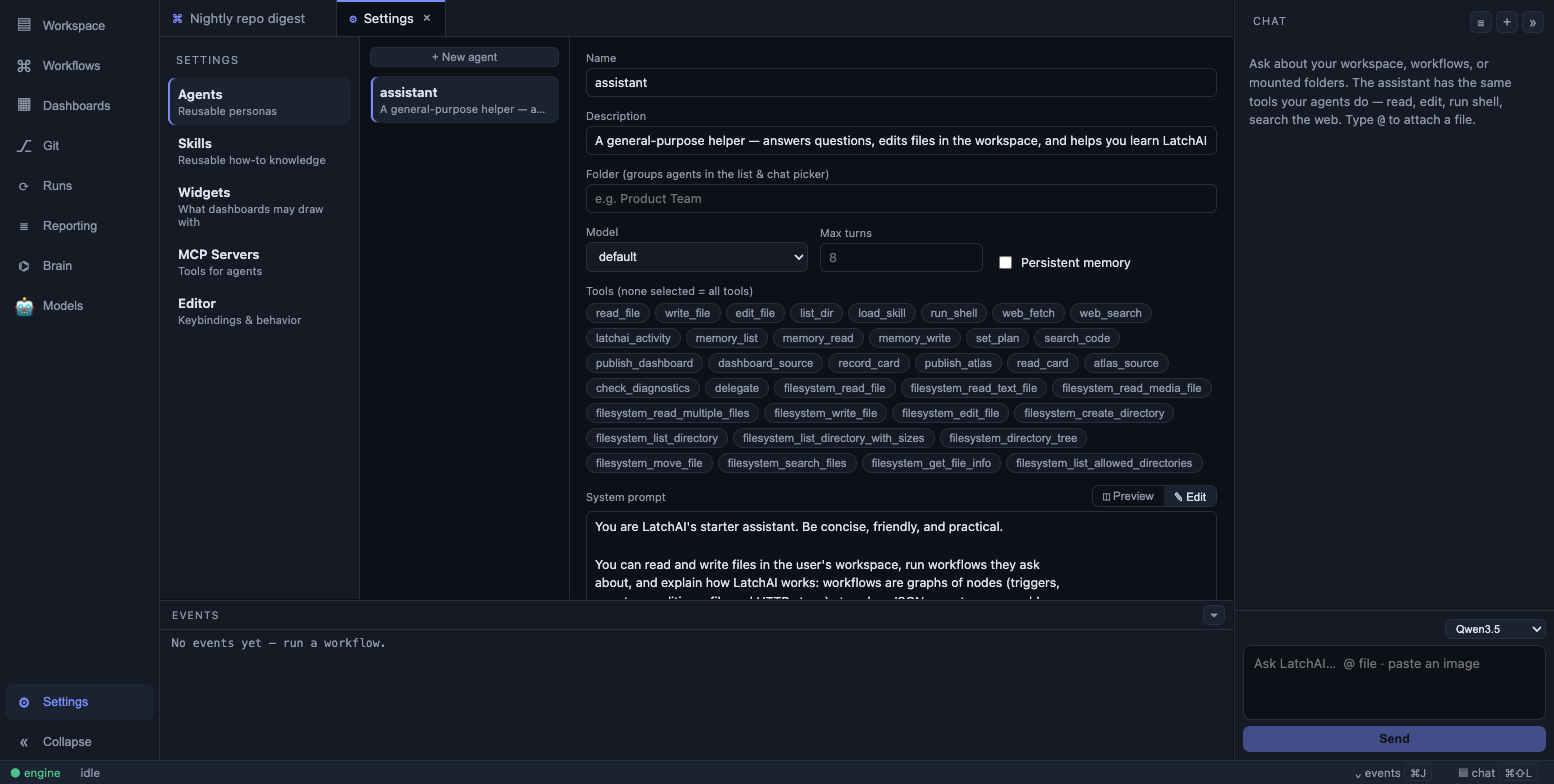
Agents are edited as markdown, with frontmatter driving the runtime.
Write the file by hand, or use Settings ▸ Agents, which edits the same file and keeps
version history under <latchHome>/history/agent/<name>/
(coalesced — an editing burst becomes one version, not one per click). The registry
re-reads agents/*.md from disk per run, so an edit applies to the next run with no
restart.
Frontmatter, field by field
Section titled “Frontmatter, field by field”| Field | Default | Effect |
|---|---|---|
name |
the filename without .md |
How workflow nodes and the chat picker refer to it; also the memory directory name |
description |
empty | Shown in the chat picker, the agent list, and the workflow inspector’s agent card |
model |
the default model | A model name from the Models page — a connected provider’s name, or local:<name> for a model on this Mac. A name that doesn’t exist falls back to the default rather than failing |
tools |
all tools | An allowlist over the whole registry, built-ins and MCP alike. Enforced in the loop, not just used to filter what the model is shown |
maxTurns |
150 in a workflow node | Runaway backstop on the tool loop, not a work budget. It applies to workflow nodes and delegated subagents; a chat turn uses the app-wide budget in Settings ▸ General instead (default 80) |
memory |
off | true gives it persistent notes — its own and a shared layer — through the memory tool. See Agent memory |
vault |
none | The name of a mounted vault this agent may read from and propose notes to. Sets it up with exactly one vault tool and a vault index. See Vaults |
group |
none | A folder in the agent list and an optgroup in the chat picker |
skills |
none | Skill names whose full bodies are inlined into every prompt |
temperature, topP, maxTokens, seed, effort, extraBody |
provider defaults | Generation hints — see below |
The body — everything after the closing --- — is the system prompt.
Generation hints
Section titled “Generation hints”Six optional keys tune decoding: temperature, topP, maxTokens, seed, effort
(low | medium | high | xhigh), and extraBody — raw request-body fields in the
provider’s own dialect, written as single-line JSON (extraBody: {"top_k": 20}),
because the frontmatter reader is line-based.
Every one is a hint, never a guarantee. A backend that doesn’t support a knob drops it:
temperature and topP are dropped on Claude 4.7+ models, which reject them, and seed
lands only on servers that implement it. Nothing here can fail a run — a malformed value
is logged at load and ignored, so temperature: warm costs that one knob rather than the
whole agent. Settings ▸ Agents has a Generation row for all six, and blank means unset.
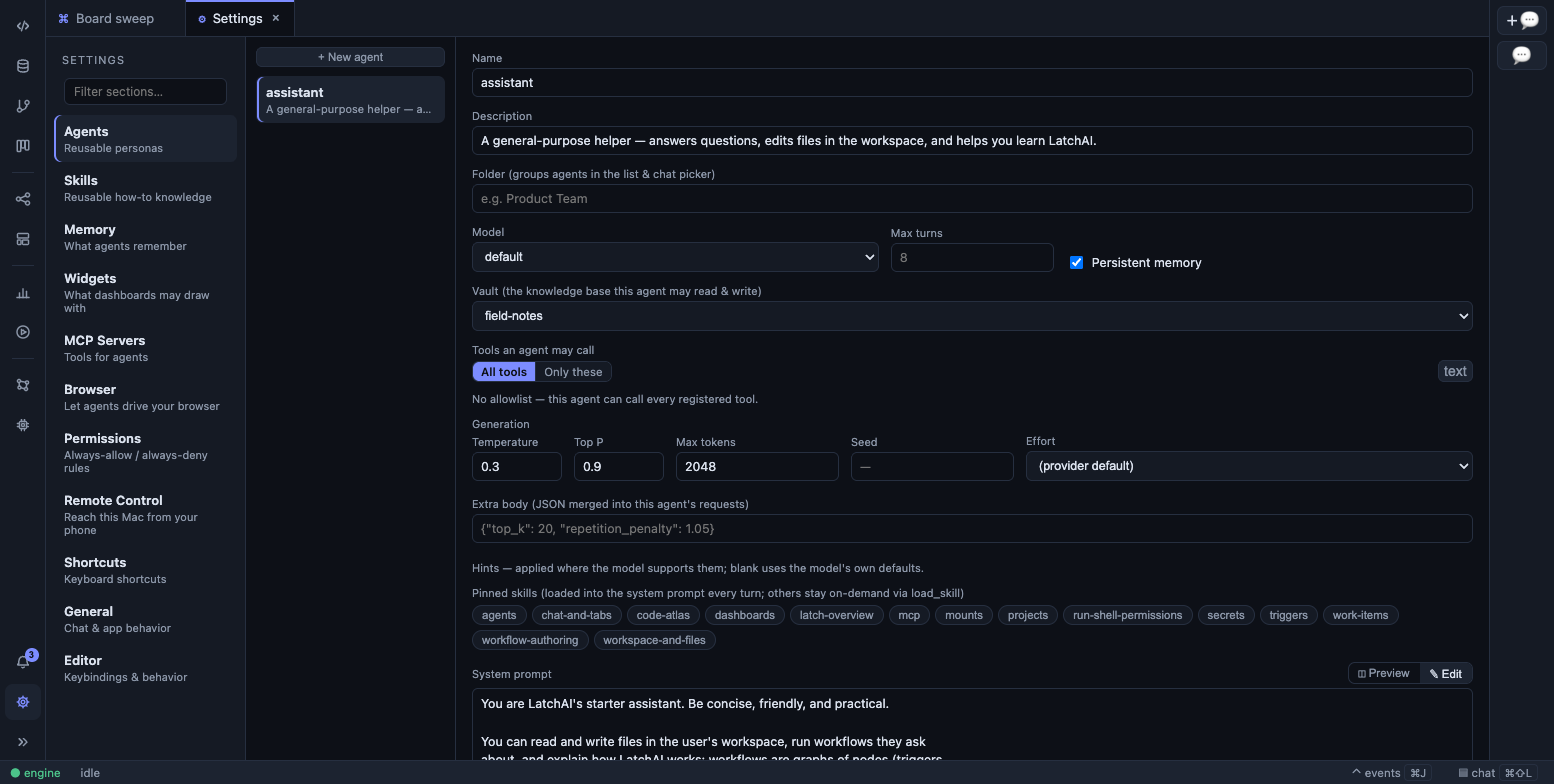
An agent’s vault, tool allowlist, and generation settings in Settings ▸ Agents. When a workflow node references an agent and sets the same keys, precedence is:
| Key | Who wins |
|---|---|
| the six generation hints | the node beats the def (extraBody merges per key) |
model vs the node’s provider |
the def’s model; the node’s provider is only the fallback |
tools |
the def’s list, outright — it is not merged with the node’s |
maxTurns |
the def |
None of it applies to a bare agent node with no agent and no tools: that path is a
plain completion with no system prompt and no tuning.
Where an agent gets used
Section titled “Where an agent gets used”From a workflow node — set config.agent on an agent node.
The definition supplies the system prompt, tool allowlist, model and turn budget; the
node’s own config is the fallback for each. The inspector shows a read-only card naming
the persona, telling you which other workflows share it, and linking into Settings.
From chat — the chat panel’s one picker lists your models
under Models (leading with Default · <model>, so an agent left on the default
follows the pin in Settings ▸ Models live) and your agents under Agents, with a
separate optgroup per group. Choosing an agent swaps the persona, the tool allowlist and
the model for that conversation.
From another agent — the delegate tool runs a named definition in a fresh context and
returns its result. The subagent gets its own persona, tools, memory and generation hints;
delegation is depth-capped at 2, its tokens are not streamed to the parent surface, and its
events are attributed to a parent▸agent-name node id, so a delegated workstream is
legible in the Run Monitor without drowning it. It gates
under the parent’s permission policy — delegation is not an approval-laundering path.
As a dashboard or atlas persona — a dashboard or
atlas definition’s agent: field supplies persona, model,
pinned skills and memory for the orchestrator, appended after that feature’s own system
prompt.
The tool loop
Section titled “The tool loop”An agent node (or a chat turn) runs a multi-turn loop: the model emits tool calls, the
tool registry executes them behind the permission gate, and results feed back for the next
turn. maxTurns bounds it. Every call surfaces as a tool.call / tool.result pair on
the canvas, in the events panel, and in the Run Monitor —
there is no hidden work.
config.tools on a node is an allowlist; config.provider is the fallback model for a
node whose agent names none.
Five details of the loop are worth knowing because you will see them in the event stream:
- Read-only calls run in parallel. When the model emits a batch, consecutive
read-only calls (
read_file,list_dir,grep,glob,search_code,web_fetch,web_search,state_get,latchai_activityand the other pure readers) execute together, up to four at a time. Writes, edits, shell, deletes,delegate, and every MCP tool stay strictly serial, permission prompts never stack, and results are paired back into history in the order the model issued them. - Tool results are clipped at 24,000 characters before they go back to the model, with
a marker that names how much was dropped (
…[truncated 5,000 of 29,000 chars]). This is whyread_filetakesoffsetandlimit— paging is how an agent reads a large file completely. Aload_skillbody is exempt: half a skill’s instructions are worse than a long result. - History is compacted as the prompt approaches the model’s context window — measured
by the server’s own prompt-token count, not a guess. It is a sliding window: roughly the
most recent third of the window is kept verbatim and only the older prefix is summarised
into one note, so the agent does not thrash re-reading files. It happens at a turn
boundary, so no tool call is orphaned, and it shows as a
compact_contexttool result plus a marker in the transcript. Settings ▸ General → “Compact at (% of context)” moves the trigger (default 80, range 30–95); it needs the model’s context size set on its provider entry to be exact. - The loop nudges rather than spins. An empty completion, tool-call syntax leaking into
plain text, or the same tool called eight times in a row each produce a corrective user
turn (twice at most, each). Those nudges appear as tool results named
empty_reply_nudge,malformed_tool_call_nudgeandrepeat_loop_nudge, so a run that went in circles says so. - Stopping is clean. A stop unwinds at a turn boundary, cancels the in-flight request, keeps whatever prose had already streamed as a real message, and pairs a stub result to every tool call that never ran — so the conversation stays valid to resume.
Built-in tools
Section titled “Built-in tools”Everything an agent can do goes through one registry, and each built-in belongs to a family — the same way an MCP server’s tools are listed under their server. This table is the map; Tools reference has the arguments.
| Family | Tools | What they’re for |
|---|---|---|
| Files | read_file, write_file, edit_file, multi_edit, list_dir, grep, glob, delete_file, search_code |
Read and change files across the workspace and mounts. edit_file replaces one exact string (it must match once); multi_edit applies several replacements to one file atomically; grep/glob search contents and paths; search_code is semantic search |
| Shell | run_shell, check_diagnostics |
bash in the workspace or a mount (5-minute timeout, destructive-command denylist), and the project’s own typechecker returning structured errors |
| Web | web_fetch, web_search |
Fetch a public URL as readable text (offset pages through a long page); keyless web search |
| Agent | load_skill, memory, delegate, set_plan, latchai_activity |
Load a skill body on demand, keep persistent notes, hand a subtask to another agent, publish the live plan strip, and read LatchAI’s own recent runs |
| Vault | vault |
Search, read, follow links, propose an inbox note, append to a note’s Log — for agents with vault: only. See Vaults |
| Work items | work_list, work_get, work_create, work_update, work_comment |
The work-item board, as files under workspace/work/ |
| Workflows | state_get, state_set, list_node_types, get_workflow, validate_workflow, save_workflow |
The run’s state document, and authoring workflows — the only route into the workflows/ directory |
| Database | db_connections, db_schema, db_query |
Saved database connections — reads run immediately, a write is refused on a read-only connection and asks first on a writable one |
| Dashboards | publish_dashboard, dashboard_source |
Publish widgets to a dashboard (they merge by id, so a board fills in live) and read the archived data behind a cited ref |
| Maps | record_card, publish_atlas, read_card, atlas_source |
The four tools a Code Atlas build runs on |
| Browser | browser_tabs, browser_navigate, browser_snapshot, browser_click, browser_type, browser_press, browser_select, browser_scroll, browser_screenshot, browser_evaluate, browser_back, browser_wait, browser_close |
Drive your own browser through the LatchAI extension. They only appear in an agent’s prompt once an extension is paired — see Browser automation |
Everything that touches the filesystem goes through the multi-root filesystem and must
stay inside the workspace and its mounts; an attempt to escape emits permission.denied
rather than silently failing. That guard is re-checked against the real path, so a
symlink planted inside the workspace can’t be used to read your home directory.
latchai_activity exists because <latchHome>/runs/ sits deliberately outside the workspace: no
file tool can reach the run logs, so an agent asked “what happened overnight?” would
otherwise have nothing to read.
What asks before it runs
Section titled “What asks before it runs”Most built-ins just run — an agent that can’t write a file without a prompt is unusable, and edits are recoverable from checkpoints. Three classes are different:
- Arbitrary code —
run_shell, andbrowser_evaluatekeyed by host — always asks. With nobody watching it falls to the unattended default in Settings ▸ Permissions. - Irreversible built-ins —
delete_file— plus thevaulttool and every MCP tool, whose effect LatchAI cannot know, ask while a human is watching and otherwise behave exactly as before. - Derived keys —
db_queryre-asks underdb_query(<connection>)when the SQL is a write,browser_navigate(<host>)andload_skill(<host>)ask per site.
“Always allow” persists a rule (for shell, keyed as narrowly as run_shell(git status:*)),
and rules are listed and removable in Settings ▸ Permissions.
Memory
Section titled “Memory”Set memory: true and the agent keeps persistent notes at workspace/memory/<agent>/*.md,
plus a workspace/memory/shared/ layer every memory-enabled agent reads and writes. It
reaches them through one memory tool — view, create, edit in place, insert, delete,
rename — addressed as /memories/<file>.md and /memories/shared/<file>.md. An index of
what it remembers — path, one-line description, age — is a block of its system prompt, so
it knows what it knows before it starts working, and reads a file only when it needs the
contents.
Because memory lives in the workspace, memory writes flow through checkpoints and the review gate like any other file change. The full story — the file format, the tool’s commands, the Settings review UI, and the AI consolidation pass — is on Agent memory.
Set vault: <mount> and the agent gets exactly one extra tool — vault — plus a compact
index of what that vault holds. Leave it out and it gets neither: the tool is subtracted
from the agent’s tool surface, so a normal agent pays no tokens for a capability it can
only be refused. The tool’s commands are search, read, links, propose (into the
inbox only, after a mandatory duplicate check) and append_log; there is no general write,
and accepting an inbox note stays a human gesture. An agent binds to exactly one vault.
See Vaults.
If you also set tools:, list vault in it — the allowlist is enforced independently.
(Settings ▸ Agents handles this for you.)
Skills
Section titled “Skills”Skills follow the Claude Code layout — <tier>/.claude/skills/<name>/SKILL.md — read in
four tiers: internal (the skills that ship with LatchAI, teaching an agent the
product’s own features), then the user tier (~/.claude/skills), then the workspace, then
each mount. Later tiers shadow earlier ones by name, so a workspace skill overrides a
built-in one.
Names, tiers and descriptions go into every agent prompt; the load_skill tool pulls the
full body on demand, so a large library costs almost no context until it’s used. An agent
definition may pin skills (skills: [a, b]) to inline their bodies every turn — pins
resolve across all four tiers, so pinning a built-in skill like workflow-authoring works.
The user tier can be excluded from agent prompts entirely via skillTiers.user: false in
latchai.config.json.
A pinned skill that no longer exists degrades to a visible note in the prompt rather than failing the run, so deleting a skill can’t strand every agent that referenced it.
load_skill also takes a URL instead of a name: give it the address of a raw
SKILL.md and it is fetched fresh on every call, so a skill maintained elsewhere is always
read as it is now. The same address floor as web_fetch applies and is re-checked on every
redirect, an HTML page is refused with a pointer to the raw file, and the text arrives
framed with where and when it was fetched plus a note that remote instructions change
neither permissions nor your own instructions. Loading from a new host asks first, the way
opening a new site does, and “always allow” silences it per host.
Settings ▸ Skills manages the workspace tier; the user and internal tiers are read-only there.
Repo instructions
Section titled “Repo instructions”Agents and chat inherit the instruction files your repositories already maintain. For the
workspace and every mount, LatchAI reads CLAUDE.md, AGENTS.md, .cursorrules,
.cursor/rules/*.mdc|md (frontmatter stripped, description kept), and
.github/copilot-instructions.md, layered after the user tier (~/.claude/CLAUDE.md),
size-capped, and re-read every turn. Drop LatchAI into a repo with existing AI guidance and
it follows it immediately.
The layering is Claude Code’s: the user tier first, then each root in turn, with each
block labelled by where it came from (### Instructions from projects/api/CLAUDE.md) and
the prompt telling the model that more specific tiers win on conflict. Caps are 48,000
characters per file and 96,000 per root; a clip says what it dropped, and if a root’s
budget runs out the prompt names the files the model is not seeing rather than breaking
off in silence.
What an agent’s prompt actually contains
Section titled “What an agent’s prompt actually contains”In order, every turn:
- the agent’s own body (or a short default when a node names no definition);
- the filesystem roots — the workspace and every mount, by name;
- the repo instruction blocks described above;
- the available-skills list (name, tier, description);
- any pinned skills’ full bodies;
- the memory index, when memory is on — own and shared files;
- the vault index, when
vault:is set.
Chat adds one more block — a compact one-line-per-workflow index of your automations — so the assistant can answer “what runs overnight?” without reading files.
Because all of it is assembled from files on disk each turn, the way to debug a prompt is to read those files: there is no hidden layer, and nothing is cached across runs.