The Brain
The Brain is one rail entry with three lenses over the same subject:
- Graph — how things connect, either across your whole workspace or inside one vault.
- Notes — the vault itself: a tree of notes, and an editor for them.
- Inbox — what agents proposed and nobody has accepted yet, with a count badge on the tab.
Open it with the Brain entry in the activity bar, or from the command palette
(⌘⇧P): Brain: Provenance Graph, Vault: Graph, Vault: Notes, Vault: Inbox,
Vault: New Note, Vault: Quick Capture. Each palette entry lands on the lens that
answers it.
Only the Graph lens’s workspace scope works with no vault configured. Everything else needs one, and a vault is a folder you point LatchAI at — see Vaults.
The Graph lens
Section titled “The Graph lens”A scope picker beside the lens tabs decides what is being drawn: Workspace —
provenance, or <name> — notes for each mounted vault. (The last entry,
+ New vault…, opens the create form instead of changing the scope.)
Workspace scope: the provenance graph
Section titled “Workspace scope: the provenance graph”Nothing in this graph is user-authored. It is derived entirely from what the daemon already writes — the documents in your home and workspace for the schema layer, and the append-only JSONL run logs for the causal layer: which run produced which file, which agent wrote which memory, which chat touched which work item. It is read-only and side-effect free; building it never writes into your home.
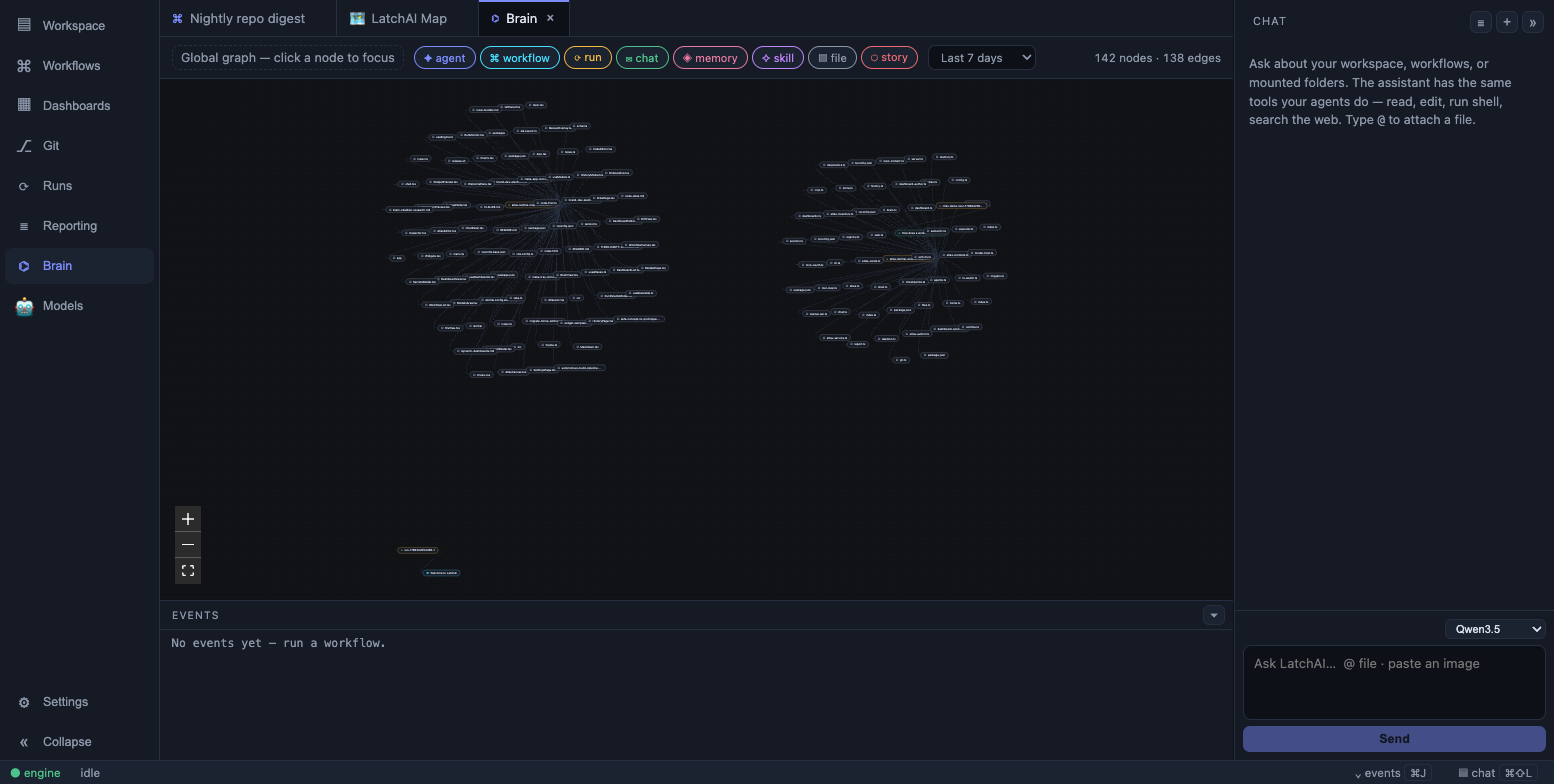
Nodes are coloured by kind; edges carry a type and a timestamp.
Ten node kinds, each with its own colour and glyph:
| Node | Derived from | Opens |
|---|---|---|
agent ✦ |
<latchHome>/agents/*.md |
— |
workflow ⌘ |
<latchHome>/workflows/*.json |
The workflow tab |
skill ✧ |
workspace/.claude/skills/<name>/SKILL.md |
The SKILL.md file |
memory ◈ |
workspace/memory/<agent>/*.md |
The memory file |
chat ✉ |
workspace/chats/*.md |
The conversation note |
work ▥ |
workspace/work/<project>/<KEY>.md |
The work item |
note ◫ |
Every note in every mounted vault | The note, in the side panel |
run ⟳ |
<latchHome>/runs/*.jsonl |
— |
file ▤ |
Paths a run touched | The file |
story ⬡ |
Issue keys found in text (AP-512) |
— |
And the edges between them:
| Edge | Meaning |
|---|---|
uses |
A workflow references an agent in a node’s config; an agent pins a skill |
remembers |
An agent owns a memory file |
authored-by |
A chat ran under a named agent; a vault note carries that agent’s source: line |
produced-by |
A run belonged to a workflow, or to a chat session |
ran |
A run executed under a named agent, when it was not a chat |
touched |
A run read, wrote or edited a file, a vault note, or a work item |
child-of |
A work item hangs off its parent |
links |
One note links another with a [[wikilink]] |
references |
A note, chat, memory, work item or run log mentions another node by [[wikilink]] or by issue key |
Two rules keep the graph from doubling itself. A run that writes into a vault edges
to the note, not to a second file-typed node beside it — the file event records
vault/people/jane-smith.md, which is the note’s identity minus a prefix. And a key
like CS-7 resolves to the work item on your board if you have one, then to a vault
note that is that key, and only otherwise mints a bare story node.
Issue keys are found by shape (ABC-123) with a denylist for the tokens that share
it and never mean an issue — UTF-8, SHA-256, RFC-2119, WCAG-2. Wikilinks
resolve in two tiers: identity first (an agent’s name, a note’s file name and its
declared aliases, a work item’s key), then the weaker keys (labels, headings, paths),
so a chat titled “Jane Smith” can never take the name of the note that is Jane
Smith. Anything still unresolved is dropped rather than drawn as a ghost, and links
inside code spans or fences are skipped — a [[wikilink]] in a fenced example is a
link being discussed, not a link.
Vault notes are dated by their own frontmatter updated:, falling back to the file’s
mtime — a vault is usually a git checkout, where every mtime is the day you cloned it.
Reading the provenance graph
Section titled “Reading the provenance graph”Nodes that are file-backed open, which is the point: the graph is a way to navigate the work, not a poster.
- Click a node to focus it. The graph re-queries centred on that node.
- Drag the depth slider (1–3, shown once something is focused) to widen or tighten the neighbourhood around the focus.
- Double-click to open: a workflow node opens its tab, a note opens in the side panel, anything else file-backed opens the file.
- Toggle type chips to hide kinds you don’t care about — turning them all off is refused, since an empty graph helps nobody. A kind a newer engine adds joins the chip row rather than being dropped from it.
- Change the time window — 24 hours, 7 days (the default), 30 days, or all time. Structural edges are timeless and always survive; only dated ones fall out.
Two questions it answers well: what did this agent touch last night (focus the
agent, 24h, depth 2 — the runs it ran and the files those runs wrote) and what
produced this file (focus the file and read the touched edges back to their runs,
and from there to the workflow or chat that started them).
Layout is a force simulation run to convergence once per query, then handed to the canvas as static positions. Drag a node to see something better; nothing is written back.
Vault scope: a note graph
Section titled “Vault scope: a note graph”Point the scope picker at a vault and the same canvas draws that vault instead:
notes as nodes, [[wikilinks]] as edges. It is derived from the one index payload
the rest of the area already reads, so there is no second source of truth.
- Notes take their type’s colour — the same colour as their dot in the note tree
and their badge in the editor. A vault that names a
colorfor a type is drawn in it. - A note still waiting in the inbox wears a dashed ring and an
inboxtag. - A link nobody has answered yet becomes a ghost node: dashed, muted, with an edge from every note reaching for it. That is the vault’s own to-write list, drawn rather than maintained. Click one and the new-note form opens, prefilled with the name.
- Chips filter by type and carry counts; a separate unwritten chip toggles the ghosts, so the picture is either “what I have” or “what I have and what it is asking for”.
- The search box highlights matches and fades the rest. It never moves a node — the shape you had learned is the shape you keep.
Reciprocal links collapse to one edge: a wikilink between two notes is one relationship, and drawing it twice says nothing extra.
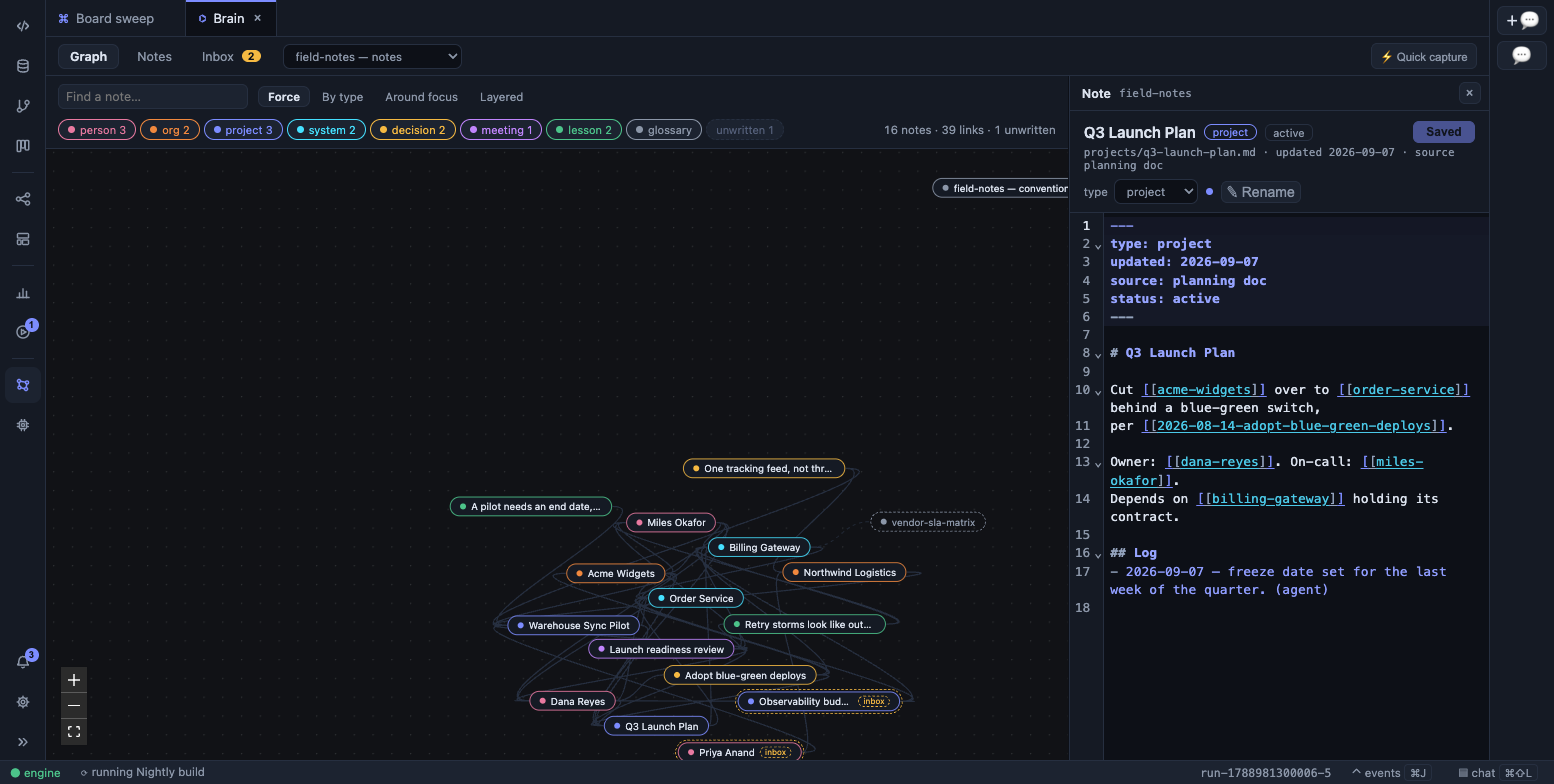
The Graph lens on a vault: the Graph / Notes / Inbox strip, the scope and layout pickers, a dashed ghost node for a note nobody has written yet, and a note open in the side panel.
Four layouts
Section titled “Four layouts”A force layout answers one question well — what is near what — and is mute about every other one, so the graph lens has a picker beside its search box. Nothing is stored and no position is written back; switching re-frames the same graph.
| Layout | Answers |
|---|---|
| Force | What is near what. The default. |
| By type | Where the people sit relative to the projects. Each type gathers in its own region, but links still pull related notes across the boundaries — which is what makes the crossings meaningful. |
| Around focus | What is near this note. Rings ordered by hop distance from the note you click (the busiest note until you do), each ring widened until its own notes fit around it. |
| Layered | A chain of reference, read left to right along link direction. |
Layered runs through ELK, which is loaded only when you pick it. While it thinks, the picture you were looking at stays put.
The note panel
Section titled “The note panel”Clicking a note in either graph opens it beside the picture rather than instead of it, so you keep the thread you were following. The panel is resizable, and it holds three things in turn: the note editor, the new-note form (a ghost node, or an unresolved link followed out of the editor), and quick capture.
Its editor shares one buffer store with the Notes lens, so there is exactly one draft
per note however you reached it. ⌘S saves whichever editor is in front. A
half-written note survives whatever else the panel shows, and survives switching to
the graph — the Notes lens stays mounted behind it rather than being torn down.
The Notes lens
Section titled “The Notes lens”The vault itself: a tree grouped by folder with the inbox pinned first and badged, and one note open at a time.
The editor is the workbench’s CodeMirror 6 — same theme, same optional Vim — plus
three things a note needs and a source file does not: [[ completion over every note
name and alias, links you can follow (an unresolved one offers to write that note),
and a frontmatter block that reads as metadata rather than prose. Its header shows the
note’s type, its updated date and its backlinks, all from the index rather than from
the buffer, so it can show you the links the note itself cannot see.
Saving is explicit — ⌘S or the button. Nothing autosaves: a vault holds durable
notes, usually under git.
Two bars can appear in that header. Triage — a folder picker, Reject, and Accept into that folder — for a note still in the inbox, because the moment you have finished reading it is the moment you have decided. Refile for the correction any note can need: this is a system, not a project. Both are covered in Vaults.
The Inbox lens
Section titled “The Inbox lens”The review channel for what agents wrote. Nothing an agent proposes lands in the vault proper; it waits here until a person accepts or rejects it, and that decision is the one place the daemon commits the vault’s repo.
Each pending note shows its body rendered (you are reading it as a note, not as raw markdown), its frontmatter as chips, and a folder picker defaulting to its type’s folder. Two buttons: Accept, which moves it into that folder and commits, and Reject, which deletes it and commits.
A banner flags the one mistake triage exists to catch — a note about something the vault already covers. The check runs over names and aliases in both directions, out of the index already in hand.
If the file moved but the commit behind it did not, the lens says so rather than swallowing it. A vault you believe is committed when it is not is a vault you find out about much later.
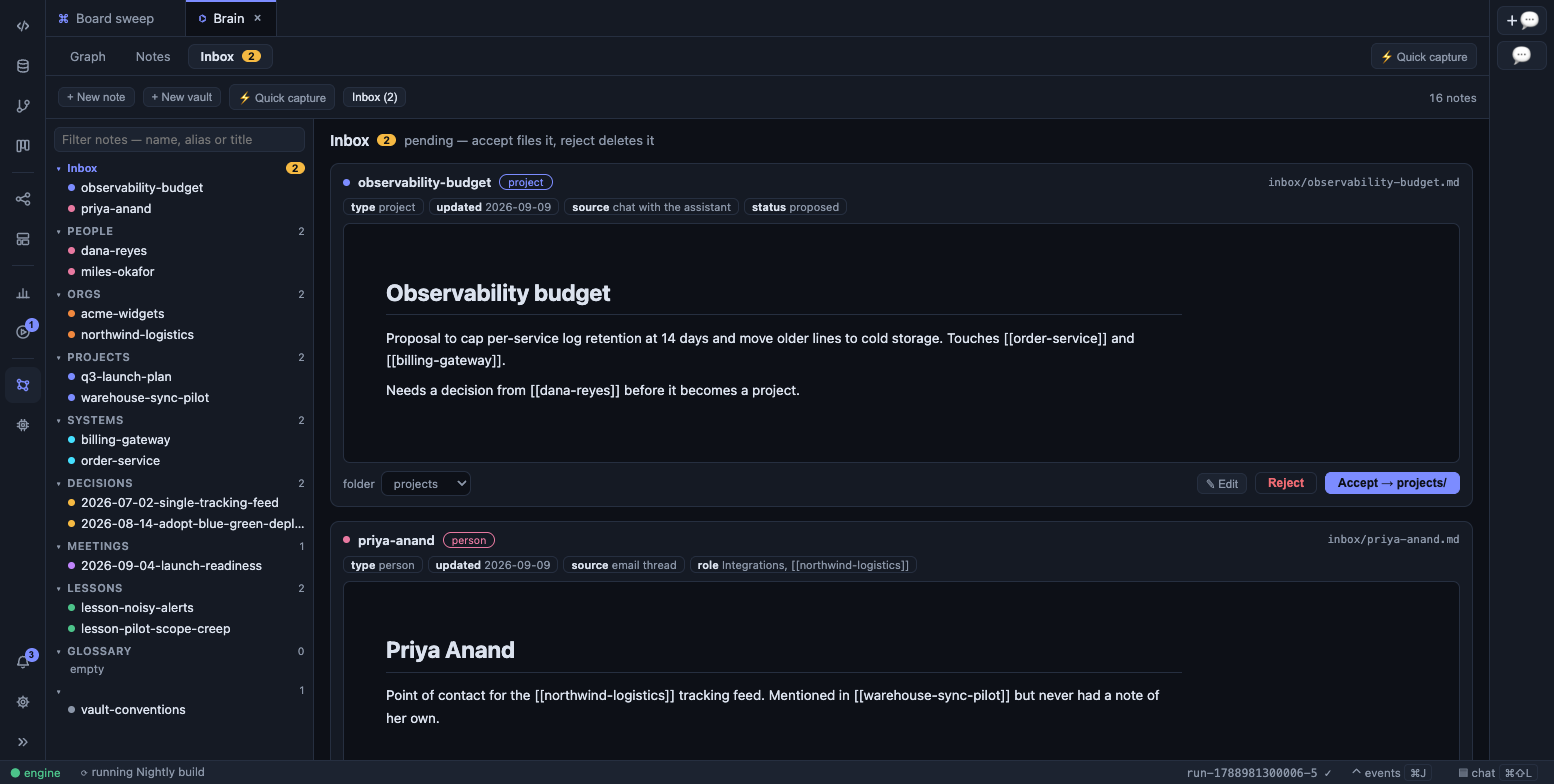
The Inbox lens: pending notes with their frontmatter, a folder picker, and Accept / Reject.
Quick capture
Section titled “Quick capture”⚡ Quick capture sits at the end of the lens strip on all three lenses (⌘⇧P →
Vault: Quick Capture). Tell it a sentence — a call you just had, three facts about a
new client — and a model pass files it: appending to notes that already exist, and
proposing the ones that do not.
The pass runs with exactly one tool, the vault tool, so the worst it can do is read this vault and stage notes in its inbox. It cannot read files, run shell, or reach the network. Its token spend streams and is logged like any other run.
The box stays after each pass, empty and focused, so the next note is a keystroke away. The notes each pass wrote accumulate as chips you can open, and the Inbox lens and its badge count them the moment they land — whether the capture came from the graph panel, the Notes lens, or the palette. On the Graph lens, capture takes the side panel, so what it writes appears as inbox nodes in the picture you are already reading.
Derived, not stored
Section titled “Derived, not stored”Nothing here is an index you maintain. The graph is recomputed from the run logs and the files each time it is queried, so deleting a chat or renaming a workflow simply changes the next picture — there is nothing to rebuild and nothing to reconcile. It stays cheap because a parsed run log is cached by path and modification time, and vault notes the same way.
What it doesn’t show
Section titled “What it doesn’t show”The provenance graph is bounded on purpose, and the bounds are worth knowing before you conclude something is missing:
- The newest 100 run logs, and 400 nodes overall. When the cap bites, the ranking keeps what is nearest the focus, then what is connected at all, then the schema and knowledge layer (agents, workflows, skills, memory, work items, notes, stories) over the long tail of runs and files, then the most recent.
- Skills from the workspace tier only —
~/.claude/skillsand mounted repos’ skills are not walked here, even though agents can load them. - Agent nodes don’t open.
<latchHome>/agents/sits outside the multi-root filesystem, so there is no path for the editor to open; edit them in Settings. - 1,000 notes per vault, 20 boards, and 200 items per board — a backlog and a vault both grow without bound, and the graph is a picture rather than a tracker.
- Issue keys are scanned from the first 300 KB of a run log, up to 25 per run.
Work items a run demonstrably moved are exact instead: they come from the
work.updatedevents, up to 25 per run, wherever in the log they landed. - Edge labels hide themselves past 60 edges, for the same reason the atlas canvas does it.