Chat
Chat in LatchAI is not a sidebar bolted onto an editor. It runs inside the engine, on the same provider, the same tool registry, the same multi-root filesystem, and the same event bus as workflow runs — which is why a chat turn can edit a file, run a test, and show up in the same review surfaces a scheduled run does.
Open it with ⌘⇧L, or from the ▤ chat button in the status bar. A conversation can also
live as a tab in the editor area: New Chat Tab in the command palette starts one, and
⧉ in the dock’s header moves the conversation you’re already having into a tab. A chat is
in exactly one place at a time — dock or tab, never both.
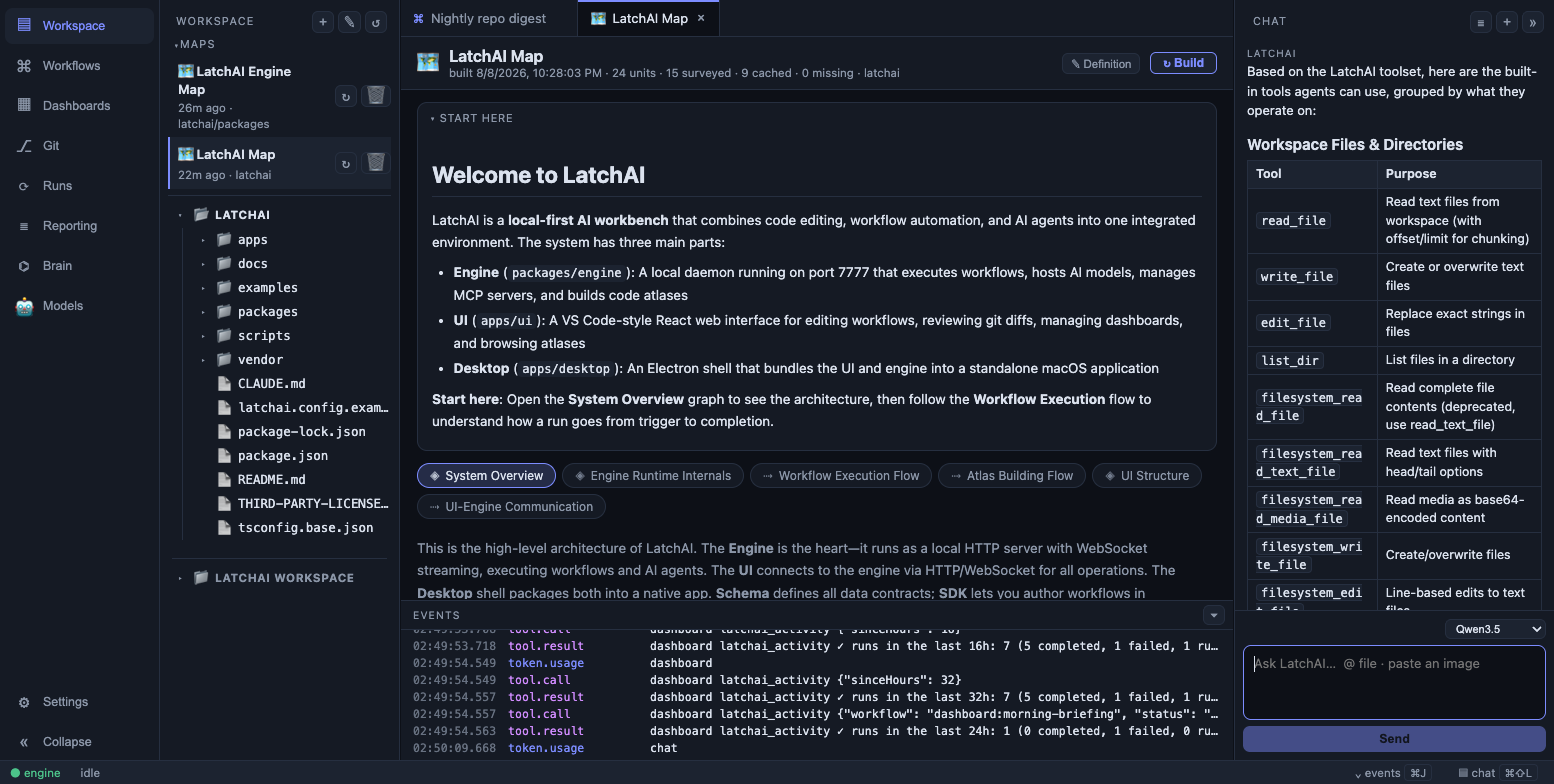
Tool calls appear inline as collapsible rows; the full entries land in the events panel.
Who answers
Section titled “Who answers”One dropdown at the bottom of the panel decides that, and it has three parts:
Default · <model>leads the list. It is the model pinned on the Models page, and picking it sends the literal namedefault— so the engine re-resolves the pin on every turn. Move the pin and this conversation follows it, with nothing to re-select.- Models — everything else in the Library: models downloaded to this Mac (listed as
local:<name>, with●marking the one currently loaded in memory and○the ones that aren’t) and connected providers. Talking to a model directly gets LatchAI’s built-in assistant persona. - Agents — your agent definitions, grouped by their
groupfrontmatter. Picking one swaps in its system prompt, its tool allowlist and its model for this conversation.
A local model for routine questions and a large hosted one for the hard problem is a per-conversation decision, not a global setting — and the conversation remembers it: a session’s model, agent, and permission mode are stored in its envelope, so reopening a chat restores the pickers to what you had.
Pick a local: model that isn’t resident and the panel says so rather than stalling: a
line above the composer explains it will load on your next message, or offers you another
model if the worker crashed.
The default persona
Section titled “The default persona”Talking to a model directly, LatchAI’s assistant is deliberately conversation-first: it is
told to answer in the chat rather than writing a file to explain itself, to prefer
read-only tools while exploring, and to reserve write_file, edit_file and run_shell
for changes you actually asked for — ending with a one-line list of the paths it touched.
It also gets a compact index of your workflows — one line each, with the node shape and any cron schedule — so “what runs overnight?” is answerable without reading a single file.
The system prompt is rebuilt every turn, so a CLAUDE.md you just edited, a mount you just
added, and a browser extension you just paired are all live on the next message.
Context
Section titled “Context”Three things reach the model as context, and it’s worth knowing which is which.
The active tab. The composer shows a chip naming what you’re looking at, and each message carries a description of it. For a file tab that description includes the buffer itself — head-capped at 4,000 characters, and marked as dirty when what you’re looking at differs from disk, so the model never answers about the saved copy of a file you have unsaved edits in. A file over 1 MB, or a binary, attaches its header only. It does not repeat: a conversation about one file sends that file once and a one-line “unchanged” note after that, until the buffer actually changes.
Other tabs send bounded facts rather than contents: a workflow tab, its id and name; a database query tab, the connection, the SQL in the editor, and the shape of the last result — columns and row count, never rows; a table tab, the table’s columns and keys; a work item, its kind, lane, fields, description, and last few activity lines.
@ mentions. Typing @ in the composer autocompletes against the file tree; up to five
mentioned files are fetched and inlined, capped at 12,000 characters in total.
Images. Paste one and it attaches as a thumbnail and is sent as a vision block — the
OpenAI-compatible provider expands it to an image_url part, the Anthropic provider to a
base64 image block. Click any image in the transcript to open the Lightbox: a
full-window view with a fit ⇄ 1:1 toggle, dismissed with Esc, the close button, or a
click on the backdrop.
The tab description travels in a context envelope marked as environment, not as something you typed, and is stripped back out of the transcript when a session is reloaded — so re-opening a chat doesn’t show you the plumbing, and neither does the markdown mirror.
Slash commands
Section titled “Slash commands”Type / as the first character and a popover lists the commands, filtered as you type.
↑/↓ move, Tab completes, Enter runs the selected one, Esc closes. A slash command
is intercepted and never sent to the model.
| Command | Does |
|---|---|
/rename <title> |
Rename this chat. With no title, opens the rename editor in place |
/new |
Start a new chat |
/stop |
Stop the turn that is running (says so if nothing is) |
/mode <ask|allow> |
Show or set when this chat asks before running a tool |
/help |
List every slash command |
The parse is deliberately narrow: a line is a command only when it starts with / and
its first token names one of the five above. /usr/local/bin, /deploy and hey /new are
prose and go to the model exactly as typed.
Naming a chat
Section titled “Naming a chat”A conversation names itself after your opening line, which is a decent guess and a poor
permanent name. Rename it three ways: right-click its tab and pick Rename…, type
/rename a better name, or type /rename alone to put the caret in the label. Titles are
1–120 characters.
The name you choose sticks. A rename locks the title, so no later message quietly takes it back — and both copies move together, so the heading of the conversation’s markdown note changes with it.
Chat has the same tool surface agents do: file reads and edits, shell, semantic search,
diagnostics, web fetch, skills, browser automation,
and every connected MCP server. Calls stream as they resolve, and the
set_plan tool drives a live plan strip above the conversation so a long multi-step turn is
legible while it happens.
Each tool call is a row in the transcript — status, tool name, a summary of the arguments —
that expands to the full arguments and result. Browser actions get a row of their own,
🌐 navigate example.com, with the page as it looked afterwards as a thumbnail you can open
in the Lightbox. The full entries also land in the events panel (⌘J). A chat turn’s events
are excluded from the Run Monitor — the panel you are already
looking at is the better view of them.
Permission mode
Section titled “Permission mode”A picker in the chat toolbar sets the session’s permission mode: 🔒 Ask permission (the
default) or ⚡ Allow all tools; /mode sets the same thing from the composer.
In ask mode three classes of call raise a permission card in the transcript — arbitrary
code (run_shell, and browser_evaluate on a given host), the delete-class built-ins, and
any tool that isn’t ours, meaning an MCP server’s. The card shows the tool, a preview of the
arguments, the rule key it would write, and four buttons: Allow once, Always allow
<key>, Deny once, Always deny. “Always” rules persist in
<latchHome>/permissions.json, and Settings ▸ Permissions edits them.
Flipping the mode applies to the running turn immediately: a prompt already on screen is released. The mode is per session, never a persisted rule.
Reasoning
Section titled “Reasoning”When a model streams its reasoning — the reasoning field Qwen, DeepSeek, and vLLM-style
servers emit — the chat shows it as a Thinking… block that expands while it streams and
folds to Thought process once the reply begins; click to reopen it. It is display only:
reasoning is never persisted or sent back to the model.
The context ring
Section titled “The context ring”A small ring in the chat toolbar fills as the conversation approaches the point where
LatchAI will compact it — amber past 80%, pulsing when compaction is imminent, dashed when
the server reports no usage. Hover it for the real numbers. When compaction happens, a slim
divider marks the spot in the transcript (context compacted — 18k → fresh window) and the
ring empties.
Applying code the assistant wrote
Section titled “Applying code the assistant wrote”Every code block in a reply carries an Apply button beside Copy, and it says where the
code is going before you press it. The label reads Apply → app.ts; the tooltip carries
the full path and how it was decided, in this order:
- the file named in the code fence —
```ts src/app.tsor```ts:src/app.ts - a path in the prose around the block that is a real file in this workspace
- the file tab you have open
- nobody said — the button reads Apply to…, which is a promise you’ll be asked
Apply merges the snippet into that file and opens a proposed diff tab: the buffer as it
was on the left, as it would be on the right, with Accept and Reject. Nothing is
written to disk either way. Accept puts the merged text into the editor buffer and marks it
dirty, so you still save it yourself with ⌘S; Reject just closes the tab. If the file is
open with unsaved edits, those edits are what the merge is computed against.
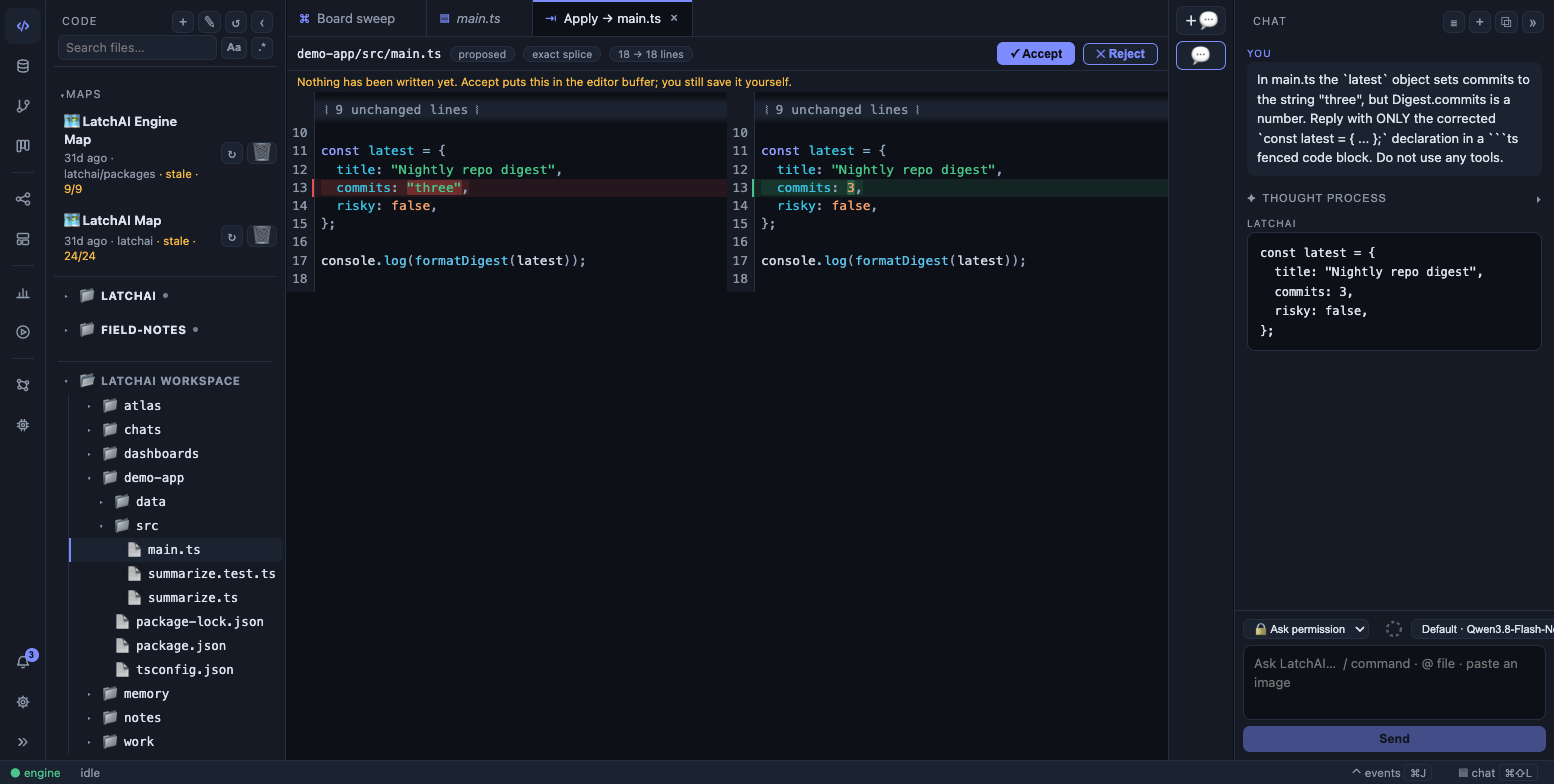
Apply from chat: the proposed diff, before and after, with Accept and Reject. Nothing is written to disk until you save the buffer yourself.
The merge runs in two tiers. First a free, exact splice inside the daemon: it handles a
whole-file rewrite, elision markers (// ... existing code ...), and fragments whose
surrounding lines pin down exactly one place in the file — and it re-indents a snippet the
model wrote at the wrong column. It declines rather than guesses: anything ambiguous
falls through to the second tier, which asks a model to integrate the change and hand back
the whole file. The diff labels which tier produced it, so merged by model is worth a
second read that exact splice is not.
That model is the one in Settings ▸ Editor — the same slot tab-completion uses. If you haven’t configured one, Apply says so quietly beside the block instead of interrupting the conversation. The model tier also refuses files over 1,500 lines, because the answer is the whole file coming back.
The button appears in chat only — the markdown file preview and the Usage transcripts are untouched — and never while a reply is still streaming, because half a function is not a change.
Reviewing what it changed
Section titled “Reviewing what it changed”Every chat turn is checkpointed. The ± Review changes affordance opens the diff for that turn in the review overlay, with a revert — the same machinery workflow runs use, so “what did the assistant actually do” has one answer everywhere in the product.
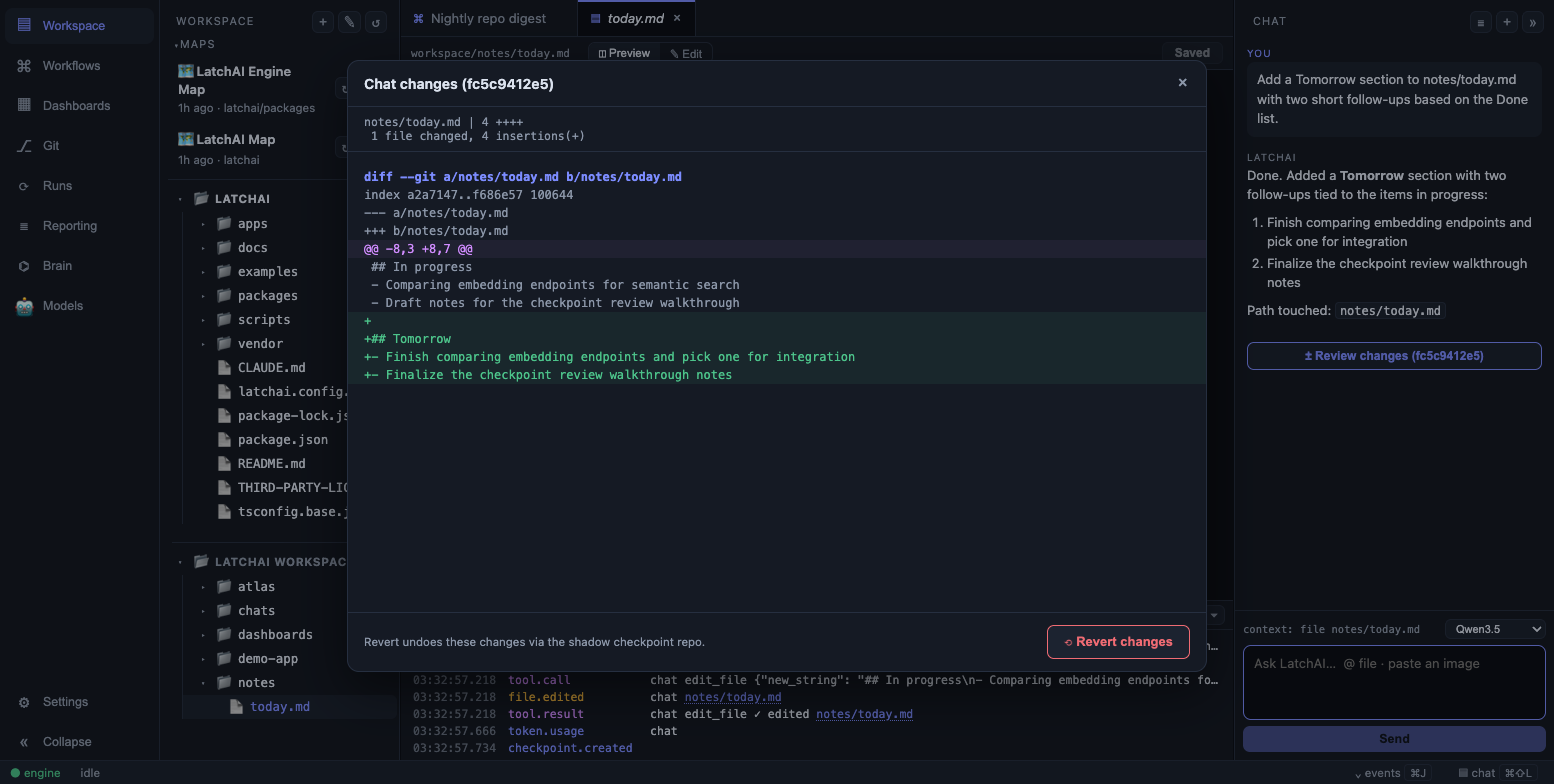
A chat turn’s file changes, reviewable and revertible.
The button appears once the turn finishes and carries the checkpoint’s short sha. It shows only when the turn actually changed something: no files touched, no checkpoint, no button.
Refining a dashboard in conversation
Section titled “Refining a dashboard in conversation”Open the chat while a dashboard tab is active and the turn is
bound to that board. Two things follow. The assistant is given bounded context — the
brief, every widget’s summary and displayed data, and an index of the run’s sources
(labels and refs, never the payloads). And publish_dashboard resolves against that
board, so “drop the token count and make the list full width” re-renders the live
dashboard instead of describing a change to it.
dashboard_source fetches one archived payload on demand when a question needs the
numbers behind a number rather than the summary.
Persistence
Section titled “Persistence”Sessions persist twice, deliberately:
- Canonical envelopes at
<latchHome>/runs/chats/<id>.json— the exact messages including tool turns. These survive restarts and are what a resumed session replays. - Markdown mirrors in
<latchHome>/workspace/chats/— YAML frontmatter and timestamped turn headings. Point an Obsidian vault at that folder, or symlink it, and every conversation is indexed and linkable with no plugin.
The mirror is rewritten on every turn, named <date>-<slugified-title>-<id-suffix>.md. It
looks like this:
---latchai: chatsession: chat-1748...created: 2026-07-28T09:14:02.113Zupdated: 2026-07-28T09:21:40.882Ztags:  - latchai  - ai-chat---
# Why is the webhook returning 404?
## You — 09:14:02
Why is the webhook returning 404?
> ⚙ tools: read_file, search_code
## LatchAI — 09:14:31
Because `hook-echo` has no `webhook_trigger` node…
The # heading is the conversation’s title, so renaming a chat renames the note’s heading
too. Tool calls are recorded as that one > ⚙ tools: line; the full arguments and results
stay in the JSON envelope, which is what keeps a vault note readable.
The ≣ button in the panel lists saved sessions newest-first with their message counts, and
reloads any of them — or opens one in a tab. A reload restores the prose and the tool rows
alike, so the model resumes with the complete history.
Limits worth knowing
Section titled “Limits worth knowing”- One turn at a time per session — but you can queue. The composer stays live while a turn works; ↳ Queue holds your next message and delivers it at the model’s next step, and a queued message can be edited or cancelled until then.
- Turn budget. A chat turn stops after 80 tool-loop turns as a runaway backstop. Change
it with
chatMaxTurnsin latchai.config.json (1–500). An agent’s ownmaxTurnsapplies to workflow nodes and delegation, not to chat. - Esc stops a turn. The turn ends at the next step boundary; what it already did stays and is reviewable.
- The conversation itself is not run history. The
chat.*events — messages, deltas, busy status — are excluded from<latchHome>/runs/*.jsonlon purpose. The turn’s work is logged: its tool calls, file writes and checkpoint land in achat-<session>-<timestamp>.jsonllog like any other run, which is how the brain can connect a conversation to the files it touched.