Notifications
The notification inbox collects the handful of things you would otherwise only catch by looking: a run that died at 3am, a run blocked on your approval, a work item that moved lane. A bell in the activity bar’s bottom cluster carries an unread badge, the panel behind it lists what happened newest first, and clicking a row takes you to the thing it is about. Nothing to configure — the engine mints these as it watches the event stream.
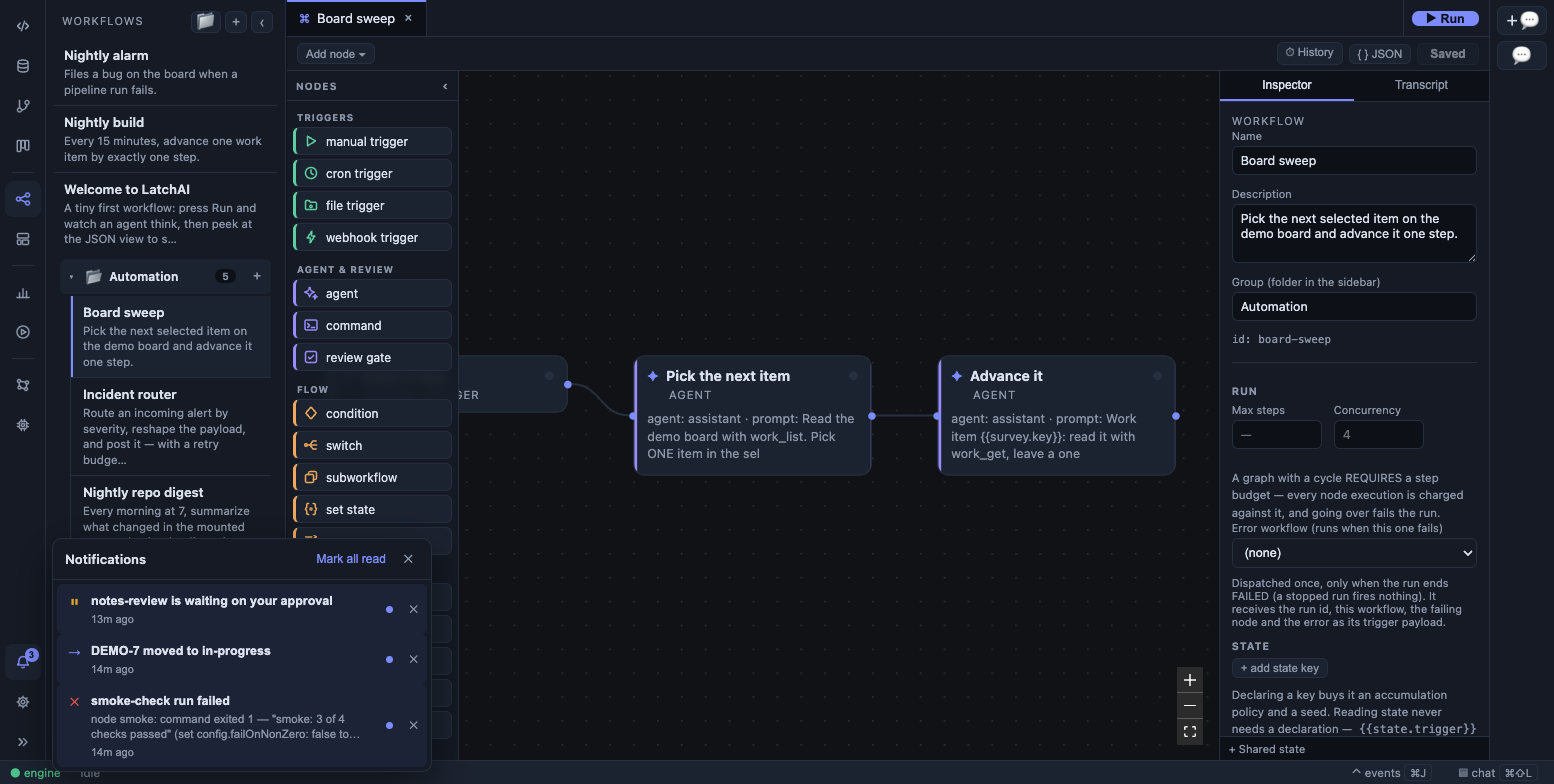
The inbox open from the bell: a failed run, a work item that changed lane, and a run waiting on your approval.
What lands in the inbox
Section titled “What lands in the inbox”Four things, and deliberately only four. The engine watches the same event stream everything else in LatchAI reads and mints a notification when one of these goes past:
| What happened | The row you get | Severity | Clicking it opens |
|---|---|---|---|
| A workflow run failed | build-pipeline run failed, with the tail of the error as the body |
error ✕ |
that run’s transcript in Usage |
| A work item changed lane | CS-7 moved to In review |
info → |
the item’s card in Projects |
| A run stopped at a review gate | release-notes is waiting on your approval |
warn ⏸ |
that run’s transcript in Usage |
| A chat is waiting on a tool permission | A chat is waiting on your approval, with <tool>: <arguments> as the body |
warn ⏸ |
that chat turn’s run in Usage |
Each row is a glyph, a title, an optional body, and how long ago it happened — the glyph as well as the colour, so the kind survives a grayscale screenshot.
Two of those need a word about when they don’t fire:
- Only lane moves. A work item whose title, assignee, description or
acceptance criteria an agent rewrote does not notify. The engine reads the same
sentence it appended to the item’s
## Activitylog and looks for astatus <old> → <new>segment; every other edit is ignored. Overnight automation touches items constantly, and a channel that fires on all of it is a channel you turn off. - One row per run. A failed run and a waiting gate are each deduped against the run they belong to, so a re-emitted event — or a resumed run that fails again — keeps to a single row. A burst of permission prompts inside one chat turn collapses the same way.
Error bodies are clipped to 500 characters, and the clip keeps the tail: a
thrown error’s actionable line is usually its last, not the framework frames
that lead up to it. A … at the front tells you it was cut.
What does not notify
Section titled “What does not notify”Nothing else on the event stream mints anything. In particular:
- a run that succeeded — the inbox is for things that need you, and “it worked” does not
- a node that retried and then succeeded, and a model call that rode out a 429
- a node that failed under
onError: "continue"or"branch", because the run handled it and carried on - a trigger that skipped a fire (see the Run Monitor)
- dashboard and atlas publishes, model downloads, chat replies, checkpoints
If you want a failure to reach you some other way, that is what a workflow’s
errorWorkflow is for: another graph, fired once when this one ends
run.failed, with the failed run, node and message as its trigger payload — free
to post to a webhook, open a work item, or anything else a workflow can do.
The bell and the badge
Section titled “The bell and the badge”The bell sits in the activity bar’s bottom cluster, just above Settings. The
badge is the unread count, shown as 9+ past nine, and it updates the moment a
notification is minted — the engine pushes the whole record down the same live
socket the canvas and the Run Monitor read, so
nothing polls.
Clicking the bell toggles the panel. It is a popover, not a sidebar view: it opens over whatever you were doing and a click anywhere else closes it.
Inside, Mark all read clears the badge without removing anything, and each
row’s ✕ dismisses that one for good. Both take effect immediately in the UI and
are persisted behind you.
The inbox is also seeded on connect, and again on every reconnect. A run that died before you opened the app — or while the daemon was restarting — is still in the list when you get there.
Where it lives
Section titled “Where it lives”<latchHome>/runs/notifications.json, beside the run logs and the pending-gate
file. It is a plain JSON array, newest first, capped at the 200 most recent
records — the inbox is a glance surface, not a log, so older items age out rather
than growing forever.
The file is rewritten atomically on every change, and every record is validated on the way back in: a hand-mangled row is skipped rather than poisoning the whole inbox.
Because it is a file in the home, the inbox survives a daemon restart, and every client that talks to that daemon reads the same one — the desktop and the phone share a single list, not two copies. Minting is broadcast live; reading and dismissing are not, so a second client already open catches up the next time it connects rather than instantly.
On the phone
Section titled “On the phone”The phone app has the inbox as one of its five tabs, against the same store and the same endpoints. It differs in three ways worth knowing:
- Grouped by day, with Today and Yesterday named. The question the app exists to answer is “did something die overnight?”, and an undifferentiated list of “3h ago / 9h ago / 2d ago” makes you do that arithmetic at 7am.
- Swipe to dismiss, with a 5-second undo. The row leaves the list
immediately and the request is held — undo simply cancels it, and nothing on
the Mac ever changed. Leaving the screen commits, so a held dismissal is never
silently lost. The
✕button goes through the same path. - A run failure opens to the full error tail, fetched from that run’s own log when you tap it, rather than the 500 characters the inbox row carried.
Approvals are pinned above the list in a “Needs you” section rather than hijacking the screen, and the app never switches tabs on its own.
Alerts that reach a closed app
Section titled “Alerts that reach a closed app”A notification can also light your lock screen, through web push. That is opt-in per phone — add LatchAI to the Home Screen, then Settings ▸ Notifications ▸ Turn alerts on — and the phone app page covers the setup.
What matters here is the policy, which lives on the Mac and is not
configurable: a notification wakes a phone if it is an approval, or if its
severity is warn or error. A work item changing lane is info and never buzzes.
The payload that crosses Apple’s or Google’s infrastructure is a title, a kind
(approval, failure or notice), a deep link, and the notification’s id —
never the body, never tool arguments, never a file path, never run output. A push
is rendered on a lock screen, and a lost phone shows whatever was sent, so the
interesting half stays one unlock away. An approval is held for ten minutes and
sent at high urgency; a failure is held for an hour at normal.
A subscription belongs to a device, not to the home, so un-pairing one phone takes its alerts with it and leaves everyone else’s alone.
A separate thing: the desktop permission alert
Section titled “A separate thing: the desktop permission alert”One OS-level notification is not part of the inbox. When a chat opens a new tool permission request and that chat is not the focused, visible tab, LatchAI raises a system notification — “LatchAI — permission needed”, naming the tool. Clicking it raises the app and jumps to that conversation.
It exists because a permission prompt on a background tab blocks a turn silently. The inbox row is minted too; this is the interrupt on top of it.
The API
Section titled “The API”The panel is a thin client over three endpoints, so anything can read or clear the inbox:
# newest-first list plus the badge's numbercurl http://127.0.0.1:7777/api/notifications# → {"notifications":[…],"unreadCount":3}
# mark one read, or every one (empty body)curl -X POST http://127.0.0.1:7777/api/notifications/read \  -H 'content-type: application/json' -d '{"id":"mfc10gao-4"}'curl -X POST http://127.0.0.1:7777/api/notifications/read
# remove one for good — 404 if it was already gonecurl -X POST http://127.0.0.1:7777/api/notifications/mfc10gao-4/dismiss
A record looks like this:
{ "id": "mfc10gao-4", "at": 1757390640000, "source": "run", "severity": "error", "title": "build-pipeline run failed", "body": "…Error: tests failed (3 of 412)", "link": { "kind": "run", "ref": "run-1757390512-7", "workflowId": "build-pipeline" }, "read": false}source is run, work or gate; severity is info, warn or error;
link.kind is run, gate or work-item, and link.ref is the run id or the
item key that clicking it resolves to.