Workflows
A workflow is a sequence of steps LatchAI runs for you — a trigger, then agents, shell
commands, HTTP calls, branches and human approvals wired together. It lives as a file:
graph JSON in <latchHome>/workflows/<id>.json. The canvas renders that document, the
executor runs it, the SDK compiles to it, and an agent can author it with tools. There is
no second representation and nothing is trapped in a database — you can grep your
automations, diff them, and commit them alongside the code they operate on.
The fastest way to make one: press + in the Workflows sidebar, drag an
agent node out of the canvas palette, connect it to the trigger
you were given, fill in its prompt, ⌘S to save, ⌘⏎ to run. Or describe what you want to
the seeded workflow-builder agent in chat and let it draft, validate and save the graph —
see Authoring with an agent. The rest of this page is what you
reach for once that first graph does something real.
The document
Section titled “The document”{ "formatVersion": 2, "id": "kebab-id", "name": "Human name", "description": "…", "group": "Folder", "disabled": false, "state": {}, "concurrency": 4, "maxSteps": 50, "errorWorkflow": "on-failure", "nodes": [ { "id": "trigger", "type": "manual_trigger", "position": { "x": 60, "y": 160 }, "config": {} } ], "edges": []}formatVersion, id, name, nodes (at least one) and edges are required;
everything else is optional. "formatVersion": 2 is required on every document — it
is the only workflow format there is. A file without it is refused everywhere: it shows in
the sidebar dimmed with an error badge, its triggers are not armed, a run attempt answers
400, and the save path refuses to write it.
A node has an id, a type, a canvas position (part of the document, so layouts survive
round-trips — and required in a file on disk), an optional label, an optional join, an
optional error policy, and a type-specific config. An edge is
{ "from", "to" } plus an optional when — a free label, 1–64 characters, that says which
branch out of the source node this edge is. The whole thing is validated with zod on save,
so duplicate node ids and edges naming nodes that don’t exist never reach the executor.
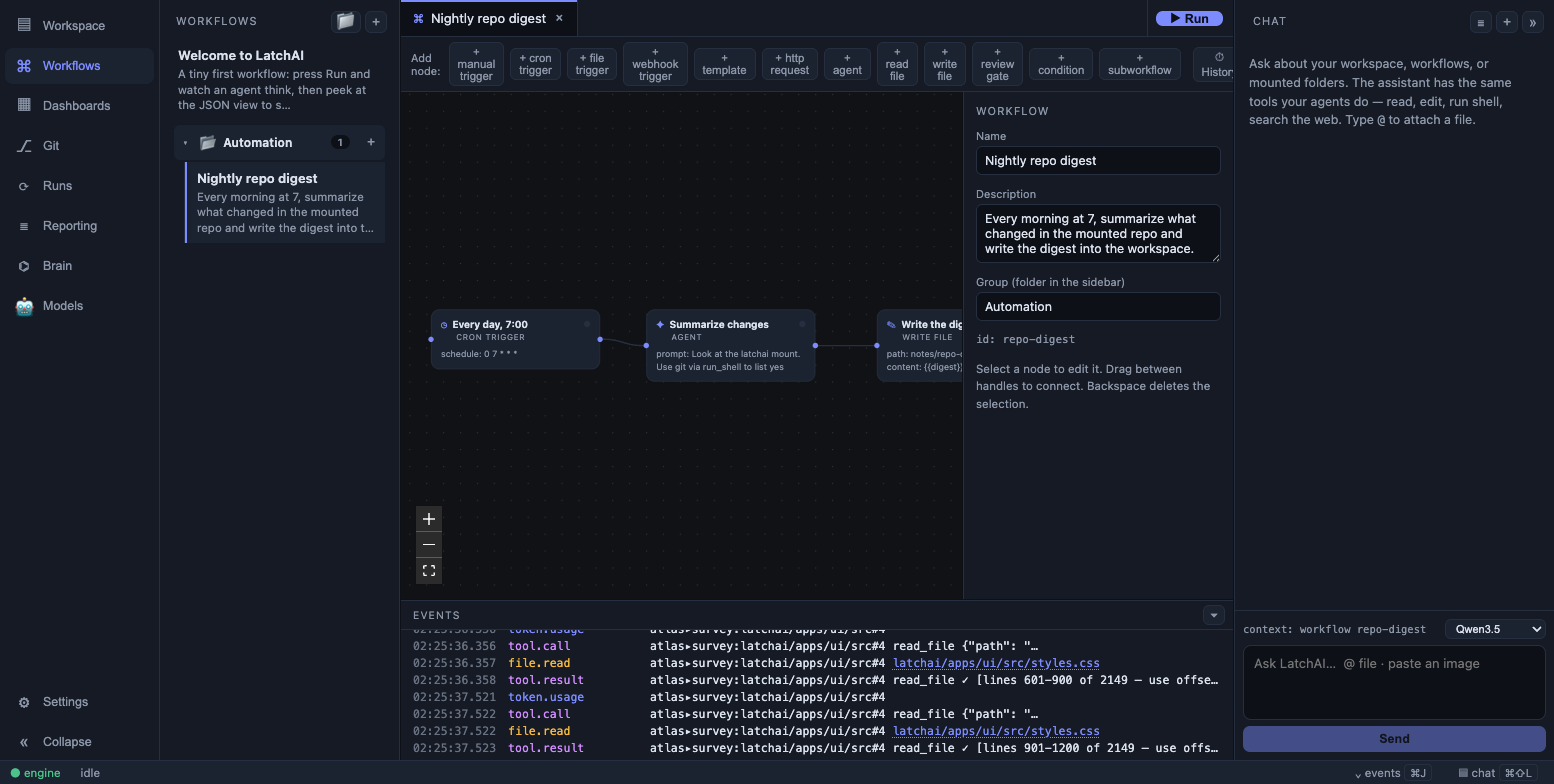
The canvas renders the same JSON the executor runs.
Here is a complete two-node workflow — a trimmed copy of the welcome.json a fresh home is
seeded with:
{ "id": "welcome", "name": "Welcome to LatchAI", "description": "A tiny first workflow: press Run and watch an agent think.", "formatVersion": 2, "nodes": [ { "id": "trigger", "type": "manual_trigger", "label": "Press ▶ Run", "position": { "x": 60, "y": 180 }, "config": {} }, { "id": "hello", "type": "agent", "label": "Say hello", "position": { "x": 340, "y": 180 }, "config": { "prompt": "Introduce yourself as LatchAI, a local-first AI automation workbench, in two friendly sentences." } } ], "edges": [{ "from": "trigger", "to": "hello" }]}Node types
Section titled “Node types”Seventeen types, in four groups — the same grouping the canvas’s node palette uses:
| Group | Type | What it does |
|---|---|---|
| Triggers | manual_trigger |
Entry point for a hand-started run; may declare a parameter form |
cron_trigger |
Entry point armed on a schedule | |
file_trigger |
Entry point armed on a watched workspace directory | |
webhook_trigger |
Entry point armed on a local HTTP endpoint | |
| Agent & review | agent |
A model turn — a bare completion, or a tool loop under an agent definition |
command |
A shell command with no model in it | |
review_gate |
Pauses the run for human approval | |
| Flow | condition |
Two-way branch on a predicate |
switch |
N-way branch on one value against ordered cases | |
subworkflow |
Runs another workflow as a step | |
set_state |
Writes to the run’s state document | |
map |
Runs a child workflow once per item of an array | |
| Data & web | template |
Fixed text with {{…}} fills |
http_request |
An outbound HTTP call | |
transform |
Reshapes data with a JSONata expression | |
read_file |
Permission-gated read | |
write_file |
Permission-gated write |
The trigger types are covered in Triggers; review_gate in
Checkpoints & review gates.
Config, node by node
Section titled “Config, node by node”| Type | Config | Output |
|---|---|---|
manual_trigger |
params? — rows of key, label?, required?, placeholder? |
With params, an object keyed by param; otherwise the payload string or triggered |
cron_trigger |
schedule — a cron expression; paused? |
The payload, or cron: <schedule> |
file_trigger |
path — a workspace-relative directory; paused? |
The changed file’s path |
webhook_trigger |
secret?; paused? |
The request body — parsed when the request says it’s JSON |
template |
text |
The interpolated text |
http_request |
url, method? (default GET), headers?, body? |
The response — parsed when the response is JSON, otherwise the text |
agent |
prompt, plus agent?, tools?, maxTurns?, provider?, outputSchema? and generation overrides |
The model’s answer — a checked object under outputSchema |
command |
command, plus cwd?, outputFile?, failOnNonZero? (default true), timeoutSeconds? |
An object: exitCode, ok, durationMs, stdout, and json when outputFile collected one |
read_file |
path |
The file’s contents |
write_file |
path, content |
wrote <path> (<n> bytes) |
review_gate |
— | approved, or approved: <note> |
condition |
input, op? (default truthy), value? |
"true" or "false" |
switch |
input, cases, plus mode? (default equals), ignoreCase? |
An object: matched, label, value, index |
subworkflow |
workflow (an id), input?, repeat? (1–50) |
The child run’s final output |
set_state |
entries — rows of key, value, parse? |
set N state key(s): … |
map |
items, workflow, concurrency? (1–8), collect? |
An array of child results, in item order |
transform |
expr, plus input?, bindings?, parse? (default true) |
The JSONata result as a JSON value |
Any node may also set "stateKey": "<key>" in its config to write its output into the
state document when it completes, and any node may carry the
error policy — retry, timeoutMs, onError — beside its config.
A few behaviours worth knowing before you rely on them:
http_request resolves {{secret:NAME}} references in the URL, headers and body at
the moment of the call — after node interpolation, so a secret value never lands in a node
output, the event log, or a model’s context. A non-2xx response fails the node naming the
host only; any secret value the server echoed back is redacted out of the response; and a
text body is clipped at 4,000 characters with a note. A JSON response becomes a real value,
so {{fetch.items.0.title}} reads straight into it. The call times out after 15 seconds —
but only when the node sets no timeoutMs of its own, which then bounds the attempt instead.
agent takes one of two completely different paths, decided by one test: is
config.tools or config.agent present? With either, it runs the full
tool loop — persona, filesystem roots, repo
instructions, skills, memory. With neither, it is one bare completion with no system
prompt at all — the right shape for “summarize this text”. config.provider picks a
model for the step; an agent definition’s own model:
wins where it is set, and its tools: frontmatter outranks the node’s allowlist entirely.
Node config may also carry temperature, topP, maxTokens, seed, effort, and
extraBody as hints — applied on the tool-loop path only, dropped silently by backends
that don’t support them.
command is the deterministic half of the same group. Reach for agent when something
has to be decided and for command when it has to be run — a test suite, a build, a
formatter. It shares the run_shell tool’s spawn path exactly (bash, a secret-scrubbed
environment, the workspace or a mount as its cwd, the same refusal of obviously
destructive commands, the same head+tail output cap), so drawing a box reaches nowhere an
agent could not. cwd and outputFile are root-relative — no leading /, no .. — and
are re-checked after templating.
{ "id": "cov", "type": "command", "config": { "command": "npm run test:coverage", "cwd": "repo", "outputFile": "repo/coverage/coverage-summary.json", "failOnNonZero": false } }outputFile is a demand for structure: the file is read after the command exits and
parsed as JSON into {{cov.json…}}, and on a clean exit a missing or non-JSON file fails
the node rather than handing prose downstream. The one relaxation is deliberate — with
failOnNonZero: false you have already said a failure is a normal outcome, so on a failed
command the file is best-effort and json is simply left undefined. That is the shape to
copy: run it, branch on {{cov.ok}}, read {{cov.json.total.lines.pct}} on the success
side. A stateKey on a command node that named an outputFile keeps just that JSON;
without one it keeps the whole object.
condition evaluates a small fixed operator set — truthy (the default), equals,
not_equals, contains, not_contains, matches (a regular expression; an invalid
pattern evaluates to false), is_empty, is_not_empty, gt, lt — with no eval
anywhere near it. Only the edge whose when matches is taken; an unlabeled edge out of a
condition is always taken.
switch is the n-way form, for when a chain of four conditions is really one routing
decision. config.input is templated and evaluated to a string, then compared against an
ordered list of cases — first match wins.
{ "id": "route", "type": "switch", "config": { "input": "{{triage.severity}}", "cases": [ { "value": "sev1", "label": "page" }, { "value": "sev2" }, { "value": "sev3" } ] } }modeisequals(the default),contains,startsWithorregex; inregexmode a case value is a JS RegExp source with no flags of its own, andignoreCaseis what supplies"i". A pattern that doesn’t compile is rejected at save time and fails the node at run time — a branch that can never be taken is a bug you have to see.- Case values are literal. Only
inputis interpolated; a{{ref}}written inside a case value is compared as those characters. - A case’s
labeldefaults to itsvalue, and the label is what an outgoing edge names. Labels must be unique, non-empty, at most 64 characters, and never"default"or"error"— both are reserved. - Edges out of the node above are labelled
when: "page",when: "sev2",when: "sev3"andwhen: "default".defaultis taken only when nothing matched — it is not a fallthrough that also fires on a match. An unlabeled edge out of a switch is always taken, which is how you say “and do this either way”. - Its output is an object, so
{{route.label}},{{route.matched}}and{{route.value}}read downstream.
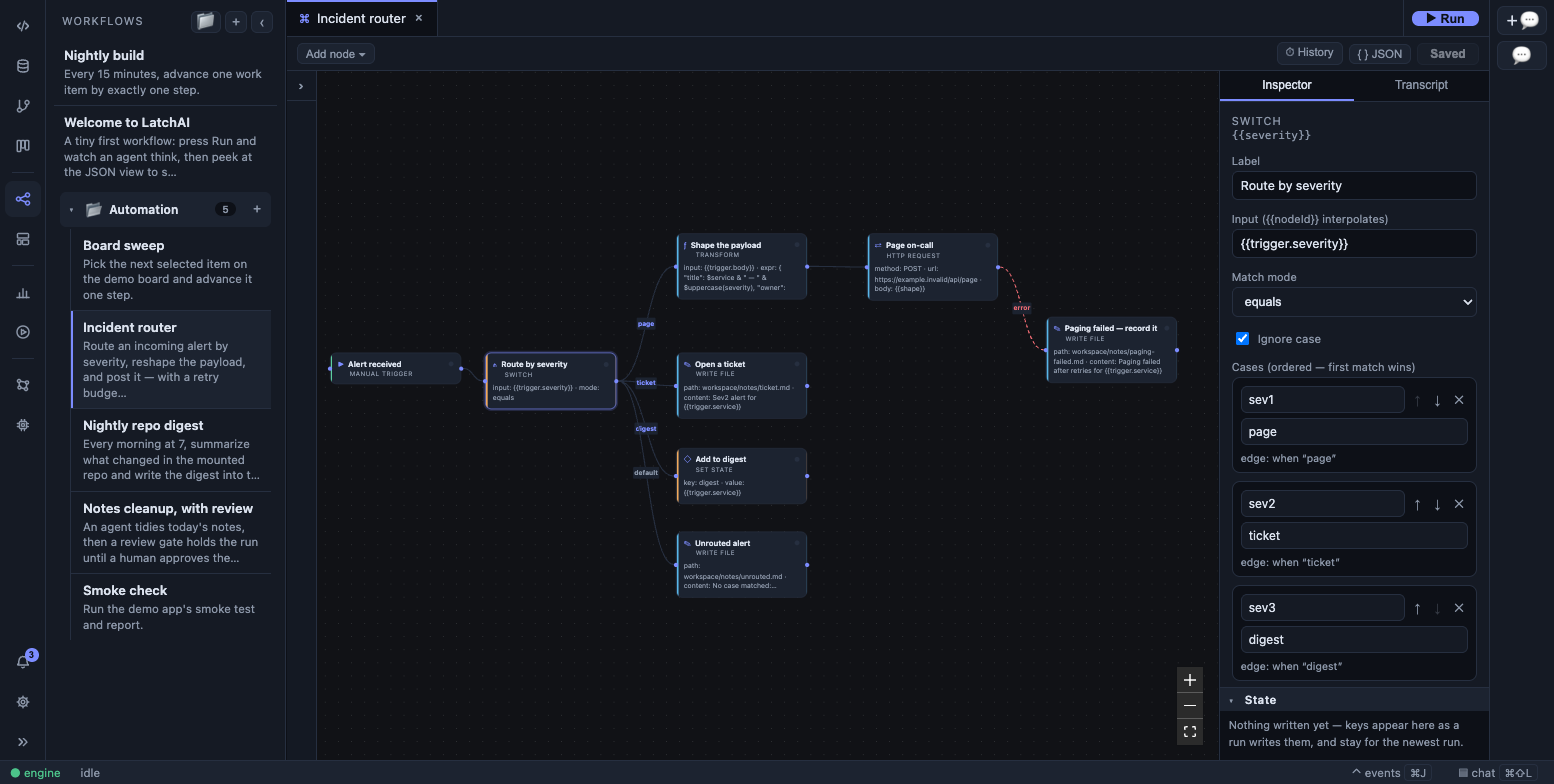
A switch node: ordered cases in the inspector, one labelled edge per case on the canvas.
transform reshapes data with a JSONata expression and no model
in the loop. Reach for it instead of an agent whenever the change to the data is a rule
rather than a judgement — picking fields, renaming them, filtering a list, adding up a
column.
{ "id": "open-issues", "type": "transform", "config": { "input": "{{fetch}}", "bindings": { "since": "{{state.cutoff}}" }, "expr": "issues[state='open' and updated > $since].{ 'key': key, 'title': title }" } }input is templated and becomes the expression’s $ (omitted, it runs against {}); each
bindings value is templated and readable as $name, and a binding name must be a plain
identifier. expr itself is not templated — it is a program, so upstream values reach
it through input and bindings rather than by being pasted into its source. parse
defaults to true, so a resolved value whose text starts with { or [ arrives as a real
object; set it false to keep everything as strings. The output is the result as a JSON
value (an undefined result becomes null), so {{open-issues.0.key}} reads into it.
Evaluation is timeboxed at 5 seconds and depth-100, and validate_workflow compiles the
expression, so a syntax error never reaches an overnight cron.
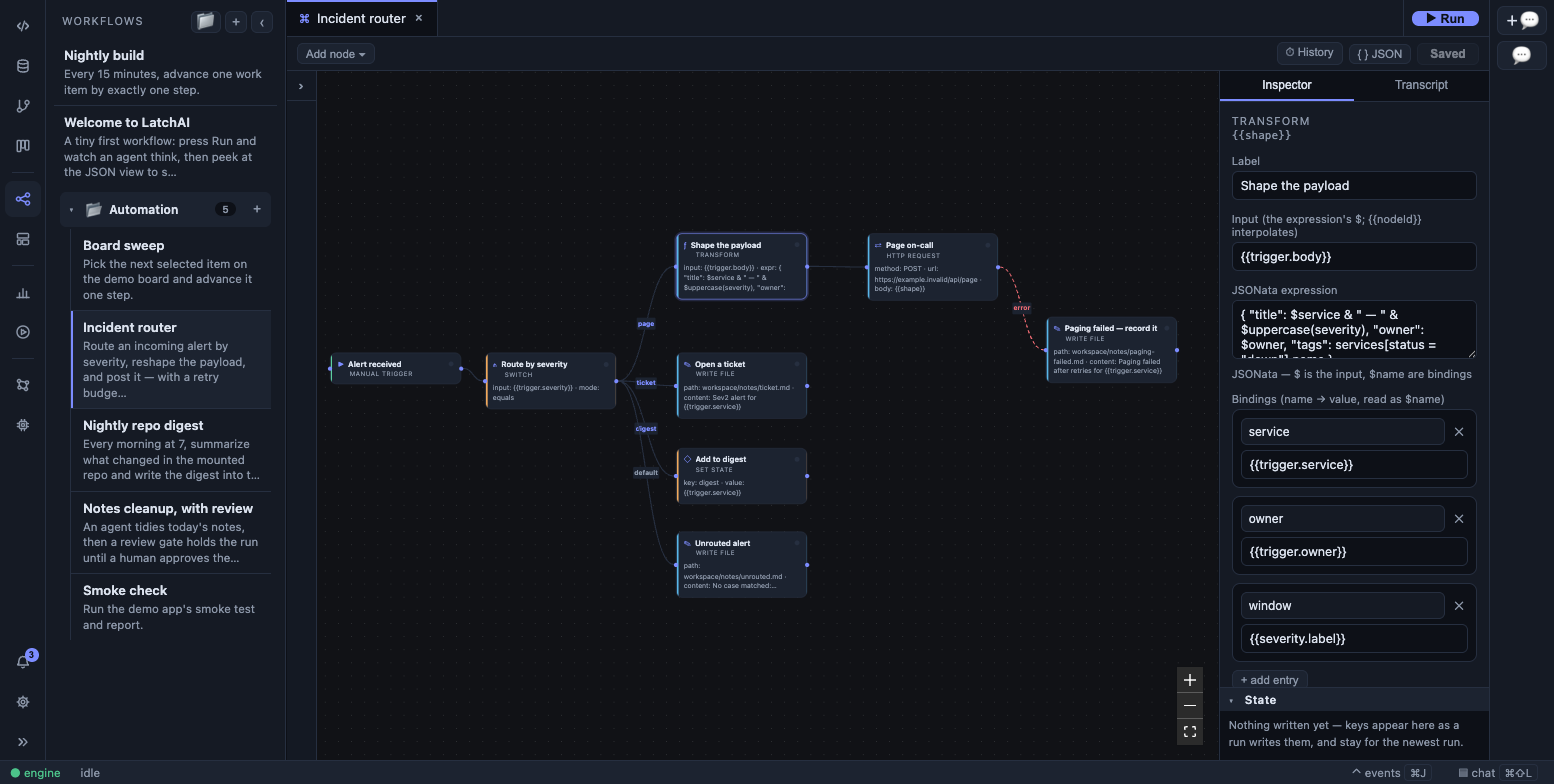
A transform node: the JSONata expression and its named bindings.
subworkflow runs another workflow by id, streaming the child’s events under the
child’s own run id. A workflow cannot reference itself, nesting is capped at depth 5, and a
failed or stopped child fails the parent node. Reach for map instead when you have an
array to fan out over.
Passing data between nodes
Section titled “Passing data between nodes”A node’s output is its result, and {{nodeId}} is how a downstream node reads it. When the
output is structured — a parsed HTTP body, a webhook payload, a manual trigger’s parameter
object, an outputSchema reply, a command’s object, a switch’s object, a transform’s
value, a map’s array — reach into it with dots:
{{fetch.items.0.title}} the first item's title{{review.verdict}} a field of a schema-checked agent reply{{cov.json.total.lines.pct}} into a command's collected JSON{{route.label}} which switch case matched{{trigger.version}} a manual_trigger parameter{{fanout.2}} the third child's resultTemplating happens only in the fields the executor fills:
| Node | Templated config |
|---|---|
template |
text |
http_request |
url, body, every value in headers |
agent |
prompt |
command |
command, cwd, outputFile |
read_file |
path |
write_file |
path, content |
condition |
input, value |
switch |
input (case values are literal) |
transform |
input, every value in bindings (never expr) |
subworkflow |
input |
map |
items |
set_state |
each entry’s value (never its key) |
A {{ref}} anywhere else is literal text and stays that way — including inside an
outputSchema, in a stateKey, in condition.op, in http_request.method and in a
file_trigger path. validate_workflow still checks refs in every config string, so one
written where nothing fills it can reject the graph and then do nothing useful.
References are strict. {{nope}} fails the node rather than surviving as text. A
reference to a node that was skipped (the other side of a branch, or a trigger that
didn’t fire) resolves to "". A non-string value is JSON-stringified when it lands in a
template. Secrets are the exception to all of it: {{secret:NAME}} never matches the
reference syntax and is resolved later, at the point of use.
On the canvas, typing {{ in any templated field opens an autocomplete listing exactly
what’s legal from there: upstream node ids (nearest first), an upstream agent’s
outputSchema fields as node.field, a command’s ok / exitCode / stdout / json,
a switch’s matched / label / value / index, the trigger’s parameters, and every
state key with its merge policy. A field the executor never interpolates gets no
autocomplete at all, which is the point.
The state document
Section titled “The state document”Every run has one. Output flows down the arrows to the next step; state is the whiteboard for loops, fan-outs, and parallel branches — and most workflows never need it. Declare keys on the workflow, and how each absorbs a write:
"state": { "findings": { "merge": "append", "initial": [] }, "attempts": { "merge": "sum", "initial": 0 }, "profile": { "merge": "merge" }, "summary": { "merge": "last" }}Four merge policies, and only these four:
| Policy | A write… |
|---|---|
last |
replaces the value. The default for any key you never declared |
append |
pushes onto an array; an unset key seeds []. A non-array current value is an error, not a silent wrap |
merge |
shallow-spreads an object over the current object |
sum |
adds a number; an unset key starts at 0 |
Read with {{state.<key>}} (dot-paths work: {{state.profile.name}}), or {{state}} for
the whole document. {{state.trigger}} is always present — the structured payload of
whichever trigger fired.
Write with a set_state node, whose entries apply in order through each key’s policy
("parse": true JSON-parses the filled value so the key holds a real object rather than
its text), or set stateKey on any node to write its output as it completes. An agent step
can also write mid-task through the state_set / state_get tools when they are in its
allowlist; those go through the same declared policies.
A key that anything reads must be declared — validate_workflow rejects a {{state.x}}
with no declaration — while a key that is only written may stay undeclared and merges as
last. Keys are top-level: dots are for reading, never for writing, and a stateKey
containing a dot fails the node.
Every write is a state.updated event, and the canvas has a live state panel that
folds them into the current document as a run progresses, each row showing its merge policy
and flashing on a write.
Branches and joins
Section titled “Branches and joins”A node with several inbound edges waits until all of them resolve — taken or skipped —
then runs if at least one was taken, and is skipped otherwise. That is what makes “do both
branches, then merge” work without a special node. "join": "any" on the node fires it on
the first taken edge instead, once.
The case to watch: a joining node whose inbound edges come from opposite sides of a
condition always sees one of them skipped, and that {{ref}} fills in as "".
Validation warns about exactly this, and names the pair.
An edge may point backwards. Taking a back edge re-arms its target, which runs again; a
condition on the other branch is the exit. A cyclic graph must declare maxSteps —
validation rejects one without it, and the executor refuses to start it. Every node
execution is charged against the budget (a re-run counts again), and exceeding it fails the
run with exceeded maxSteps <n>. Budget it as roughly laps × nodes.
{ "formatVersion": 2, "id": "refine-loop", "name": "Refine until good", "maxSteps": 30, "state": { "attempts": { "merge": "sum", "initial": 0 } }, "nodes": [ { "id": "t", "type": "manual_trigger", "position": { "x": 60, "y": 160 }, "config": {} }, { "id": "draft", "type": "agent", "position": { "x": 320, "y": 160 }, "config": { "prompt": "Draft it. Attempt {{state.attempts}}." } }, { "id": "count", "type": "set_state", "position": { "x": 580, "y": 160 }, "config": { "entries": [{ "key": "attempts", "value": "1" }] } }, { "id": "check", "type": "agent", "position": { "x": 840, "y": 160 }, "config": { "prompt": "Good enough?\n\n{{draft}}", "outputSchema": { "type": "object", "required": ["ok"], "properties": { "ok": { "type": "boolean" } } } } }, { "id": "branch", "type": "condition", "position": { "x": 1100, "y": 160 }, "config": { "input": "{{check.ok}}", "op": "equals", "value": "true" } }, { "id": "save", "type": "write_file", "position": { "x": 1360, "y": 160 }, "config": { "path": "out/final.md", "content": "{{draft}}" } } ], "edges": [ { "from": "t", "to": "draft" }, { "from": "draft", "to": "count" }, { "from": "count", "to": "check" }, { "from": "check", "to": "branch" }, { "from": "branch", "to": "save", "when": "true" }, { "from": "branch", "to": "draft", "when": "false" } ]}The canvas counts laps: a node running for the fourth time wears a ×4 badge, which is the
whole story of a retry loop at a glance. A back edge is exempt from the join rule — it does
not gate readiness, or a loop head with an all join would deadlock waiting for a lap that
hasn’t happened yet.
Fan-out with map
Section titled “Fan-out with map”{ "id": "fanout", "type": "map", "config": { "items": "{{fetch.issues}}", "workflow": "triage-one", "concurrency": 4, "collect": "triaged" } }items must resolve to a JSON array; workflow is another saved workflow, never this one.
Each child runs with its own run id and its own state document — the item is its trigger
payload, so the child reads it as {{state.trigger.field}}. concurrency is 1–8 (default
4, and clamped rather than rejected). The node’s output is the array of child results in
item order; collect, which must name a state key declared append, accumulates
results in completion order as children finish. An empty array yields []; a failed
child fails the node after the others settle.
Structured outputs
Section titled “Structured outputs”The prompt carries the task. The schema carries the shape. Give an agent node an
outputSchema and the engine renders it into a reply template, appends that to the prompt
itself on the first turn, extracts the JSON from the reply, checks it, and makes the parsed
object the node’s output — so {{review.verdict}} works and a condition can branch on
it.
{ "id": "review", "type": "agent", "config": { "prompt": "Is this ready to ship?\n\n{{draft}}", "outputSchema": { "type": "object", "required": ["verdict"], "properties": { "verdict": { "type": "string", "description": "ship = merge it | hold = needs work" }, "reasons": { "type": "array", "items": { "type": "string" }, "description": "one line each" } } } } }The model is sent the prompt, a blank line, and then:
Reply with ONLY a JSON object, no prose and no code fence: {"verdict": "<string — ship = merge it | hold = needs work>", "reasons": ["<string>", … — one line each]}That one line is everything the model is told about the shape, which is why per-field
wording goes in description. The checker enforces type, required, properties,
and items and ignores the rest — enum, pattern, minimum, oneOf, formats — so
allowed values belong in the description too (x = meaning | y = meaning). Keep — and
{{refs}} out of a description: the renderer already uses that dash as its separator, and
nothing interpolates a schema. The root must be an object with properties; one nested
level is drawn in the template, deeper levels collapse to {…} but are still checked. A
reply that doesn’t fit gets one repair turn, rebuilt from the bare prompt plus the failure
and the whole schema; after that the node fails. Validation warns if a prompt under an
outputSchema still spells the template out by hand.
The inspector has a field builder for the schema, with a live preview of the rendered line and a button to copy it.
Parallelism
Section titled “Parallelism”"concurrency": 1..16 (default 4) is how many ready nodes run at once; dispatch order is
deterministic, and at concurrency: 1 a run replays the topological order exactly. Two
consequences to design around: a review_gate blocks only its own branch, and a run’s
“final output” is whichever branch happened to finish last — when a run has an answer,
accumulate it in state and read it from there.
When a step fails
Section titled “When a step fails”Three optional keys sit on every node, beside config rather than inside it — next to
position and join:
{ "id": "call", "type": "http_request", "position": { "x": 320, "y": 160 }, "retry": { "max": 3, "delayMs": 2000, "backoff": "exponential" }, "timeoutMs": 30000, "onError": "continue", "config": { "url": "https://api.example.com/status" }}retry—max(1–10) extra attempts, so the node runs at most1 + maxtimes.delayMs(0–600000, default 1000) is the wait before the first retry;backoffisexponential(the default —delayMs × 2^(attempt-1), capped at 60 s) orfixed. Each scheduled retry emits anode.retryevent before the wait, and the node card showsretry 2/3instead of an unexplained pause.timeoutMs(1000–3600000) bounds one attempt by wall clock. Withretryset the node may therefore spend up to1 + maxtimeouts plus the waits between them. Node types with a timeout of their own keep it as the fallback:http_requestuses its 15 s default only when this is unset, and acommandnode’sconfig.timeoutSecondsstill kills the process — this bounds the attempt on top of it.onError— what happens once every attempt has failed:fail(the default) — the node fails and the run fails with it;continue— the failure is handled: the node’s output becomes{ "ok": false, "error": "…", "attempts": n }, the run carries on, and it can still endrun.completed. AstateKeyon the node writes that same object, so state readers seeok: false. The edges resolve as if the node ran — and since no branch label can match an error object, only its unlabeled edges are taken;branch— the same output, plus an edge rule.
A deliberate stop outranks all of it. A run the user stopped never retries and never
continues; it ends run.stopped.
Error edges
Section titled “Error edges”An edge out of any node may be labelled when: "error". It is taken only when that node
failed with onError: "branch" — never on success — and a node that failed that way takes
its error edges and skips every other edge out of it. That is what makes branch a
redirect rather than an extra fan-out. Validation rejects when: "error" on a node whose
onError is not branch, and rejects any other label the source node cannot produce.
{ "formatVersion": 2, "id": "status-check", "name": "Status check", "errorWorkflow": "on-failure", "nodes": [ { "id": "t", "type": "manual_trigger", "position": { "x": 60, "y": 160 }, "config": {} }, { "id": "call", "type": "http_request", "position": { "x": 320, "y": 160 }, "retry": { "max": 3, "delayMs": 2000 }, "timeoutMs": 30000, "onError": "branch", "config": { "url": "https://api.example.com/status" } }, { "id": "use", "type": "template", "position": { "x": 600, "y": 80 }, "config": { "text": "up: {{call}}" } }, { "id": "alert", "type": "template", "position": { "x": 600, "y": 260 }, "config": { "text": "the API is down after {{call.attempts}} attempts: {{call.error}}" } } ], "edges": [ { "from": "t", "to": "call" }, { "from": "call", "to": "use" }, { "from": "call", "to": "alert", "when": "error" } ]}On the canvas an error edge is drawn dashed, in the failure colour, so the path a failure takes reads as one without hovering it.
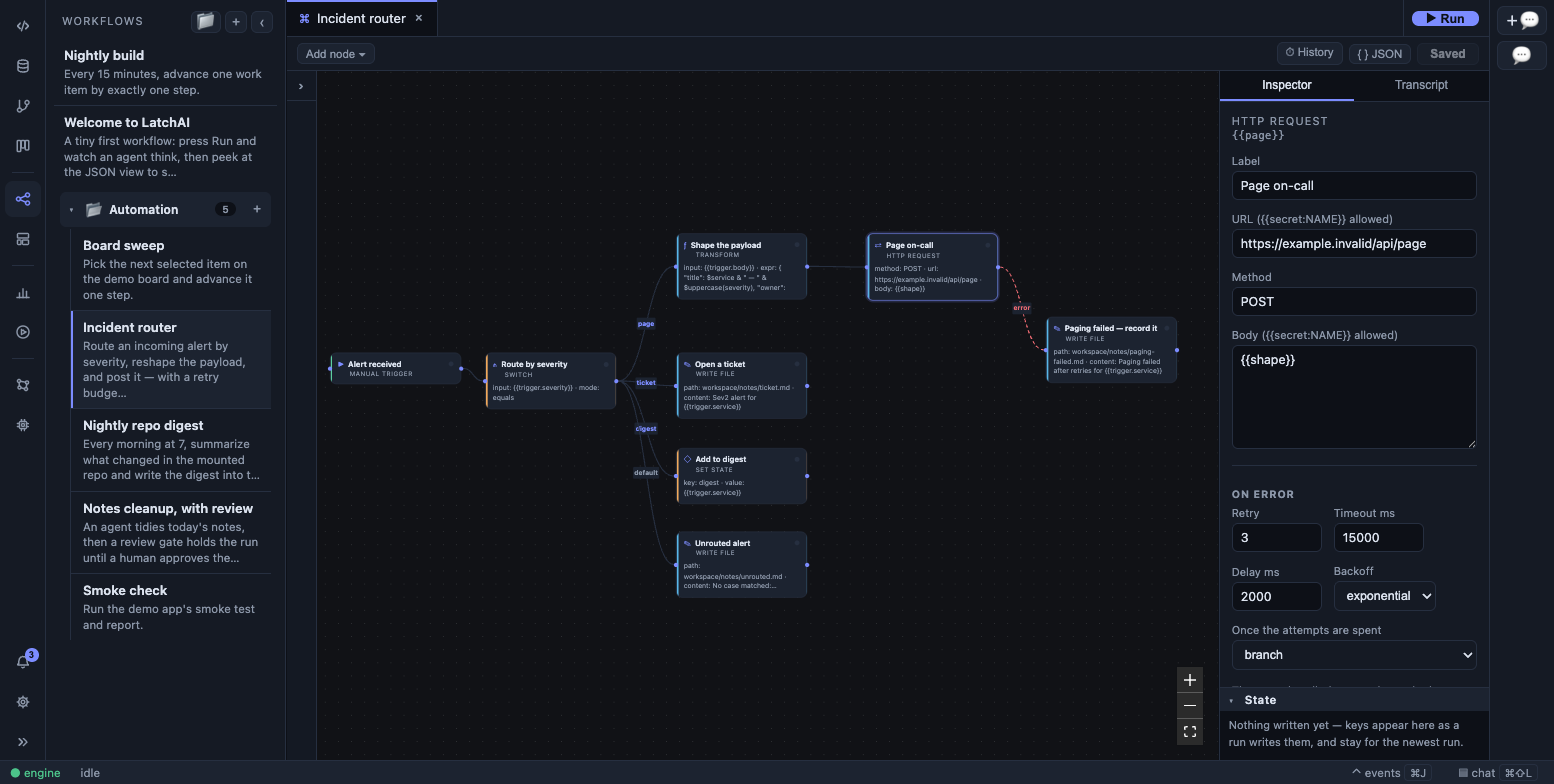
A node with retry, timeout, and on-error set in the inspector, and its dashed error edge running to a handler node.
The error workflow
Section titled “The error workflow”The document may name another workflow to run when this one ends run.failed — the
alarm bell for a pipeline that dies at 3am. That is the top-level errorWorkflow key, set
to the id of the handler graph ("errorWorkflow": "on-failure" in the sample above).
It fires once, through the trigger service (so it obeys the same one-run-per-workflow
guard), with the payload
{ runId, workflowId, workflowName, nodeId?, error, at, fromErrorWorkflow: true } as its
trigger output — so the handler reads {{trigger.error}}, {{trigger.workflowName}} and
{{trigger.nodeId}}. A run.stopped rings nothing; a map or subworkflow child rings
nothing (the parent fails with it, and one failure is told about once); and a run started
by an error workflow never rings another, which is the loop brake. The target must exist and
must not be this workflow — both are checked at save time — and a target deleted since is
logged and skipped rather than failing the failure.
Separately, and below all of this, transient model calls are retried at the transport
seam: a 429, a 5xx or a dropped socket gets up to three attempts with a fixed ~5 s pause
(honouring Retry-After, capped), announced as a model.retry event and never
double-counted in usage. A stopped run fails fast instead.
Durable runs
Section titled “Durable runs”A run can be stopped (⏹ on its row in the Runs sidebar, or POST /api/runs/<id>/stop):
in-flight nodes settle and log, and the run ends with run.stopped. A stop is final.
A run the engine died under is interrupted: on boot, the engine sweeps runs/ for logs
with a start and no end, marks each run.interrupted, and the Runs sidebar offers ▶▶
Resume. A resume replays the log — restoring every node whose output was recorded, the
state document write by write, the step budget, and which trigger fired — and re-runs only
what was in flight. It appends to the same run id, under the same log, with
source: "resume". If the workflow file changed in a way that matters (nodes, edges,
config, state, budgets — not positions or labels) the resume is refused rather than run
against a different graph.
The corollary for authors: a resume re-runs every node it couldn’t restore, so prefer
“write this file” over “append to this file”, and put anything irreversible behind a
review_gate.
Authoring on the canvas
Section titled “Authoring on the canvas”The canvas is fully editable. A node palette is docked on its left edge, grouped by
category — drag a card onto the canvas to create the node where you dropped it, or click it
to place it in the middle of the view. (The toolbar’s Add node ▾ picker is the
keyboard-first half of the same catalog: open, type three letters, Enter.) Drag between
handles to connect, Backspace deletes the selection after a confirmation, and dragging a
node persists its position.
Clicking an edge opens a small menu of the guards its source node can actually produce —
true / false out of a condition, each case label plus default out of a switch, error
out of a node that branches on failure — with (always) at the top and a free-text box
beside it, since when is an open string.
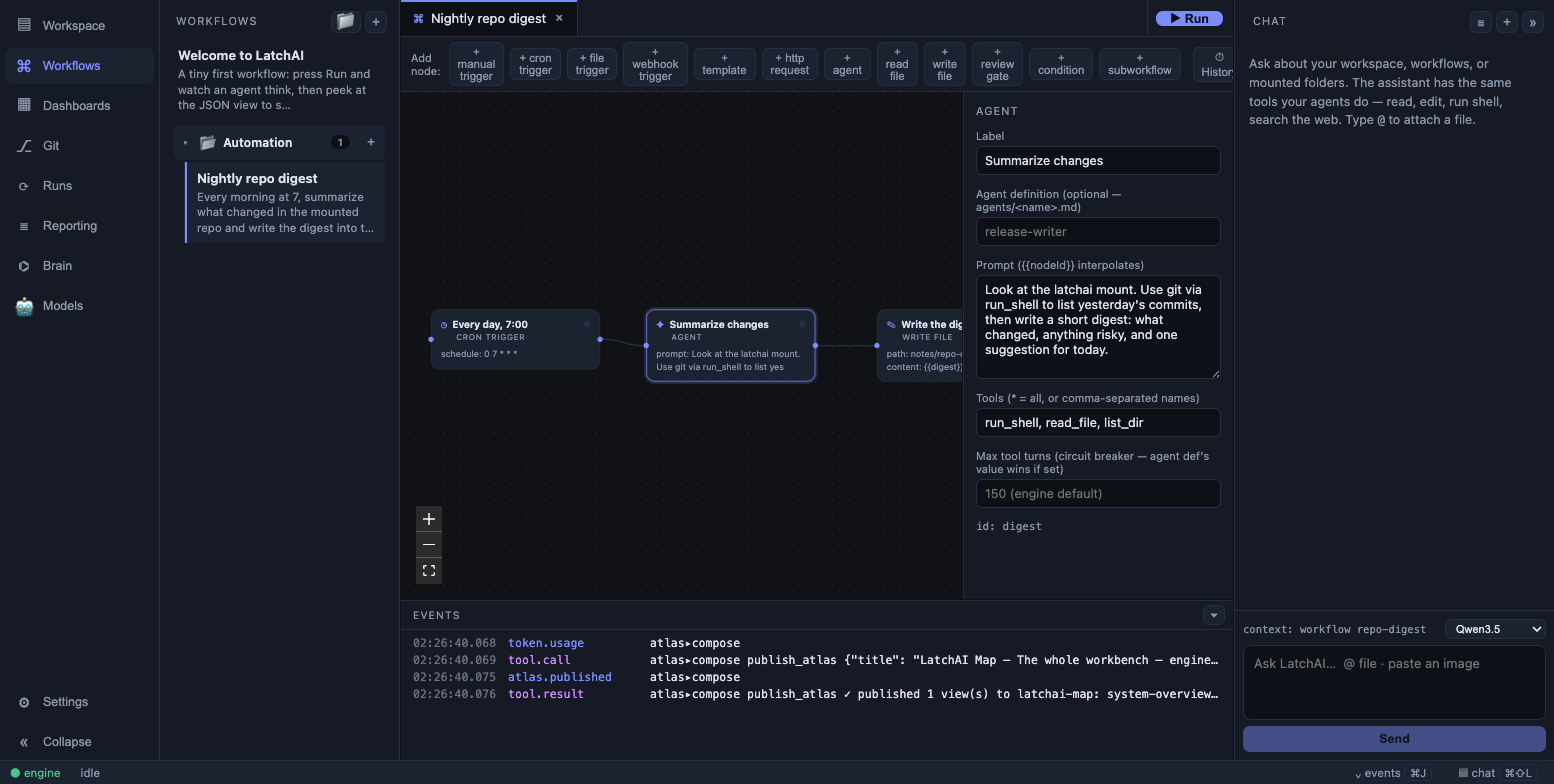
Selecting a node opens a form built from that node type’s config.
The inspector is built from a per-type field list, so it stays honest about what each node
actually reads: a cron_trigger gets a schedule builder with presets and a preview of the
next three fires, a manual_trigger gets a row editor for run parameters, a condition
gets the operator dropdown, a switch gets reorderable case rows, a transform gets a
monospace expression box and name/value binding rows, a set_state gets its entry rows, a
map gets a child-workflow box completing over the workflows on this machine (and tells you
when collect names a key that isn’t declared append), an agent gets the “runs as”
picker, the tool picker,
the output-schema builder and a generation section, and a command spells out the refs it
produces. Below the node’s own config, every node gets the On error section — retry,
timeout, and what happens once the attempts are spent — and a pausable trigger gets its
paused checkbox at the bottom. With nothing selected, the inspector edits the workflow
itself: name, description, folder, state keys, concurrency and maxSteps.
Drafts track dirty state per tab, ⌘S saves, and ⌘⏎ runs (saving first if dirty, since
the engine runs the file on disk). Discard throws a draft away and reloads the saved
file, and ⏱ History browses previous saved versions.
Workflows file into folders — the document’s group. Rows drag between folders in the
sidebar, and that drop edits only that one key in the raw JSON, so even a rejected v1 file
can be filed away.
Authoring as JSON
Section titled “Authoring as JSON”A workflow tab toggles between Canvas and JSON. Both views project the same draft, so an
edit in the JSON appears on the canvas and vice versa; invalid JSON surfaces the parse
error and simply doesn’t commit. With Vim mode on in the editor, :w runs the same save
handler as ⌘S.
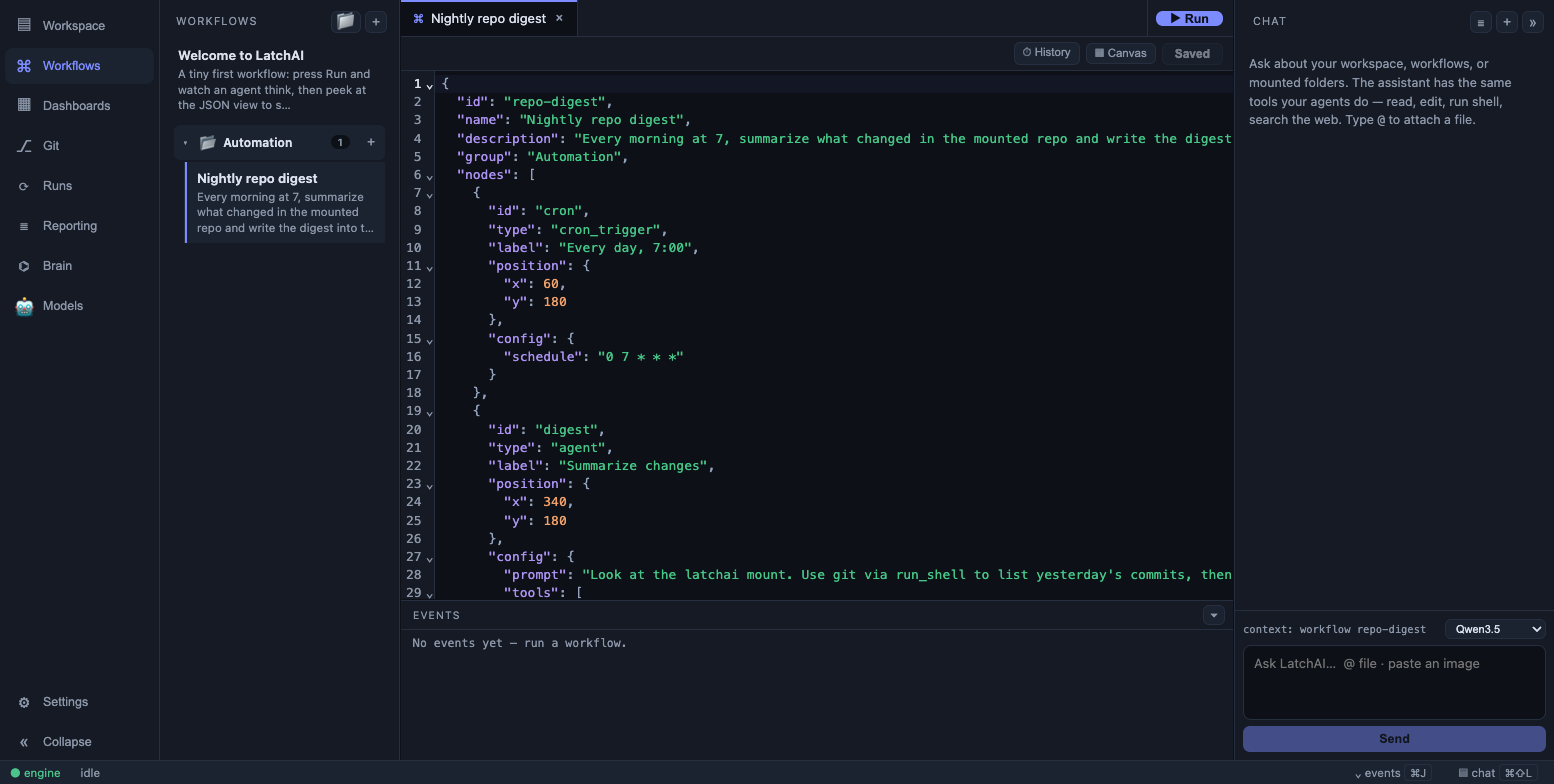
Canvas and JSON are two views of one draft.
The JSON view is also the only place some config is reachable: a webhook_trigger’s
config.secret has no inspector field.
Authoring with an agent
Section titled “Authoring with an agent”Four built-in tools let an agent build workflows: list_node_types (the catalog and each
type’s config), get_workflow, validate_workflow, and save_workflow. Workflow files are
fenced off from the ordinary file tools, so these are the only way in. A fresh home seeds a
workflow-builder agent that knows the drill — ask it for a workflow in chat and it drafts,
validates, and saves one.
save_workflow writes the whole document, so an edit is a read-modify-write: a key left
out is a key deleted.
validate_workflow answers in two channels. Errors block the save — a {{ref}} naming
no node (with a did-you-mean), a read of an undeclared state key, a cycle with no
maxSteps, a missing required config key, an edge label the source node cannot produce, an
unknown map or subworkflow target, an errorWorkflow that doesn’t exist, a switch regex
or JSONata expression that doesn’t compile. Warnings don’t: a reference across a
condition that will fill in as "", a map.concurrency the engine clamps, a maxSteps too
small for one lap, a prompt that hand-writes the reply template, a second webhook_trigger
the bare /hooks/<id> URL can’t reach, a second manual_trigger ▶ Run will never fire, a
{{ref}} naming one trigger in a graph that has several. A workflow an agent saves with
triggers is written disabled: true until a person enables it.
Authoring in code
Section titled “Authoring in code”The SDK’s defineWorkflow() builder emits the same format — always formatVersion: 2 — so
a code-authored workflow is an ordinary citizen on the canvas. The direction is one-way by
design: code compiles to graph JSON; there is no round-trip sync to keep honest.
import { defineWorkflow } from "@latchai/sdk";
const wf = defineWorkflow("release-notes", "Release Notes (code-first)", (w) => {  w.manualTrigger();  const changes = w.readFile("changes", "input/changes.txt");  const notes = w.agent(    "draft",    `Turn this raw change list into friendly release notes with a headline:\n\n${changes}`  );  w.writeFile("publish", "out/release-notes.md", `# Release Notes\n\n${notes}\n`);});
Each builder call returns a step handle whose toString() is {{stepId}} — which is why
dropping ${changes} into a template literal emits exactly the right interpolation token —
and step.at("verdict") emits {{stepId.verdict}}. Steps chain to the previous one by
default; pass a handle as the trailing after argument to fork, or null to detach (which
is what a labelled branch needs, since an unlabeled edge is always taken).
The builder covers the palette: manualTrigger / cronTrigger / fileTrigger /
webhookTrigger, agent and namedAgent, command, fetch (an http_request),
template, readFile / writeFile, transform, condition, switch, subworkflow,
reviewGate, setState, map, plus state({…}), join(step, "any") and
connect(from, to, "false") for a labelled or backwards edge. Every step method also takes
the error policy — { retry, timeoutMs, onError } — in its options object, and
defineWorkflow’s fourth argument carries description, concurrency, maxSteps and
errorWorkflow. Write the returned object to <latchHome>/workflows/<id>.json and it opens
on the canvas, laid out left to right.
Running
Section titled “Running”- From the canvas —
⌘⏎. - Headless —
npm run run <path-to-workflow.json>, with trailing arguments joined into the run payload. - Over HTTP —
POST /api/runs/<workflow-id>, optionally with a{"payload": "…"}body (a JSON object works too, which is what the keyed-parameter run form sends). It answers 202 when the run was dispatched, 409 when that workflow is already running, 400 with the engine’s own sentence when the file on disk is rejected, and 404 for an unknown id. - By trigger — see Triggers.
A manual start fires the manual_trigger if the graph has one, else the first trigger in
document order. When a manual_trigger declares config.params, the UI asks for them
before the run and the trigger’s output is an object keyed by param — {{trigger.version}}
— with blank optional answers omitted, so mark a param required when something downstream
reads it.
Manual runs go through the same one-run-per-workflow guard that triggers use, so a click can’t overlap a cron fire — the second start is simply refused as busy.
Runs are an event stream
Section titled “Runs are an event stream”The executor is event-sourced. Execution emits an ordered stream — run.started,
node.started / node.delta / node.completed / node.retry / node.failed /
node.skipped, state.updated, file.written / file.read / file.edited,
tool.call / tool.result, shell.exec, web.fetch, db.query, browser.action,
plan.update, model.retry, token.usage, permission.requested / permission.resolved
/ permission.denied, gate.waiting / gate.resolved, checkpoint.created,
work.updated, and finally run.completed, run.failed, run.stopped, or
run.interrupted — and every surface that shows you a run is a consumer of it. The live
canvas animation, the Run Monitor, the append-only JSONL log
in <latchHome>/runs/, the Usage page, and the
brain all read the same events.
Two events carry no run id, so they reach the live stream but never land in a run’s log:
trigger.skipped (a fire that produced no run — the workflow was already running, or its
document was refused) and workflows.changed (the workflows/ directory changed on disk).
One consequence worth internalising: a failed run still resolves. The failure is a
run.failed event in the stream, not an exception thrown at whoever started it — which is
exactly why a subworkflow node checks the child’s status rather than just reading its
output.
Disabling a workflow
Section titled “Disabling a workflow”A workflow may set disabled: true. Its cron, file, and webhook triggers are not armed —
so it cannot fire overnight — while manual runs still work. The sidebar has per-workflow
disable and delete controls, and a disabled row wears an off badge. To hold one trigger
instead of all of them, set "paused": true in that node’s config: pause one door,
disabled closes the building.