Overnight pipelines
Once triggers are armed and the daemon runs as a service, LatchAI can work while you sleep. The most demanding thing it is used for is an autonomous build pipeline: a team of agents that reads a backlog and ships tested code without a human in the loop.
This page describes the pattern — the graph, the failure policy, and the operational checklist that
makes it survive the night. A longer runbook of one such pipeline, with its agent roster and
troubleshooting, lives in docs/autonomous-build-pipeline.md in the LatchAI repository.
The shape of it
Section titled “The shape of it”Two workflows, not one. A planning workflow runs on demand and turns an idea into a plan, an architecture, and a set of stories. A build workflow runs on a short cron and advances exactly one story by one step per run: survey the board, pick the next story, implement it, test it, move it.
Each step is either an agent with its own persona and tool allowlist, or —
when the step is deterministic — a plain command node with no model in it at all. There is no special
“pipeline” primitive in LatchAI; the agents are ordinary agents/*.md files grouped in the sidebar.
The three rules that make it work are worth stating plainly, because they are what you copy, not the agent roster:
- One step per run. A run picks up whatever the board says is next and advances it by exactly one state. Runs are short, failures are cheap, and progress is durable.
- State lives outside the process. See below.
- Every step has a bar it must clear. The tests are run by a
commandnode, not asserted by an agent. An agent that can only claim success will.
A minimal version you can copy
Section titled “A minimal version you can copy”A cron, a surveyor that reads the board, a worker, a real test run, and two ways out. Everything else in a bigger pipeline is more agents on this same skeleton.
{ "formatVersion": 2, "id": "nightly-build", "name": "Nightly build", "description": "Every 15 minutes, advance one work item by exactly one step.", "errorWorkflow": "nightly-alarm", "nodes": [ { "id": "wake", "type": "cron_trigger", "position": { "x": 40, "y": 220 }, "config": { "schedule": "*/15 * * * *" } }, { "id": "survey", "type": "agent", "label": "Pick the next item", "position": { "x": 280, "y": 220 }, "retry": { "max": 2, "delayMs": 5000 }, "config": { "tools": ["work_list", "work_get"], "prompt": "Survey the board with work_list. Choose exactly ONE item to advance, preferring to finish something already in progress over starting anything new.", "outputSchema": { "type": "object", "required": ["verdict", "key"], "properties": { "verdict": { "type": "string", "description": "work = advance an item | none = nothing is ready" }, "key": { "type": "string", "description": "the item key to advance; empty when the verdict is none" } } } } }, { "id": "gate", "type": "condition", "position": { "x": 520, "y": 220 }, "config": { "input": "{{survey.verdict}}", "op": "equals", "value": "work" } }, { "id": "build", "type": "agent", "label": "Advance it", "position": { "x": 760, "y": 140 }, "config": { "agent": "developer", "prompt": "Advance {{survey.key}} by one step: write the code and its tests in the myrepo mount. Leave the item where it is — the test step decides whether it moves." } }, { "id": "tests", "type": "command", "label": "npm test", "position": { "x": 1000, "y": 140 }, "timeoutMs": 1800000, "config": { "command": "npm test", "cwd": "myrepo", "failOnNonZero": false } }, { "id": "green", "type": "condition", "position": { "x": 1240, "y": 140 }, "config": { "input": "{{tests.ok}}", "op": "equals", "value": "true" } }, { "id": "land", "type": "agent", "label": "Move it on", "position": { "x": 1480, "y": 60 }, "config": { "tools": ["work_update", "work_comment"], "prompt": "The tests passed. Move {{survey.key}} to the next lane and comment what was built." } }, { "id": "bounce", "type": "agent", "label": "Send it back", "position": { "x": 1480, "y": 260 }, "config": { "tools": ["work_comment"], "prompt": "The tests failed. Comment the failure on {{survey.key}} and leave it where it is.\n\n{{tests.stdout}}" } } ], "edges": [ { "from": "wake", "to": "survey" }, { "from": "survey", "to": "gate" }, { "from": "gate", "to": "build", "when": "true" }, { "from": "build", "to": "tests" }, { "from": "tests", "to": "green" }, { "from": "green", "to": "land", "when": "true" }, { "from": "green", "to": "bounce", "when": "false" } ]}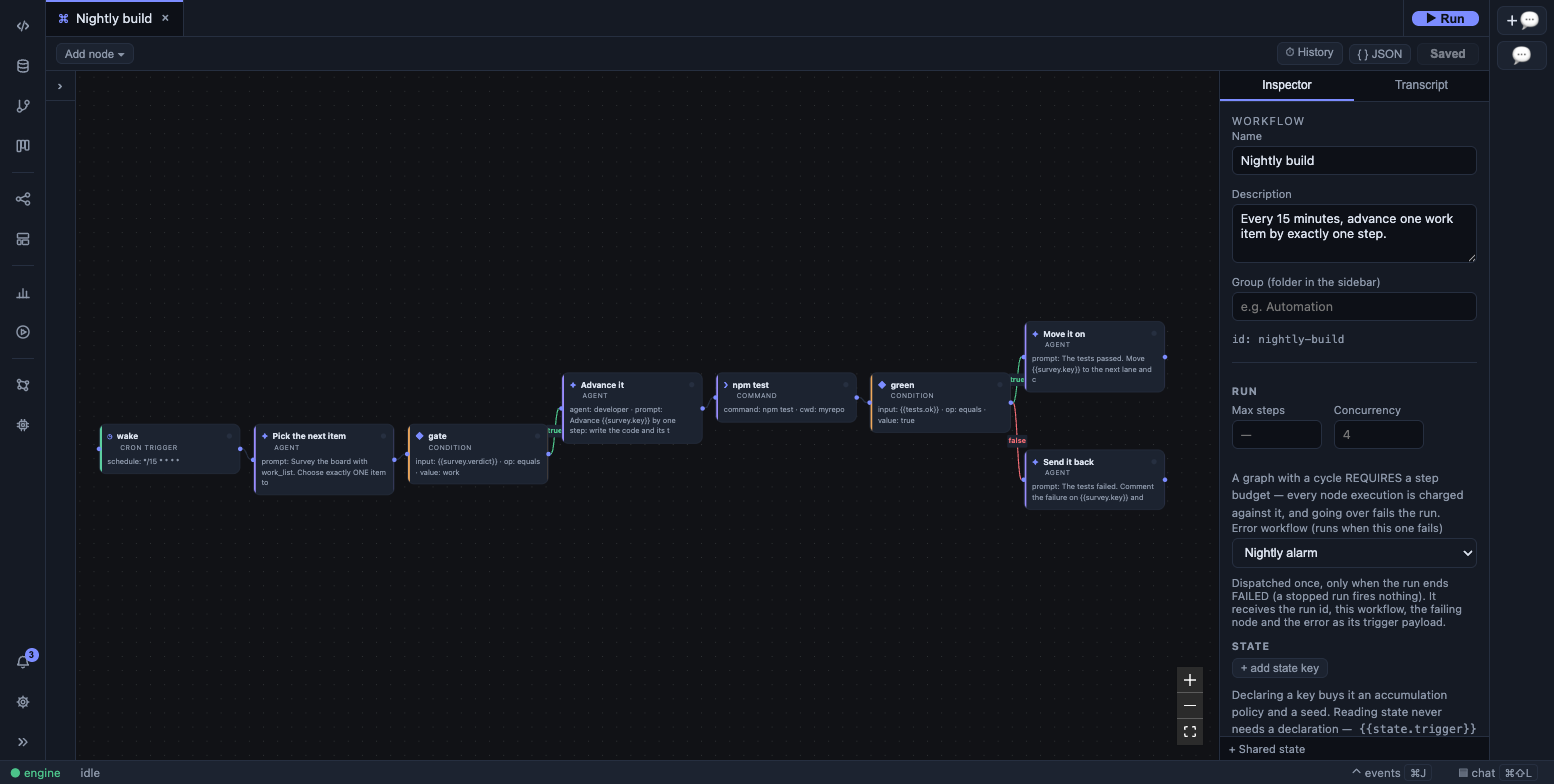
The nightly-build workflow from this guide, on the canvas. Five things in there are doing the real work:
- The surveyor answers in a shape, not in prose. Its
outputSchemamakes the node’s output a parsed object, sogatetests{{survey.verdict}}and the worker reads{{survey.key}}instead of anyone grepping a sentence. The engine also renders the schema into the prompt, so the model is told the shape on its first turn — see structured outputs. gatemakes “nothing to do” a no-op. Acondition’s untaken branch is simply skipped and the run completes; the pipeline is silent on a quiet night rather than failing.- The tests are a
commandnode. No model, no tokens, no turns — the deterministic half of the graph. It sharesrun_shell’s spawn path exactly (bash, a secret-scrubbed environment, the workspace or a mount ascwd, the same refusal of destructive commands), and its output is an object:{{tests.ok}},{{tests.exitCode}},{{tests.stdout}}, plus{{tests.json…}}if you pointconfig.outputFileat a JSON report. failOnNonZero: falseturns a red suite into a branch rather than a dead run, which is what letsgreenroute tobounceand have the failure recorded on the item.- The tool allowlists are narrow, and they differ per step. The surveyor cannot write; the step that
moves the item cannot edit code.
config.agentis the other way to say the same thing — it points at anagents/<name>.mdfile holding the persona, tools, model and turn budget, which is where a real pipeline keeps them. An agent definition’s owntools:list outranks a node’s.
The board is the state
Section titled “The board is the state”There is no separate queue. A board holds the state, and an item’s lane is its position in the
pipeline. LatchAI’s own project boards are built for exactly this: the
surveyor calls work_list, the worker moves the item with work_update and narrates with
work_comment, and every run that touches the item links itself to it — with its cost. An external
tracker wired in through MCP works the same way.
That is what makes the pipeline restartable: a run that dies mid-story leaves the story in a status the next run knows how to pick up, because the next run reads the board rather than any in-memory state.
The corollary is that transitions must be exact. With a LatchAI board, work_update refuses a lane the
board doesn’t declare and names the ones it does. With an external tracker, guessing a transition id
tends to silently no-op rather than error, which produces a pipeline that looks busy and advances
nothing: read the ids from the tracker’s own transitions endpoint, pin them in the agent definition, and
have the agent verify the state it expected after it moves something.
The same principle covers stuck work: if an item bounces between two states repeatedly, something upstream is wrong, and a pipeline with no way to park an item will loop on it all night. Count the bounces somewhere the board can see, and route a repeat offender to a refinement step rather than back to the worker.
When a step fails at 3am
Section titled “When a step fails at 3am”Three optional keys sit on every node, beside config — this is where an overnight graph earns its
keep:
retry—maxextra attempts (1–10),delayMsbefore the first one (default 1000), andbackoff(exponentialby default,fixedif you prefer). Each scheduled retry emits anode.retryevent, so the run view shows “retry 2/3” rather than an unexplained pause. In the sample above the surveyor gets two extra attempts, because the cheapest failure to absorb is a flaky first call.timeoutMs— a wall-clock budget for one attempt (1s–1h). Thetestsnode gets 30 minutes so a hung suite fails the node instead of holding the cron slot until morning.onError—fail(the default: the node fails and the run fails with it),continue(the step completes with{ ok: false, error, attempts }and the run carries on), orbranch(the same output, but only the node’swhen: "error"edges are taken and every other edge out of it is skipped).
A run you stopped never retries and never continues. A deliberate stop is final.
Do not confuse node retry with the engine’s own model-call retry, which is always on: a transient 429,
5xx or network failure on a model call is retried a few times with a pause (honouring Retry-After) and
shows as model.retry in the transcript. Node retry is for the step; that one is for the API.
The error workflow is the alarm bell
Section titled “The error workflow is the alarm bell”A graph may name another workflow to run when it ends run.failed:
{ "formatVersion": 2, "id": "nightly-alarm", "name": "Nightly alarm", "description": "Files a bug on the board when a pipeline run fails.", "nodes": [ { "id": "trigger", "type": "manual_trigger", "position": { "x": 60, "y": 180 }, "config": {} }, { "id": "file", "type": "agent", "label": "File it", "position": { "x": 320, "y": 180 }, "config": { "tools": ["work_create"], "prompt": "Create a bug on the myproject board titled \"{{trigger.workflowName}} failed at {{trigger.nodeId}}\". Put the run id {{trigger.runId}} and this error in the body:\n\n{{trigger.error}}" } } ], "edges": [{ "from": "trigger", "to": "file" }]}"errorWorkflow": "nightly-alarm" on the build graph is the whole wiring. It fires once, with
{ runId, workflowId, workflowName, nodeId, error, at } as its trigger payload — which is why the
trigger node here is called trigger, so {{trigger.error}} resolves.
Three rules keep it from becoming its own problem: a run you stopped rings nothing; a run started by an error workflow never rings another, so a failing handler fails once instead of looping; and the target must exist and must not be the workflow itself, which is checked when you save.
You already get told
Section titled “You already get told”Even with no error workflow, a run that dies is not silent:
- The notification inbox. A bell in the activity bar with an unread badge. A failed run, a work-item lane change, a run waiting on your approval and a run waiting on a permission prompt each mint a notification with the error tail in its body, and clicking one jumps to its subject — the run’s transcript, the board item, or the waiting gate. See notifications.
- Your phone’s lock screen. A paired phone receives a push for anything blocked on a human and anything that went wrong — never routine progress — and the tap lands on the right screen even from a cold start. The push carries a title, a kind and a deep link; never a body, tool arguments or run output.
An error workflow is what you add on top when the failure should become work: a bug on the board, a file in the workspace, a message somewhere else.
Isolation for agent git
Section titled “Isolation for agent git”Built projects live outside the LatchAI workspace, reached through a
mount, each its own git repository. This is deliberate: agents
run real git — branch, commit, merge per story — and giving each project its own repository keeps that
from ever reaching LatchAI’s own history or another project’s.
Two mechanisms back that up. run_shell (and the command node, which shares its spawn path) sets a
git ceiling at the LatchAI home, so git discovery inside the workspace cannot walk up out of it. And
checkpoints are workspace-only by design — the shadow repo does
not follow the symlink into external projects, which self-version through their own history instead.
The overnight checklist
Section titled “The overnight checklist”An overnight run fails quietly if any of these are missing:
- The daemon is running — a cron fires nothing if the engine is down.
- The workflow is not disabled, and the cron trigger is not paused.
disabled: trueon the document closes every door at once;"paused": trueon one trigger node holds just that schedule while ▶ Run and the graph’s other triggers keep working. Both are states you forget you left it in. - Any external dependency the agents use is up (a container runtime, a model server).
- The machine stays awake — a sleeping Mac drops everything mid-run.
caffeinateis the blunt instrument. - The daemon was restarted after any change to
packages/engine, since the engine does not hot-reload. (Agents and workflows are re-read per run — see what reloads.) - A cyclic graph has a
maxStepsbudget. Without one it is refused rather than run, because a loop with no budget cannot be proven to stop.
The “already running → skip” guard prevents overlap when a run takes longer than the cron interval, so a short interval is safe. And a run the engine died under is interrupted, not lost: it shows in the Runs sidebar with a ▶▶ Resume that restores every finished node and re-runs only what was in flight.
That last part has a consequence worth designing for: a resumed run re-runs any step whose output it
could not restore. Prefer “write this file” to “append to this file”, and put anything genuinely
irreversible behind a review_gate so a human sees it each time.
Watching it afterwards
Section titled “Watching it afterwards”Everything the pipeline did is in the Run Monitor live, in Usage afterwards — transcripts, tokens, and cost per run and per work item — and in the checkpoint diffs per run. The phone shows the same workflows, runs and transcripts, which is usually where you read a bad night first.
Reading a bad night, in the order that usually finds it:
- Did it run at all? A cron that fired while the previous run was still going emits
trigger.skipped— visible in the events panel, absent from run history. Lots of those means the interval is shorter than the work. - Where did it stop? The run’s log has the node that failed and its error. Check for
node.retryfirst: a step that failed three times before giving up is a different problem from one that failed once. - What did it actually change? The
±diff on the run. An agent that reports success and produced no diff is the failure mode worth hunting — it means a step “completed” without doing anything. - Then decide: rerun (transient — a model timeout, a container that wasn’t up), refine (the item was underspecified and keeps bouncing), or park it and move on.
Troubleshooting
Section titled “Troubleshooting”The cron fires, runs “complete”, and nothing advances. The daemon is running engine code from before
your last edit — the engine loads packages/engine into memory at boot and never re-reads it. Restart
the engine. This one is worth suspecting first, because the symptom is a pipeline that looks perfectly
healthy.
Every run ends at the same node, immediately. Check the node’s tool allowlist before you touch the
prompt. A step told to call work_update without it in tools is not confused; it is unarmed.
The board never moves but the tests are green. failOnNonZero: false means a non-zero exit is a
value, not a failure — make sure something downstream actually reads {{id.ok}}. A command node
whose result nothing branches on is a step that cannot fail.