Projects & work items
A project in LatchAI is a folder of markdown: workspace/work/<project>/board.md declares
the lanes, and every item is one <KEY>.md beside it. The Projects page renders those
files as a kanban board; agents read and move the same items with five work_* tools; and
because every change goes through the engine, each item ends up linked — automatically —
to the runs, chat turns, commits, and token spend that touched it.
Open it with Projects in the activity bar (the last entry under Development), or
⌘⇧P → Projects: Boards & Work Items. To start a board, write a board.md — the empty
Projects page shows the recipe, and an agent can write it for you.
There is no database for any of it. A board is something you can grep, diff, commit, and
open in Obsidian, and an agent that moves a card is making a file edit that shows up in the
run’s diff like any other.
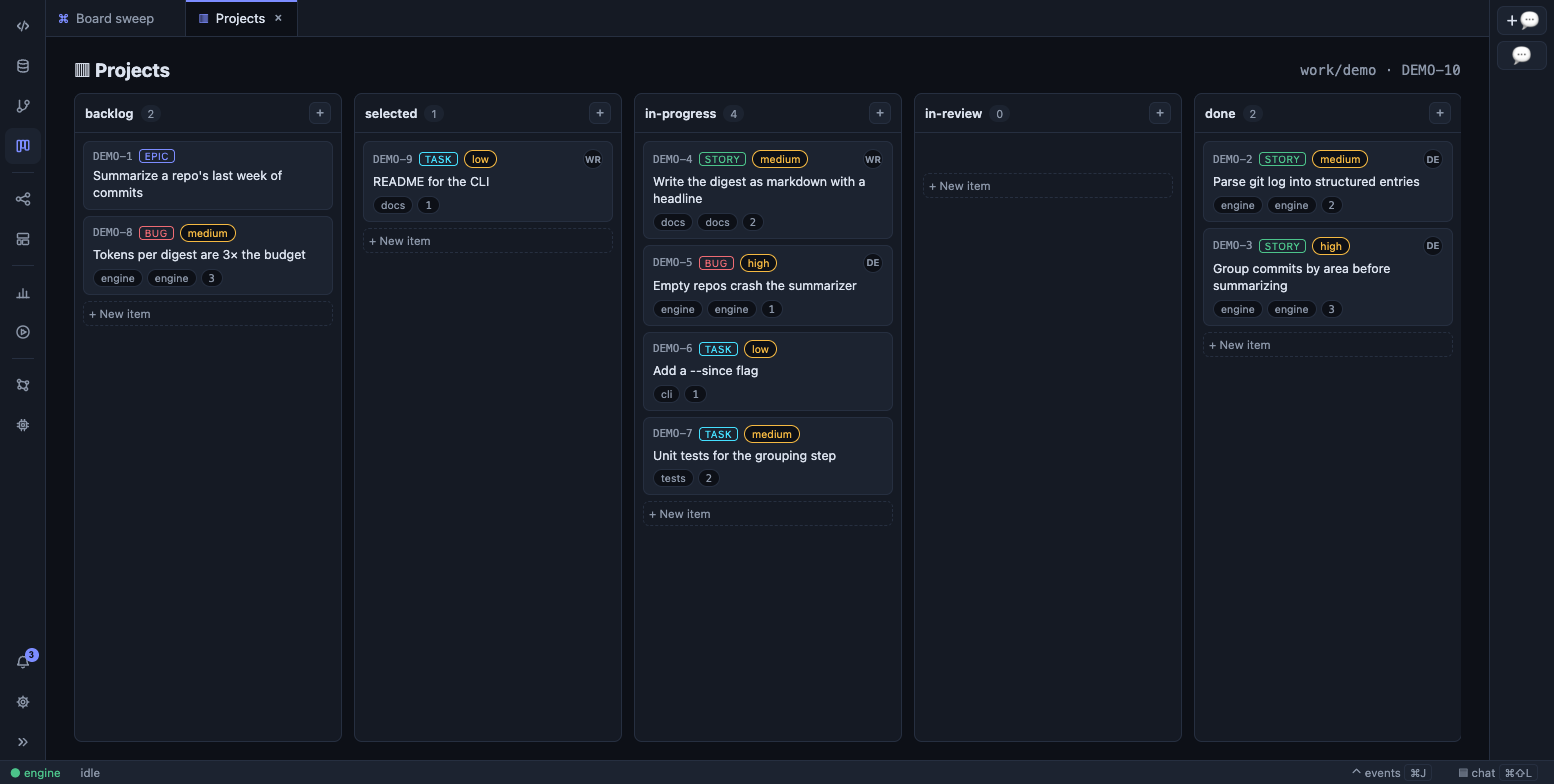
One column per lane, in the order board.md declares them.
The files
Section titled “The files”~/LatchAI/workspace/work/ demo/ board.md the board: lanes, kinds, fields, body templates DEMO-1.md one item per file DEMO-2.md archive/ archived items, same formatThe folder name is the project id. The board is the only required file — a folder without
board.md is not a board. Both are ordinary markdown with frontmatter.
board.md
Section titled “board.md”---name: Demo appprefix: DEMOnext: 1lanes: [backlog, selected, in-progress, in-review, done]kinds: [epic, story, bug, task]repos: [demo-app]fields: - {"key": "component", "type": "select", "options": ["engine", "ui"], "kinds": ["story", "bug"]} - {"key": "points", "type": "number"}---
What this project is, in a paragraph agents will read.
## Template: bug
### Steps to reproduce| Key | Meaning |
|---|---|
name |
The board’s display name. Defaults to the folder name |
prefix |
The uppercase key prefix. Must be unique across all your boards — two boards sharing one are both flagged, and creating items on either is refused until it’s fixed. Omit it and LatchAI derives one from the folder name (its first four letters and digits, uppercased) |
next |
The key counter, default 1. LatchAI bumps it for you; keys are never reused |
lanes |
The status list, in column order. Default backlog, selected, in-progress, in-review, done |
kinds |
Item kinds. Default epic, story, bug, task |
repos |
Mount names where this project’s code lives — used to find commits (below) |
fields |
Custom fields: string, number, boolean, date, select (with options), or url, optionally restricted to some kinds |
Prose above the first ## Template: heading is the board’s description. Each
## Template: <kind> section seeds the body of a new item of that kind — the place to put
the “steps to reproduce” skeleton every bug should start with.
The frontmatter parser is the same deliberately small one agents use: one key per line,
lists inline, and each fields row written as single-line JSON. Nothing here is ever fatal:
a bad field row, a field name that collides with a built-in, a duplicate field, a next:
that isn’t a number, a ## Template: naming a kind the board doesn’t declare — each is
dropped with a reason, and the reasons are listed in a banner at the top of the board for
you to fix.
An item
Section titled “An item”---key: DEMO-7title: Wire the cast picker to the reel builderkind: storystatus: in-progressparent: DEMO-2assignee: developerlabels: [ui, reel]estimate: 3priority: highrank: 200component: uicreated: 2026-08-21T14:02:11.884Zupdated: 2026-08-21T15:40:02.001Z---
The description, as free markdown.
## Activity
- 2026-08-21T14:02:11.884Z · human (ui): created as story in backlog- 2026-08-21T15:40:02.001Z · architect (run-1755790802001-1): status backlog → in-progressKeys are <PREFIX>-<n> and globally unique, so DEMO-7 identifies an item without
naming its board. Custom-field values sit flat beside the built-ins. priority and
assignee are free strings; estimate and rank are numbers; parent is another key.
Because the values are flat, the built-in names are reserved — a board that declares a
field called title gets a problem line, not a broken item. The rule runs the other way
too: a frontmatter key that is neither built-in nor currently declared (a field the board
dropped after items were written) is preserved verbatim on every rewrite and shown on
the item page as a read-only stale field. A config change never deletes your data.
The ## Activity section is append-only and machine-written. Every change — from the
UI, from a tool call, from a comment — appends one line stamped with the time, the actor
(an agent definition’s name, or human), and the run that did it. Nobody edits a line that
is already there, which is what makes it a history rather than a note.
The board
Section titled “The board”With more than one board, a tab strip picks between them; the header shows the folder and the next key the board will hand out.
Columns are the board’s lanes, in its order — the view invents no columns and hides none.
Cards carry the key, a kind badge, a priority chip, the assignee’s initials, the title, and
chips for labels, estimate, and any select field with six options or fewer. Drag a card
between or within lanes and LatchAI writes the new status and a rank in one save, so
the history reads as one move rather than two unrelated edits; ordering within a lane is by
rank ascending, unranked cards last.
+ on a lane creates an item there — kind and title, with the board’s template seeding the
body — and the card’s page opens on click.
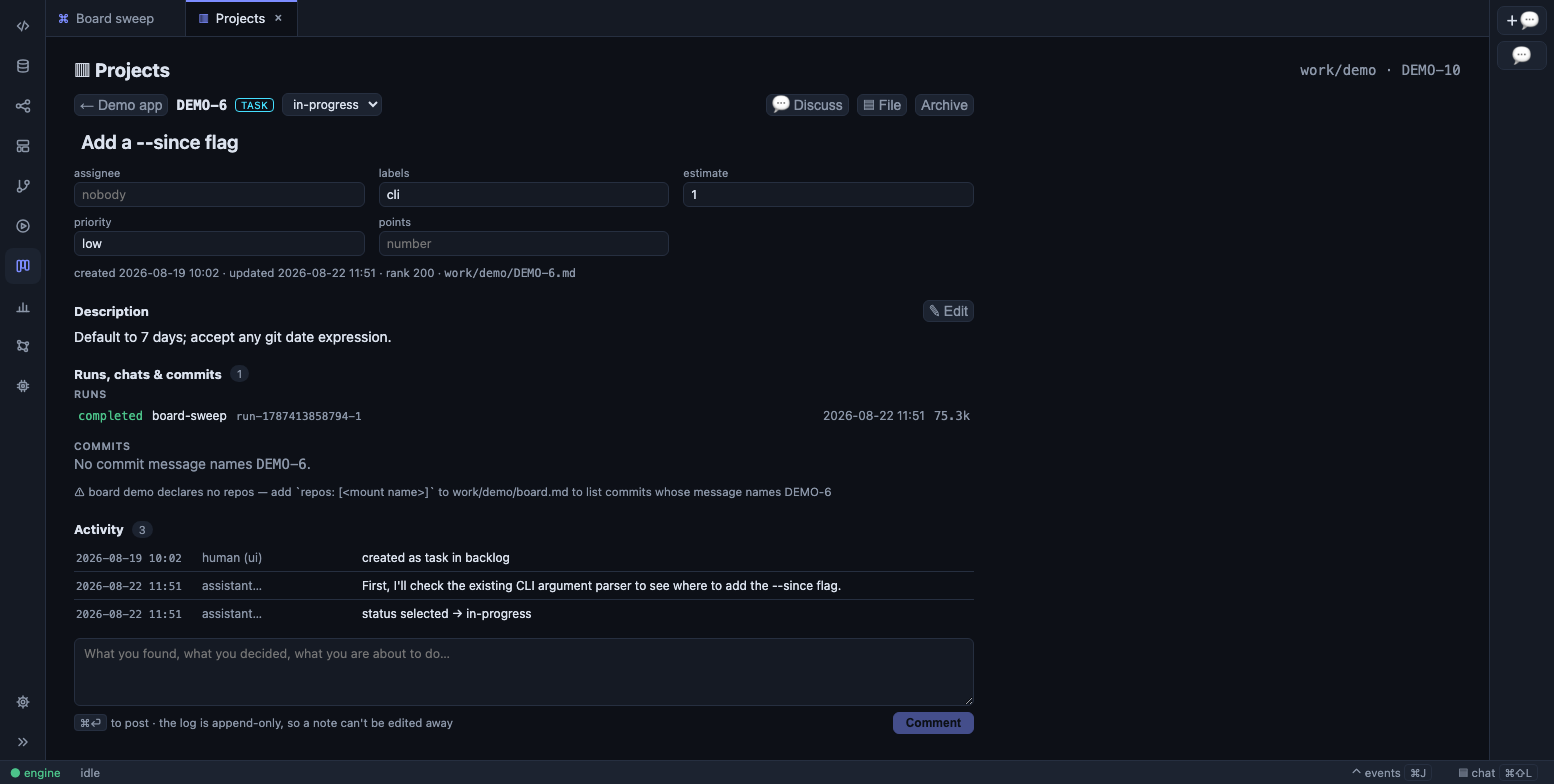
Everything the engine knows about one item, on one page.
The item page edits in place: the title, a lane picker, assignee, labels, estimate,
priority, and every custom field rendered by its type. It renders the description as
markdown with an edit toggle, and ends with the activity timeline and a comment box
(⌘⏎ posts). ▤ File opens the markdown itself in the editor; 💬 Discuss opens the
chat bound to this item, so every message carries a compact digest of it — kind, lane,
fields, description, and the last few activity lines — and “what’s blocking this one?”
needs no copy-paste. A run id in the activity log is a link into its transcript.
Archiving moves the file into archive/; un-archiving moves it back. There is no delete,
on purpose.
When an item moves lane
Section titled “When an item moves lane”A lane change mints a notification: DEMO-7 moved to in-review on the bell, and clicking it opens the item. Only a lane change does — a title,
assignee or description edit is not something you need told about, so it is ignored. That
is what makes an overnight run’s progress visible in the morning without watching it.
The five tools
Section titled “The five tools”Agents work the board through the same registry as every other capability. The tools are
built-ins, always available, and — because they only ever write inside workspace/work/ —
they need no permission prompt: every change is a workspace file edit, captured by
checkpoints and revertible like any other.
| Tool | What it does |
|---|---|
work_list |
List items, filtered by project, status, kind, label, assignee; per-lane counts follow. archived: true lists the archive instead |
work_get |
One item in full — frontmatter, body, and activity log |
work_create |
New item on a board (project, kind, title, plus optional body, parent, assignee, labels, estimate, priority, fields). The key comes from the board’s counter and the item lands in the first lane; a per-kind template, if the board has one, goes above your body |
work_update |
Change status (must be one of the board’s lanes), title, body, assignee, labels, estimate, priority, rank, custom fields, or archived. Pass only what changes |
work_comment |
Append a line to the activity log — what was found, decided, or about to happen |
Errors teach: a status that isn’t a lane comes back naming the lanes; an unknown kind
names the kinds; a bad field names the declared ones. An agent that reads the board with
work_list first rarely hits any of them.
An agent can amend an item’s body, not just its status and fields — and the tool
description is emphatic about the one rule that makes that safe. The body is the
durable description and acceptance criteria: amend it when the story is narrowed,
re-scoped, or its criteria change. Narrative — what you did, what you found — is a
work_comment, never a body edit. body replaces everything above ## Activity, so
the discipline is work_get first and send back the whole markdown, edited rather than
regenerated. The activity log records that the body changed and by how much; the file’s
own history holds the diff.
One limit is still deliberate: work_create ignores any status an agent passes. Agents
create into the first lane and move items, so the log shows the move. (The HTTP route
does accept a lane — that is how + on a lane works, and an item created there never sat
in the first lane, so claiming it moved out of one would be fiction.)
Two built-in skills ship with the engine and are listed in every agent’s prompt:
work-items spells out the tool mechanics and working conventions — comment as you go,
name the key in commit messages (DEMO-7: …), branch as demo-7 — and projects answers
what the area is for and when to reach for it.
The weave: what links itself to an item
Section titled “The weave: what links itself to an item”Nothing in the prompt, no id protocol, no branch-name parsing. Three joins, each derived from something the engine already records:
- Runs. When a run calls
work_create,work_update, orwork_comment, the engine writes awork.updatedevent — carrying the run id, project, and key — into that run’s log. A run that changed an item is that item’s run. (Reading withwork_getorwork_listdoes not link; only changes do.) - Chats. The same events from a chat turn carry the session id, so a conversation’s turns appear as one chat row with a turn count.
- Commits. For each repo the board declares under
repos:, LatchAI runsgit log --grep=<KEY>(boundary-checked, soDEMO-7never matchesDEMO-70). A commit message that names the key is the link. Arepos:entry is a mount name, a path inside one, orworkspacefor the workspace itself; an absolute path or a..is refused, sinceboard.mdis something an agent can write.
The git side is bounded on every axis, because it runs on the daemon’s own thread: the first six repos a board declares, twenty commits from each, five seconds per repo, and the result cached for fifteen seconds so re-rendering the page doesn’t re-walk history. A repo that doesn’t resolve, or isn’t a git repository, is skipped with a note on the page rather than failing the panel.
Each linked run row shows its status, workflow, time, tokens, and — priced per model, cache reads and writes included — its dollar cost. The Usage page rolls that up in a By work item table, so “what did DEMO-7 cost us?” is a number.
The joins reach the rest of the workbench too. In the git panel,
a commit subject that names a live board’s key renders the key as a button that opens the
item. In the brain, every item is a work node: [[DEMO-7]]
wikilinks resolve to it, bare mentions in chats and memory become references edges, a
run’s work.updated events become touched edges, and parent becomes a child-of edge.
Archived items stay in the graph, marked as archived.
Working the board from a workflow
Section titled “Working the board from a workflow”There is no work-item trigger or node; the board is worked by agents with the five tools,
and the pattern from Overnight pipelines applies
directly: a cron-armed workflow whose first agent calls work_list with
status: selected, picks one, and a second agent advances it — commenting as it goes,
moving it with work_update when its bar is cleared.
Two ways to react to the board rather than poll it:
- A
file_triggeronwork/<project>fires on any item change. - The activity log is the handoff. An agent that leaves “ready for review: tests green, see DEMO-7: branch” as a comment has told the next run everything it needs.
Because the board is files, the state survives anything: a run that dies mid-item leaves the item in a lane the next run knows how to read.
Limits worth knowing
Section titled “Limits worth knowing”- Filtering and search exist in
work_list, not on the board view. The archive is reachable by API (GET /api/work?archived=1) and from an item’s own page, not as a board view. - Custom fields, lanes, and kinds are edited in
board.md, not in the UI. - Run and cost links are read from the Usage index, which needs Node’s built-in
node:sqlite; without it the item page shows commits only. - Commits appear only when the board declares
repos:. The page says so when it doesn’t. parentis not checked to exist; the brain links it when it does.
The API
Section titled “The API”Everything the page does is HTTP, attributed human (ui):
curl -s localhost:7777/api/work # every board, with lane counts and item summariescurl -s localhost:7777/api/work/demo/DEMO-7 # one itemcurl -s localhost:7777/api/work/demo/DEMO-7/links # its runs, chats, commitscurl -XPOST localhost:7777/api/work/demo \ -H 'content-type: application/json' \ -d '{"kind":"bug","title":"Reel export drops the last frame","status":"selected"}'curl -XPUT localhost:7777/api/work/demo/DEMO-8 \ -H 'content-type: application/json' -d '{"status":"in-progress"}'curl -XPOST localhost:7777/api/work/demo/DEMO-8/comment \ -H 'content-type: application/json' -d '{"text":"reproduced on 0.9.0"}'The routes and the tools call the same three functions, so the validation, the teaching
errors, the activity line and the events are identical whoever made the change — only the
attribution differs. The one thing the route accepts that the tools don’t is a status on
create.