The LatchAI home
All of your instance data lives in the LatchAI home, a directory that is deliberately outside the code repository. The repo contains code; the home contains your work. That separation is what lets you pull a new version of LatchAI without touching a single thing you made.
Where the home lives
Section titled “Where the home lives”The home is resolved in this order: the LATCHAI_HOME environment variable, then the
pointer file at ~/.config/latchai/home (written by onboarding), then the ~/LatchAI default.
Whichever wins, the engine bootstraps the layout on boot — the operation is idempotent,
so an existing home is never overwritten.
To see which one won, ask the engine:
curl -s localhost:7777/api/home# {"path":"/Users/you/LatchAI"}What a fresh home looks like
Section titled “What a fresh home looks like”First boot creates exactly this much, and nothing else:
~/LatchAI/ agents/ assistant.md the starter persona workflow-builder.md an agent that authors workflows for you workflows/ welcome.json press ▶ Run dashboards/ morning-briefing.md a worked dashboard brief widgets/ 12 built-in widget types, one file each atlas/ empty until you define a code map workspace/ empty — this is where your work goes runs/ chats/ canonical chat envelopes checkpoints.git/ the shadow repo behind change review report.db the Usage index models/ empty until you download one mcp.json {"servers":{}} mobile-token.json the phone app's per-home token, minted at bootEverything else in the layout below is written on first use, not on first boot: there
is no latchai.config.json until you connect a model, no mounts.json until you add a
folder, no history/ until you save something twice. A home missing one of those files is
a home that has not needed it yet.
The full layout
Section titled “The full layout”~/LatchAI/ agents/ named personas as markdown + frontmatter workflows/ graph JSON — the canonical workflow format dashboards/ dashboard briefs (markdown + frontmatter) widgets/ the widget catalog agents draw with atlas/ Code Atlas definitions workspace/ the working area: files agents read and write .claude/skills/ skills you write, one folder per skill work/ project boards and work items memory/ agent memory, own and shared chats/ markdown mirrors of conversations models/ model weights downloaded to run on this Mac runs/ runtime state (never hand-edit) relay/ remote-access keys and push subscriptions history/ coalesced version history latchai.config.json providers, the API gateway, the relay, tab completion mcp.json MCP server declarations mounts.json folders added to the workspace databases.json saved database connections permissions.json persisted allow/deny rules for gated tools secrets.index.json secret names, never values browser-token.json the paired browser extension's token mobile-token.json the phone app's tokenEvery one of those is a file you can open, diff, and commit:
| Path | What’s in it |
|---|---|
agents/assistant.md |
The seeded starter agent: YAML frontmatter (name, description, model, memory) over a markdown system prompt. |
agents/workflow-builder.md |
A seeded agent that turns a plain-language request into a validated workflow. See Your first project. |
workflows/welcome.json |
The seeded workflow: { formatVersion: 2, id, name, description, nodes: [...], edges: [...] }, positions included so layout survives a round-trip. |
dashboards/morning-briefing.md |
A dashboard brief — frontmatter declares the slots, the body is the instruction an agent follows to fill them. |
widgets/*.md |
One file per widget type the dashboard author may draw with — metric, list, table, line, bar, area, donut, status, timeline, links, markdown, mermaid. |
atlas/*.md |
Code Atlas definitions — what to survey and how to present it. |
models/<org>/<repo>/ |
Weights downloaded from the Models page, one folder per model — delete from the UI rather than by hand while a model is loaded. |
latchai.config.json |
Connected providers and the default one, the embeddings endpoint, the OpenAI-compatible api block, the relay block, editor completions, and the chat budget knobs chatMaxTurns / compactFraction. See Models. |
mcp.json |
{ "servers": { … } } — stdio or HTTP MCP servers. |
mounts.json |
{ "<name>": "/absolute/path" } — the folders you added to the workspace. An entry whose folder no longer exists is dropped when the engine loads it. |
databases.json |
{ "connections": [ … ] } — SQLite files and Postgres URLs the Database area knows, with {{secret:…}} references for passwords. |
permissions.json |
The “always allow” / “always deny” rules you answered from a permission card, plus what an unattended run does with a call that would otherwise ask. |
secrets.index.json |
Names only, never values. See Secrets. Off macOS, the values sit beside it in a 0600 secrets.local.json. |
browser-token.json, mobile-token.json |
The pairing tokens for the browser extension and the phone app — one per home, minted lazily. Deleting one un-pairs that device. |
workspace/ — the working area
Section titled “workspace/ — the working area”workspace/ is the root every agent tool resolves against, alongside any folders you
mount. It is also where the durable, human-readable
output collects: chat transcripts mirror to workspace/chats/ as markdown with YAML
frontmatter, agent memory lives at workspace/memory/<agent>/*.md
with a workspace/memory/shared/ layer, project boards live at
workspace/work/<project>/, skills you write land in workspace/.claude/skills/<name>/SKILL.md,
and dashboard and atlas exports land in workspace/dashboards/ and workspace/atlas/.
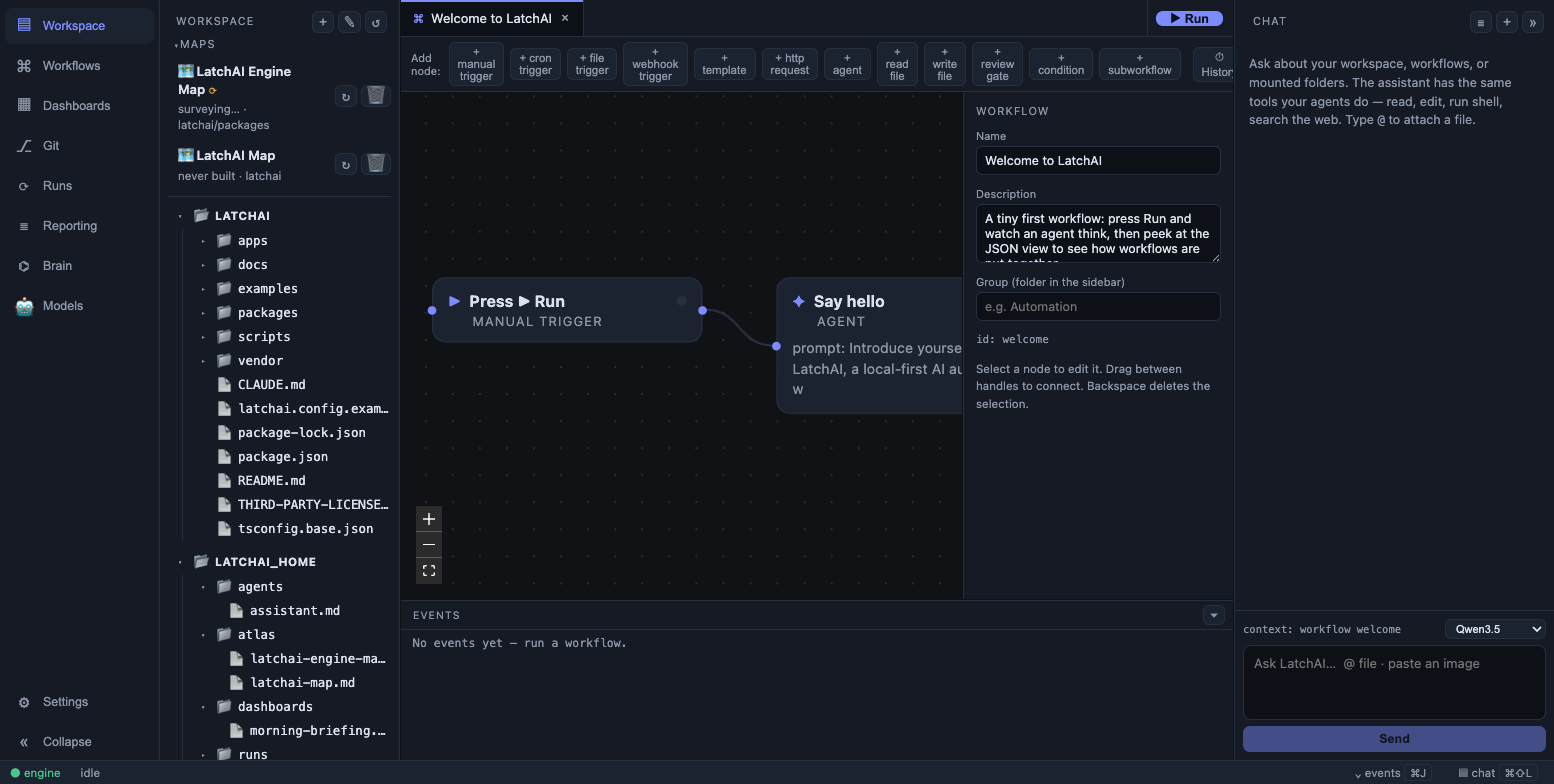
The home as the workbench sees it — workspace on top, mounts beside it.
Paths in the file explorer, in editor tabs, and in every agent tool call are relative to
this root — notes/today.md, not /Users/you/LatchAI/workspace/notes/today.md. A path whose
first segment names a mount routes to that mount instead; everything else stays here, and
anything that resolves outside the set is refused.
runs/ — runtime state
Section titled “runs/ — runtime state”runs/ is machine-owned. It holds append-only JSONL run logs (runs/<runId>.jsonl), the
shadow git repository used for checkpoints
(runs/checkpoints.git, with the workspace as its work tree), canonical chat envelopes at
runs/chats/<id>.json, the Usage index (runs/report.db, a
disposable SQLite projection of the logs), the
notification inbox (runs/notifications.json), review
gates outstanding when the engine last stopped (runs/pending-gates.json), per-connection
database query history (runs/db-history/), OAuth tokens for MCP servers that use them
(runs/oauth/<server>.json), the semantic search index (runs/semantic-index.json), and
per-build dashboard and atlas documents. Nothing here is meant to be hand-edited — it is
the record, not the source.
Two things worth knowing about it. The chat envelopes in runs/chats/ are the exact
message history including tool turns, which is what makes a session resumable after a
restart — the markdown in workspace/chats/ is the readable mirror, not the source. And
the semantic index is keyed by file mtime, so deleting it costs a re-index, not data.
relay/ — remote access state
Section titled “relay/ — remote access state”Created the first time you use remote access: relay/keys.json
is this daemon’s key material for the blind relay, and relay/push.json and
relay/vapid.json hold the web-push subscriptions that let a closed phone app get an alert.
All three are written 0600 inside a 0700 directory. A push subscription belongs to a
paired phone, not to the home, so un-pairing a device takes its alerts with it.
history/ — version history
Section titled “history/ — version history”Saving an agent, skill, workflow, dashboard, widget, or atlas definition records a version
at history/<kind>/<name>/<timestamp>.<ext>. Only the live file is ever read by prompts
and the executor; history is a directory nothing else looks at, which is why it can be
aggressive about keeping copies without affecting behaviour. See
Version history for the coalescing and retention rules.
First boot and seeding
Section titled “First boot and seeding”Three different seeding rules apply, and the difference matters when you upgrade:
- Once, into a fresh home only.
agents/assistant.md,agents/workflow-builder.md,workflows/welcome.json, and an emptymcp.json. These are yours to edit, so a later release never rewrites them — which also means improvements to the seededworkflow-builderprompt reach new installs only. The durable half of that agent’s knowledge lives in aworkflow-authoringskill that ships with the app and does update for everyone. - Whenever an entry is missing. The widget catalog is treated as a capability rather than user content: any built-in type not on disk is written, including into homes created before dashboards existed, and an entry you have edited is never overwritten.
- Only while the directory is empty.
dashboards/morning-briefing.md— so deleting it is a decision that sticks, but a brand-new home always has one worked example.
Moving the home
Section titled “Moving the home”Relocating the home moves the content, rewrites the pointer file, and exits the engine — a clean restart is the only safe way to swap out the root every service holds a path into. The desktop shell respawns the engine automatically; a terminal daemon has to be restarted by hand.
Onboarding’s “Choose a different folder…” is the front door. Afterwards, the move is an API call:
curl -XPOST localhost:7777/api/home \ -H 'content-type: application/json' \ -d '{"path":"/Volumes/work/LatchAI"}'# {"ok":true,"path":"/Volumes/work/LatchAI","restarting":true}The engine answers first and exits a moment later, so a client can poll GET /api/home
until the new one is up — which is exactly what onboarding does.
Three rules the move follows:
- An existing home is adopted, not overwritten. If the target already looks like a
LatchAI home — the test is whether it has an
agents/directory — the pointer is repointed at it and nothing is moved. That is the reinstall case. - A non-empty target gets a
LatchAI/subfolder. Picking~/Documentsmeans “put my LatchAI folder in there”, not “turn Documents into a LatchAI home”. - The new home cannot live inside the old one, and the path must be absolute.
Cross-device moves (an external volume) fall back to copy-then-remove, so they are slower but work.
Troubleshooting
Section titled “Troubleshooting”LATCHAI_HOME wins over the pointer file, and it is per-process. If one terminal exports it
and another doesn’t, npm run engine and npm run run are operating on two different
homes — the workflow you just saved in the UI won’t be the one the CLI executes. When
something is mysteriously missing, check curl -s localhost:7777/api/home against
echo $LATCHAI_HOME before looking any further.