Secrets
Anything LatchAI automates eventually needs a credential. The rule the secret store enforces is simple: a secret’s value never enters a file you might commit, an event you might share, or a prompt you might send to a model.
Where secrets live
Section titled “Where secrets live”On macOS, secrets are stored in the login Keychain via the system security CLI — not in the workspace,
not in git, not in any LatchAI file. Each one is a generic password under the service latchai, with the
secret’s name as the account, so security sees them too:
security find-generic-password -s latchai -a MY_TOKEN -w # prints the value (Keychain may prompt)A names-only index (secrets.index.json, in the LatchAI home)
lets LatchAI list what exists without exposing values.
Off macOS, or if the Keychain is unavailable, the store falls back to secrets.local.json in the home,
written with 0600 permissions. That fallback is a real file with real values in it, so treat it
accordingly — and exclude it if you ever put your home under version control. GET /api/secrets reports
which backend is live (keychain or file) alongside the names.
Both files are part of the home, so relocating the home carries your secrets and the index with it.
Managing them
Section titled “Managing them”The secrets manager is a command-palette away: ⌘⇧P → Secrets: Manage. It lists the names it knows,
takes a new name and value, and deletes. It never displays a value — the API has no read endpoint for
the UI to call, by construction.
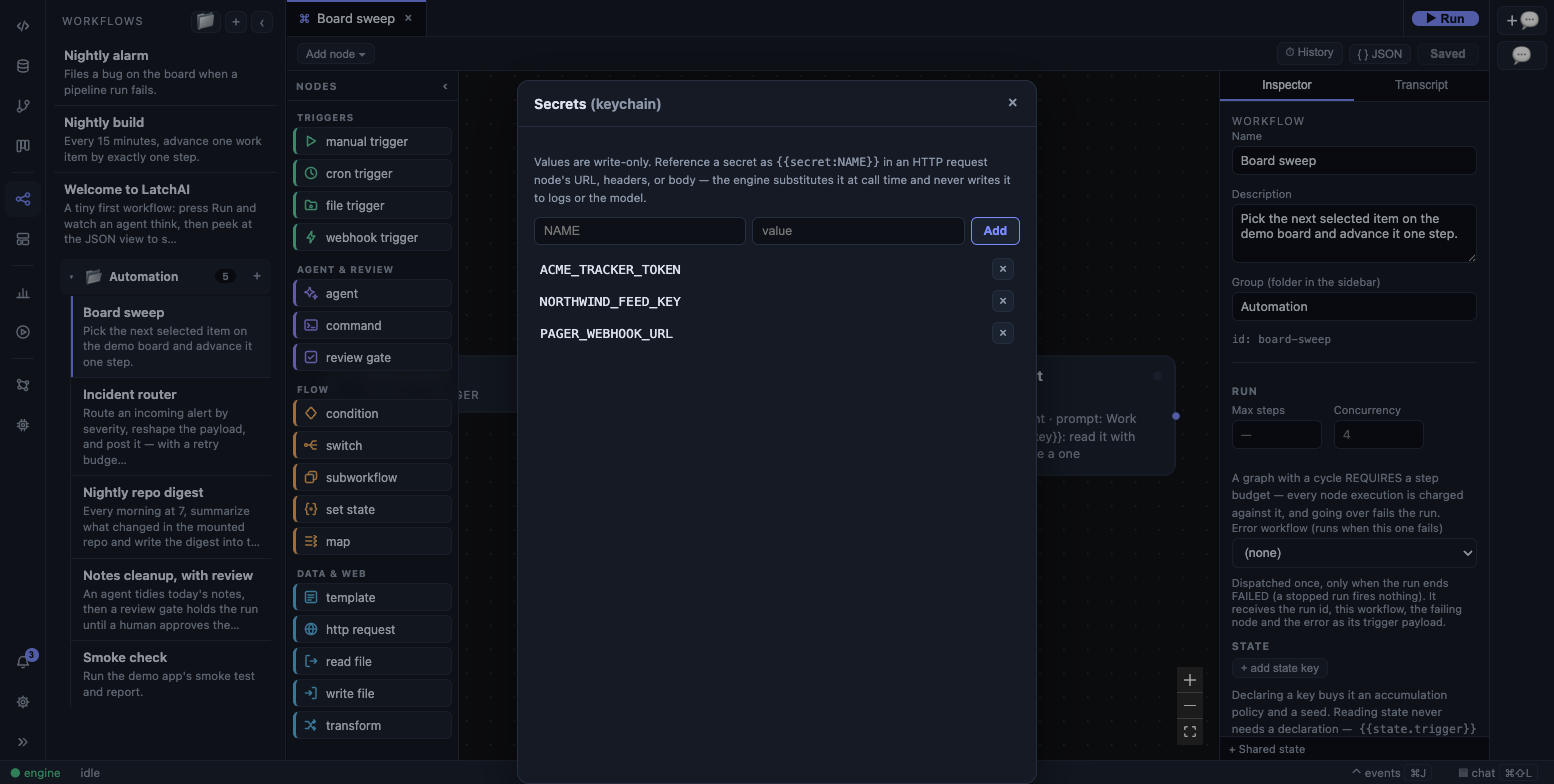
The Secrets manager: the backend chip beside the title, and names only — never values.
- Names are
[A-Za-z0-9_.-]. A name outside that set is rejected rather than escaped. - Rotating is adding the same name again; the Keychain entry is updated in place, and every
{{secret:NAME}}reference picks up the new value on its next use with no edits. - Deleting removes the entry and the index line. References to it start failing loudly (see Troubleshooting) rather than quietly sending an empty string.
Referencing a secret
Section titled “Referencing a secret”Secrets are referenced as {{secret:NAME}}. The reference is what gets stored; the value is substituted
at the moment of use, so it never reaches the file on disk, the run event log, or a model’s context
window.
There are five places that resolution actually happens:
| Where | What resolves |
|---|---|
An http_request node |
the url, every headers value, and the body |
mcp.json |
a stdio server’s env values, an http server’s headers values |
latchai.config.json |
a provider’s apiKey |
databases.json |
a Postgres connection URL |
| Model downloads | a secret named HF_TOKEN, sent to Hugging Face |
Anywhere else — a template node, an agent’s prompt, a command node’s command — the reference is not
resolved. It passes through as the literal text {{secret:NAME}}, which is safe but useless.
In a workflow
Section titled “In a workflow”{ "type": "http_request", "config": { "url": "https://api.example.com/v1/things", "headers": { "Authorization": "Bearer {{secret:EXAMPLE_TOKEN}}" } }}Substitution happens after {{nodeId}} interpolation and immediately before the call, so an upstream
node’s output can build the request while the credential is still added last.
Two more defences on the same node. The response is scanned for any secret value the call used and those
occurrences are replaced with [redacted], so a chatty API that echoes your token back can’t leak it
into a node output that a model then reads. And a failed request reports the host only —
POST api.example.com -> 401 — never the full URL, which may carry a token in its query string.
In an MCP server
Section titled “In an MCP server”The same referencing works in mcp.json, which is what keeps tokens out of a file you’d otherwise
happily paste into a bug report:
{ "servers": { "tracker": { "transport": "http", "url": "https://mcp.example.com/mcp", "headers": { "Authorization": "Bearer {{secret:TRACKER_TOKEN}}" } } }}For a stdio server, put the reference in an env value instead — the same substitution happens as the
child process is spawned.
Provider API keys
Section titled “Provider API keys”Keys entered in the Models page’s Connected rows are written to the
secret store and referenced from latchai.config.json as {{secret:...}} rather than stored inline.
Keys you don’t touch on a later save carry over automatically, so the UI never has to echo a key back to
you to preserve it. The secret is named for the provider — provider.<name>.apiKey — so what you see in
the config is a pointer:
{ "providers": { "openai": { "type": "openai", "baseUrl": "https://api.openai.com/v1", "apiKey": "{{secret:provider.openai.apiKey}}" } }}Database connections
Section titled “Database connections”A Postgres connection in the Database area stores its URL verbatim, refs
and all, in databases.json:
postgres://app:{{secret:APP_DB_PASSWORD}}@localhost:5432/appIt is resolved in exactly one place — the moment a connection is opened — and the resolved string never leaves the adapter that received it. The connection list hands back the stored definition (with a flag saying it contains a reference), driver errors are scrubbed of the URL before they surface, and nothing logs it.
Model downloads
Section titled “Model downloads”If you store a secret called HF_TOKEN, LatchAI sends it as the authorization header when downloading
model weights from Hugging Face — which is what gated repositories and higher rate limits need. Not
having one is the normal case, not an error.
The agent shell
Section titled “The agent shell”run_shell executes with a secret-scrubbed environment: every variable whose name looks
credential-shaped (SECRET, TOKEN, PASSWORD, PASSWD, API_KEY, CREDENTIAL, in any case) is
dropped before the command runs. An agent can read env freely and still not find your keys there.
The command workflow node shares that exact spawn path, and neither it nor run_shell has any way to
add an environment variable — there is deliberately no env config on either. So a shell step cannot
be handed a credential through its environment at all; anything it legitimately needs must be fetched by
the command itself.
Both also run with a git ceiling at the LatchAI home, so git discovery inside workspace/ cannot walk up
out of it — an agent’s git add -A stages its own project, never LatchAI’s. Mounted repositories are
their own git toplevels and are unaffected.
Before a shell command is shown in a permission prompt or written to a log, secret-shaped substrings in
it are masked: TOKEN=… style assignments, sk-/ghp_/xox…/Bearer … prefixes, and
--password/--token/--api-key arguments all come back as [redacted].
Webhook secrets
Section titled “Webhook secrets”A webhook_trigger may set config.secret; callers present it with the
x-latchai-secret header or a ?secret= query parameter. Combined with the engine’s loopback bind and
non-local Host/Origin rejection, a webhook is local-only unless you deliberately change the bind
address.
If you do expose a hook beyond the machine:
- Set
config.secretfirst. It is the only authentication the hook has; the comparison is constant-time over hashes, so neither the value nor its length leaks through timing. - Terminate TLS in front of it. The engine speaks plain HTTP; a bare
LATCHAI_BINDon a LAN address sends that token in the clear. - Keep the blast radius small. The workflow behind the hook runs with whatever tools you gave it — put the narrowest allowlist you can on any agent node it reaches.
- Watch it. Every fire is a
run.startedwithsource: "webhook", so unexpected traffic is visible in the Run Monitor and the run logs.
Device tokens are not secrets
Section titled “Device tokens are not secrets”Two credentials belong to devices rather than to services, and they live in the home rather than in the secret store — you never reference them, and rotating one means re-pairing:
- The browser extension authenticates to the engine with a token in
browser-token.json, minted the first time it is needed. Rotate it from Settings ▸ Browser; the live extension socket is dropped immediately and has to reconnect. See browser automation. - A paired phone presents the token in
mobile-token.jsonon every request. The relay’s pinned peer keys, the push identity and each phone’s push subscription live underrelay/in the home, in a directory the engine creates0700with0600files. Un-pairing a phone forgets all of it. See the phone app.
Both files are part of the home, so relocating the home keeps your devices paired rather than silently locking them out.
Troubleshooting
Section titled “Troubleshooting”A missing secret fails differently in each place it’s used, and knowing which message belongs to which saves a lot of guessing:
- In a workflow —
http_requestthrowsunknown secret: NAMEand the node fails. The run stops; nothing is sent. - In a provider — the engine can’t fail the boot over it, so it logs
[latchai] SECRET RESOLUTION FAILED … the raw placeholder will be sent as the API key; fix the secret in Settingsand carries on. The symptom downstream is every model call returning 401. Check the daemon’s console (or<latchHome>/runs/daemon.log) before you go looking at the provider’s status page. - In an MCP server — connection is refused with
secret not set: NAME — add it in Secrets, then re-save, and that server’s tools are simply absent from the registry. - In a database connection — connecting throws the same
unknown secret: NAME, before any driver is touched. (A wrong value is a different failure: the driver’s own error, with the URL scrubbed out of it.)