Database
The Database area connects the workbench to the databases your projects actually use.
Add a SQLite file or a Postgres URL and you get a schema browser, query tabs with a real SQL
editor, a results grid that handles a hundred thousand rows, and exports — and agents get
the same connections through three db_* tools, with a gate between them and anything
that writes.
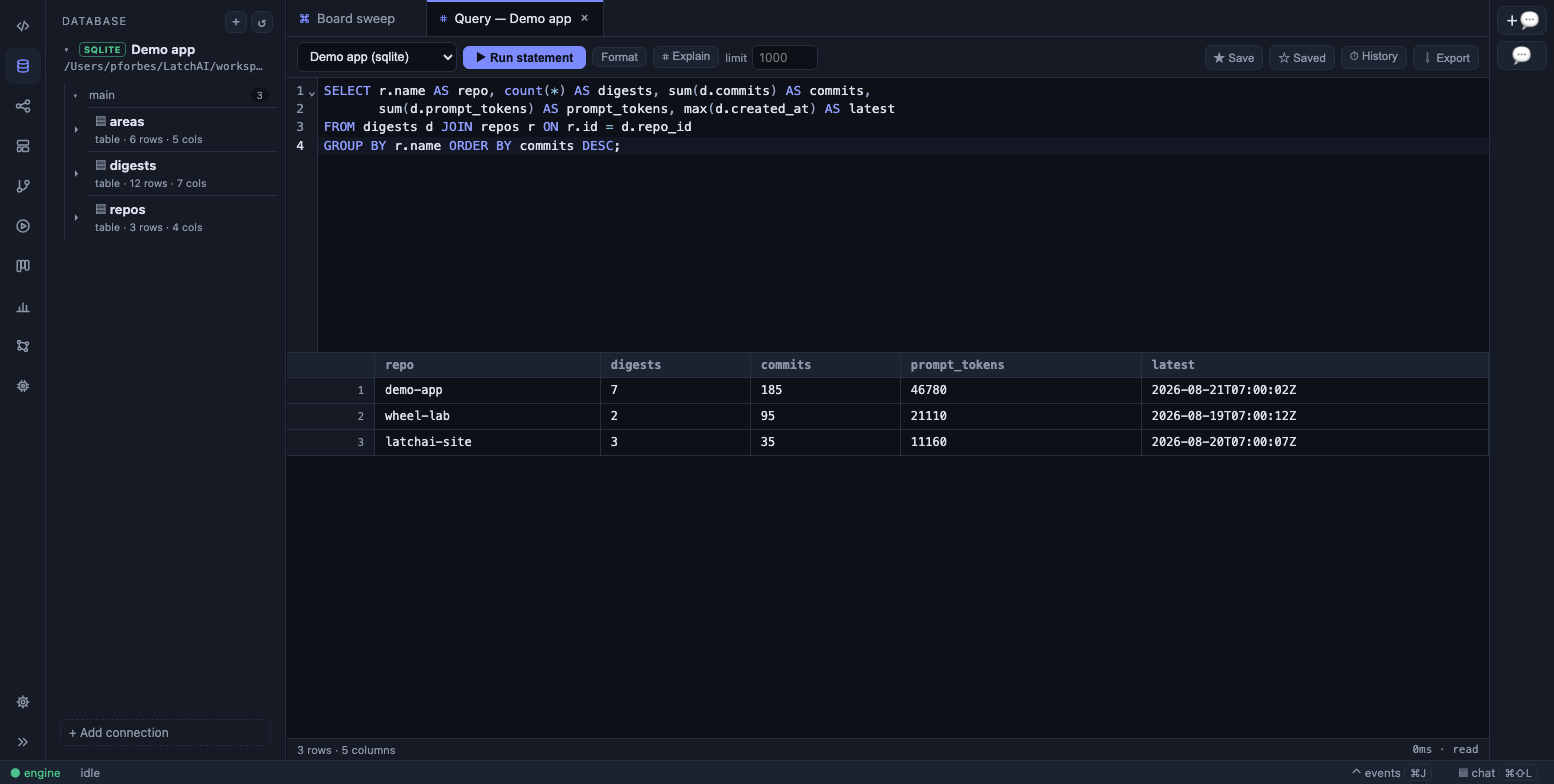
A query tab against a SQLite connection, with the schema in the sidebar.
Connections
Section titled “Connections”Two engines: SQLite, through Node’s built-in driver, and PostgreSQL, through the
pg client. Open Database in the activity bar — the second entry in the Development
group — and + Add connection (or ⌘⇧P → Database: Add Connection). A connection is:
| Field | Meaning |
|---|---|
id |
A stable key ([\w.-]), fixed after creation; it also names the query-history file |
name |
Display name. Defaults to the id |
engine |
sqlite or postgres |
file |
SQLite: the database path — absolute, or ~-prefixed. In the packaged desktop app a Browse… button opens the native file picker |
url |
Postgres: the connection URL |
writable |
Off by default. A read-only connection refuses any statement that isn’t a read, from the UI and from agents alike |
rowLimit |
Rows a query may return; default 1000, up to 100,000 |
timeoutMs |
Per-statement timeout; default 30 seconds, up to five minutes |
Connections are stored in <latchHome>/databases.json, a hand-editable file that moves with
the home. A Postgres URL is stored verbatim —
which means you write the password as a {{secret:NAME}} reference and keep the value
in the secret store. The reference is resolved at the moment of
connecting and the resolved URL never leaves the driver; a secret that can’t be resolved
fails the connection rather than dialing with a placeholder. The sidebar prints the URL
exactly as it is stored, {{secret:…}} and all.
Read-only is enforced three times over, not by the UI’s good manners: the tool and the
service refuse non-reads on a read-only connection, SQLite is opened read-only at the
driver, and every statement on a read-only Postgres connection runs inside
BEGIN READ ONLY … COMMIT, so the server rejects a write even if everything above it was
fooled.
The schema browser
Section titled “The schema browser”The sidebar is a tree: connection → schema → table → columns. Tables show whether they are
a table or a view, an estimated row count, and a column count; columns show their type, a
key for primary keys, not null, and → table.column for foreign keys. Postgres schemas
collapse as groups; SQLite’s single schema is flattened away. Each connection row has
New query, Refresh schema, Edit, and Delete. The schema is cached for a
minute, and dropped outright when you refresh, edit, or delete the connection.
Clicking a table opens a table tab: 200-row pages, server-side sorting and filters
(eq, ne, lt, gt, like, null, notnull), refresh, export, and a shortcut to a
SQL scratchpad on the same connection. Cells edit inline when — and only when — the
connection is writable, the table isn’t a view, it has a primary key, and those key columns
are actually in the result you are looking at; the footer says which of the four is missing.
An edit is validated against the live schema, parameterised, and committed only if exactly
one row matched.
Query tabs
Section titled “Query tabs”The SQL editor is CodeMirror with the engine’s dialect, schema-driven completion of table and column names, and the same theme and optional Vim mode as every other editor in the app. Each tab carries its own connection picker, so one pad can be re-pointed without opening another. The toolbar:
- Run (
⌘⏎) — the selection if there is one, else the statement at the caret, else everything. - Format — tidies whitespace and keyword case.
- ⌗ Explain — a plain
EXPLAIN, neverANALYZE. - A row-limit box; a
writablechip when the connection allows writes. - ★ Save and ☆ Saved — name the current SQL, and pick from what you’ve kept. Saved queries live in this browser and are filtered to the tab’s connection.
- ⏱ History — every statement the connection has run, from the UI or an agent, kept
by the engine at
<latchHome>/runs/db-history/<id>.jsonl(the last 500). - ⇩ Export — CSV, JSON, NDJSON, or SQL inserts (which asks for a target table). Exports stream up to a million rows, and CSV cells that look like formulas are escaped.
Drafts persist per tab, so a half-written query survives a reload. When a result hits the
row limit, the footer says so — first 1000 rows — limit hit — rather than letting a
round number pass for the whole table.
The results grid
Section titled “The results grid”The grid windows its rows, so a 100,000-row result scrolls without a stutter. Click a
header to sort (query results sort locally, asc → desc → off; table tabs sort on the
server); right-click one to hide a column, show it again, or show all — presentation only,
with the footer reporting N of M columns. Drag the header edge to resize. Double-click a
cell (or press Enter) to edit it inline where edits are allowed. Arrow keys move the
selection, shift extends it, and copy yields tab-separated text. A docked value panel pins
the active cell’s full value, pretty-printed, with its own copy button, and stays put while
you scroll. NULL shows as ∅.
Agents and the database
Section titled “Agents and the database”Three built-in tools, available to chat and to any agent whose allowlist includes them:
| Tool | What it does |
|---|---|
db_connections |
List the connections — id, engine, writable, rowLimit, timeoutMs. Never the URL |
db_schema |
A connection’s tables and views with each column’s type, primary key, and foreign keys. Pass table to expand one table and list its indexes |
db_query |
Run SQL and get the result back as a table, within a character budget that says showing N of M when it clips. An optional rowLimit overrides the connection’s own cap for that call |
Reads are free. Writes ask. Every statement is classified before it runs — read,
mutate, or unknown, and unknown is treated as a mutation. The classifier is a real
tokenizer, not a prefix check: a WITH … INSERT is a mutation, EXPLAIN ANALYZE is a
mutation (it executes), PRAGMA x = y is a mutation, a string or a quoted identifier
containing delete is not, and a multi-statement input takes its strictest statement’s
class — so SELECT 1; DROP TABLE t is gated.
On a read-only connection, a write from an agent is refused with a plain message the
model can act on (“this statement is a mutation, not a read … ask the user to mark the
connection writable”) rather than an error it will retry. On a writable connection, a
write from a chat turn raises a permission card — 🔐 Permission needed — db_query(<connection>) with the SQL shown — and Allow once, Always allow, Deny
once, Always deny. “Always” rules persist in <latchHome>/permissions.json. A read never
prompts, which is what makes “what’s in this table?” a cheap question.
Every db_query call lands in the run log as a db.query event — connection, the SQL (up
to 500 characters), its class, rows, affected rows, and timing — including the ones that
were refused or denied. A transcript in Usage renders those rows
in full, so you can read exactly what an agent asked the database and what came back.
Chat knows what you’re looking at
Section titled “Chat knows what you’re looking at”With a query tab or a table tab active, the chat composer shows a
query <connection> or table <name> chip, and every message carries a compact digest:
for a query tab, the connection, the SQL in the editor, and the shape of the last result
— column names and the row count, never the rows; for a table tab, the table’s columns with
their types and keys from the schema cache. “Why is this slow?” and “add the customer’s
email to this” need no copy-paste, and no row of data reaches the model unless an agent
queries for it.
Under the hood
Section titled “Under the hood”Every SQLite statement runs in a small dedicated child process the engine can kill unconditionally on timeout, so a runaway recursive CTE is a killed process rather than a wedged daemon. That costs a few tens of megabytes per open connection.